Manual · Sick
CiMAX 78xx Scanner Technical Reference Manual
Manual201 pagesPDF 2.8 MB
Technical reference manual for the CiMAX 7800, 7850 and 7855 fixed-position laser scanners and their Standard and Hex Interface Units.
Covers · 3 models
The models it covers
Summary
What is in it
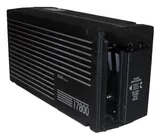
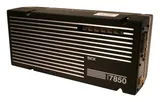
Technical reference manual for the CiMAX 78xx family of intelligent fixed-position laser scanners: the 7800, the side-firing 7850 and the 7855 sweep raster scanner, often used in conveyor scan tunnels. It gives specifications, installation and setup with photoeyes and tachometer, controls, connectors and indicators of the scanner and the Standard and Hex Interface Units, scanning principles, startup and operation, host commands and C program downloads, communication modes, diagnostics, group setup strings and dimension diagrams.
Its parts
- Overview & Maintenance
- Installation & Setup
- Controls, Connectors, & Indicators
- Introduction to Scanning
- Startup & Operation
- Host Commands & Downloads
- Communication Modes
- Diagnostics
From the manual
Key facts from this manual
Each line names its page in the PDF.
SICK Auto Ident technical reference manual (EM-63070-1H, Rev H, February 2002) for the CiMAX 78xx fixed-position laser scanners, covering the CiMAX 7800, 7850 and 7855 with the Standard and Hex Interface Units. It gives the specifications, installation, controls and indicators, startup and operation, host commands, communication modes and diagnostics.
- Device
- Intelligent fixed-position laser scanner with local and network control and user C programming, often used in scan tunnels p. 24
- 7850 differences
- 7850: same as the 7800 but without auto focusing; longer case with a 90° deflection mirror so the beam leaves from the side p. 24
- Memory
- 256K (approx. 100K for user C programs and data) or 1M (approx. 800K) p. 26
- Communications
- Host port RS-232 or RS-422, Terminal port RS-232, RS-485 LAN port with Starnode, optional network port (Ethernet 10 base 2 or 10 base T, SDS, DeviceNet) p. 26, 27, 28
- Power
- Regulated +12 VDC, 2A max., +5 VDC, 1A max., from the external Interface Unit p. 27
- Inputs
- Eight standard, active low when <1.0 VDC, 30 VDC intermittent, 27 VDC continuous max; seven optional for height sensing p. 28
- Outputs
- Eight open collector solid state, 30 VDC at 150 mA max; defaults Output 1 No Read, 2 Match, 3 No Match p. 28
- Laser
- Laser diodes, 635-685 nanometers (visible red light) p. 27
- Scan rate
- 300-750 scans per second, set by the application keysheet p. 27
- Reading range
- 7800: 10 mil barcodes, 1" high, at 18-50" with the laser autofocusing system p. 24, 27
- Size and weight
- 7800: 13.3 x 6.5 x 4.69 inches (338 x 165 x 119 mm), 13 pounds (5.9 kilograms); 7850/7855: 14.38 x 6.5 x 4.9 inches (365 x 165 x 124 mm), 14 pounds (6.4 kilograms) p. 26
- Environment
- 32° to 122° F. (0° to 50° C); 5% to 95% humidity, non-condensing p. 27
- Interface units
- Standard Interface Unit for one scanner or two (115/230 ±10% VAC @ 0.8/0.4A); Hex Interface Unit for up to six (115/230 ±10% VAC @ 3.0/1.5A) p. 24, 28, 29
- Tachometer parts
- Measuring wheel P/N 16002070215 (12" circumference); universal tracking mounting base P/N 14005750000 p. 35
What this manual walks you through
- Specifications of the scanner and interface units p. 26, 27, 28, 29, 30
- Monthly cleaning and inspection p. 30
- Unpacking, inspection and the installation checklist p. 31
- Installing a tachometer for gap tracking p. 35
- Reading the six status LEDs p. 39, 40
- Understanding the startup messages p. 84, 85, 86
- Power-up after memory failure and checksum warnings p. 86
- Reading the diagnostic status string from the host p. 101, 102
Good to know
- There are no operator serviceable parts or controls in the scanner; refer service to a factory authorized dealer. p. 4
- Opening the scanner with power applied can cause injury; internal maintenance is done at the factory. p. 30
- A lithium battery replaced incorrectly can explode; use the same or an equivalent type. p. 4
- Do not change the configuration away from the keysheet without consulting SICK Auto Ident. p. 25
- Changing the file system size re-initializes it and loses all previous data. p. 85
Questions this manual answers
What is the difference between the CiMAX 7800 and CiMAX 7850?
The 7850 is the same electrically and in operation but has no auto focusing, and its longer case has a 90° mirror so the beam leaves from the side. p. 24
What power does a CiMAX 7850 scanner need?
Regulated +12 VDC at 2A max. and +5 VDC at 1A max., supplied by an external Interface Unit. p. 27
What does the SETUP LED mean on a CiMAX 78xx scanner?
The scanner is in Setup or Diagnostics mode and is not running application software. p. 39
Why does my CiMAX scanner show the copyright message at every power-up?
The battery-backed RAM may have failed; cycle the power, and if the message persists the manual says to contact SICK Auto Ident for service. p. 86
How can I tell if the CiMAX laser diode is failing?
Send ~5~ for the diagnostic string; a 1 in the Laser Diode Fault digit means the diode may have failed or is beginning to fail. p. 102
Contents
Chapters and sections
Each line opens the PDF at its page.
- CiMAX 78xx Scanner Technical Reference Manual1
- CHAPTER 1 Overview & Maintenance23
- CHAPTER 2 Installation & Setup31
- CHAPTER 3 Controls, Connectors, & Indicators39
- CHAPTER 4 Introduction to Scanning59
- CHAPTER 5 Startup & Operation83
- CHAPTER 6 Host Commands & Downloads97
- CHAPTER 7 Communication Modes127
- CHAPTER 8 Diagnostics129
- APPENDIX A Group Setup Strings169
- APPENDIX B ASCII Equivalence183
12 more lines, from page 187 on
The whole text · 23 parts
Read the manual here as text
Its text as extracted from the PDF, unedited, in parts; each page opens the PDF at that page.
- CiMAX 78xx Scanner Technical Reference Manual1-6
- Contents, pages 7 to 147-14
- Contents, pages 15 to 2215-22
- CHAPTER 1 Overview & Maintenance23-30
- CHAPTER 2 Installation & Setup31-38
- CHAPTER 3 Controls, Connectors, & Indicators, pages 39 to 4839-48
- CHAPTER 3 Controls, Connectors, & Indicators, pages 49 to 5849-58
- CHAPTER 4 Introduction to Scanning, pages 59 to 6659-66
- CHAPTER 4 Introduction to Scanning, pages 67 to 7467-74
- CHAPTER 4 Introduction to Scanning, pages 75 to 8275-82
- CHAPTER 5 Startup & Operation83-96
- CHAPTER 6 Host Commands & Downloads, pages 97 to 10697-106
- CHAPTER 6 Host Commands & Downloads, pages 107 to 116107-116
- CHAPTER 6 Host Commands & Downloads, pages 117 to 126117-126
- Pages 127 to 135127-135
- Pages 136 to 144136-144
- Pages 145 to 153145-153
- Pages 154 to 162154-162
- Pages 163 to 168163-168
- APPENDIX A Group Setup Strings169-182
- APPENDIX B ASCII Equivalence183-186
- APPENDIX C Dimension Diagrams187-196
- Index197-201
The file