Manual · PSC
User's / Programming Guide, Handheld Laser Bar Code Scanners, Keyboard Wedge / Wand Emulation Interface
Manual84 pagesPDF 680 KB
User's and programming guide for PSC handheld laser bar code scanners (5300 series) with keyboard wedge, serial and wand emulation interfaces.
Filed with · 1 model
Also filed with these models on the old site
Summary
What is in it
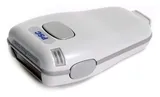
The user's and programming guide for PSC handheld laser bar code scanners with keyboard wedge and wand emulation interfaces. It covers unpacking and installation in keyboard wedge, serial TTL, RS232, AutoSense and wand emulation modes, then gives the programming symbols for serial communication, general parameters, message formatting, serial commands, keyboard wedge parameters, symbologies, wand emulation parameters, the Memory Module of the 5300 series and the marker beam. It ends with labeling, maintenance and hexadecimal and function key tables.
Its parts
- Introduction
- Unpacking
- Installation
- Setup Overview
- Parameters Selection Guidelines
- General Parameters
- Message Formatting
- Serial Commands
- Keyboard Wedge Parameters
- Symbologies
- Wand Emulation Parameters
- Memory Module
- Marker Beam
- Scanner Labeling
From the manual
Key facts from this manual
Each line names its page in the PDF.
PSC User's / Programming Guide for its handheld laser bar code scanners with keyboard wedge, serial and wand emulation interfaces. The guide mentions the 5300 series once and never names the 5381 itself. It explains installation, the AutoSense and Memory Module options, and how to program the scanner by scanning menu bar codes.
- Interfaces
- Keyboard wedge, serial (TTL, or RS232 through an adapter pod) and wand emulation p. 7, 10
- Keyboard wedge
- Connects between keyboard and terminal with a Y cable; draws power from the terminal p. 7, 8
- Serial levels
- Serial TTL 0 to 5 volts, normal or inverted; RS232 needs an optional cable, adapter pod and power supply, full continuous power only p. 10
- Baud rates
- 300, 600, 1200, 2400, 4800, 9600 (serial default), 19200 p. 14, 19
- Data format
- 7 or 8 data bits, 1 or 2 stop bits, optional parity p. 20
- Terminal types
- IBM PC-AT, PS/2, PC-XT, IBM 3151, DEC VT220, Macintosh, IBM 3477, IBM 319X, Unisys B-26, Link 125, and PC-AT keyboards for several languages p. 40, 41, 42
- Symbologies
- Code 39, Code 93, Interleaved 2 of 5, Code 128, Standard 2 of 5, Codabar, UPC-A, UPC-E, Code 11, EAN/JAN, MSI/Plessey p. 16
- Package
- Scanner, interface cable, User's Manual, plastic scanner holder p. 8
- AutoSense
- Factory-installed option for hands-free reading in the AutoSense stand, using a trigger beam and reflective tape p. 7, 11
- Memory Module
- Factory-installed option; stores decoded labels in battery backed RAM to send later, with an interlabel delay up to 9.9 seconds p. 68
- Wand emulation
- Same code or converted to Code 39 (full ASCII); black high or white high; simulated scan rate 5 to 70 inches per second p. 14
- Laser timeout
- 6 seconds (default), 4, 2, 1 or ½ second p. 30
- Power modes
- Continuous full power, or standby after a successful read p. 29
- Magnetic stripe
- A detached magnetic stripe reader plugs into the MSR receptacle on the housing connector p. 7, 9
What this manual walks you through
- Installing the scanner as a keyboard wedge with the Y cable p. 8, 9
- Programming the terminal type p. 9, 40, 41, 42
- Setting up serial TTL or RS232 communication p. 10
- Using the AutoSense stand for hands-free scanning p. 11, 12
- Switching to wand emulation p. 13
- Changing settings by scanning menu bar codes p. 17, 18
- Setting baud rate, data bits, stop bits and parity p. 19, 20
- Setting intercharacter and interlabel delays p. 27
- Storing and sending labels with the Memory Module p. 68, 69
- Cleaning the window and inspecting cords p. 73
Good to know
- On a first-time installation the scanner must be programmed for the connected terminal. p. 9
- When the scanner runs from a battery, such as a hand-held terminal, AutoSense should be disabled; AutoSense works only in full power mode. p. 11
- Data stored in the Memory Module cannot be sent through the wand emulation output. p. 68
- Memory Module commands used on a scanner without that option damage its programmed instructions. p. 68
- Never use solvents such as alcohol on the enclosure. p. 73
Questions this manual answers
How do I connect a PSC handheld scanner as a keyboard wedge?
With the terminal off, plug the Y cable into the scanner handle, the keyboard into the short leg and the long leg into the terminal. Then scan Wedge Mode Enable and your terminal type. p. 8, 9
What baud rates does the PSC scanner support?
300, 600, 1200, 2400, 4800, 9600 and 19200 baud, chosen by scanning a menu bar code. p. 19
What does Reset to Default (ZA) do on a PSC scanner?
It returns the scanner to Keyboard Wedge mode with a PC-AT terminal type. p. 9
Can a PSC keyboard wedge scanner output RS232?
Yes, with an optional cable, adapter pod and power supply. Program serial mode with normal polarity (symbol CA); RS232 levels need full continuous power mode. p. 10
How do I clean a PSC scanner window?
Wipe it with a slightly damp cloth or facial tissue, using water or a cleaner such as Windex; never use solvents on the enclosure. p. 73
Contents
Chapters and sections
Each line opens the PDF at its page.
- Introduction7
- Unpacking8
- Installation8
- Setup Overview14
- Parameters Selection Guidelines17
- General Parameters27
- Message Formatting31
- Scanner Labeling72
- Serial Commands37
- Keyboard Wedge Parameters40
- Symbologies44
26 more lines, from page 48 on
The whole text · 12 parts
Read the manual here as text
Its text as extracted from the PDF, unedited, in parts; each page opens the PDF at that page.
- Pages 1 to 61-6
- Pages 7 to 137-13
- Setup Overview14-16
- Parameters Selection Guidelines17-26
- General Parameters27-30
- Message Formatting, pages 31 to 3931-39
- Message Formatting, pages 40 to 4840-48
- Message Formatting, pages 49 to 5749-57
- Message Formatting, pages 58 to 6658-66
- Message Formatting, pages 67 to 7167-71
- Scanner Labeling72-74
- Appendix A75-84
The file