Manual · Motorola
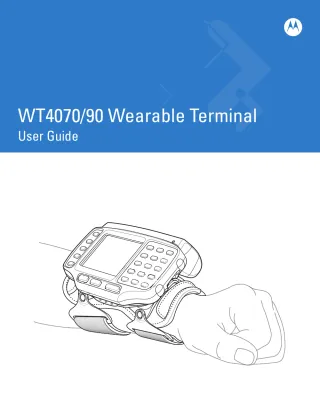
WT4070/90 Wearable Terminal User Guide
Manual94 pagesPDF 6.2 MB
User guide for the Motorola WT4070 and WT4090 wearable terminals: setup, batteries, keypads, scanning, accessories and troubleshooting.
Covers · 1 model
The models it covers
Summary
What is in it
The user guide for the Motorola WT4070/90 family of wearable terminals. It covers unpacking, installing and charging the main battery, fitting the wrist mount and connecting a scanner, then using the power button, LEDs, two-color or triple-tap keypads and the Windows CE 5.0 display, warm and cold boots and laser scanning. Further chapters describe the USB and Ethernet cradles, spare battery charger, RS409 and RS309 scanners, hip mount, freezer pouch and headset, plus maintenance, troubleshooting, technical specifications and regulatory information.
Its parts
- About This Guide
- Getting Started
- Using the Wearable Terminal
- Accessories
- Maintenance & Troubleshooting
From the manual
Key facts from this manual
Some pages are scans or cannot be read; this says only what the readable text supports. Each line names its page in the PDF.
The WT4070/90 Wearable Terminal User Guide (72E-87633-03 Rev. A, May 2008) for the WT4070 and WT4090 wearable terminals. It explains the parts, installing and charging the batteries, the keypads and LEDs, warm and cold boots, scanning with the RS409 and RS309 scanners, the cradles and charger, troubleshooting, and the technical specifications.
- Device
- Wearable terminal worn on the arm or a belt, running Microsoft Windows CE 5.0 Professional p. 19, 71
- CPU
- XScale PXA270 processor at 520 MHz p. 71
- Main battery
- Removable rechargeable 3.7 VDC lithium ion, standard capacity 2330 mAh; charges in less than four hours p. 22, 71
- Display
- Color 2.8 inch QVGA p. 71
- Keypads
- Two-color alphanumeric keypad or triple-tap (cell phone like) alphanumeric keypad p. 29
- Radios
- WT4090: Symbol 802.11a/b/g, 100 mW; Bluetooth Version 1.2 p. 72
- Scanners
- RS409 and RS309 laser scanners, optional, for 1D bar codes p. 41, 45
- Cradles and charger
- Single Slot USB cradle (terminal plus a spare battery, USB sync); Four Slot Ethernet cradle; Four Slot Spare Battery Charger p. 19
- Other accessories
- Wrist mount, hip mount, headset, headset adapter for a barrel jack headset p. 19
- Software kits
- Device Configuration Package (DCPforWT40x0c50) and Platform SDK (PSDK40x0c50) p. 19
- Size and weight
- 5.7 x 3.7 x 1.0 inches; 11.3 oz. (320 gm) with battery p. 71
- Operating temperature
- -4 °F to 122°F (-20 °C to 50 °C); battery charging 32 °F to 104 °F (0 °C to +40 °C) p. 72
- Ruggedness
- Multiple 4 ft.(1.2 m) drops to concrete; 500 half-meter tumbles; IP54 Category 2 p. 72
- Cradle power supply
- Single Slot USB cradle: approved supply rated 12 VDC, minimum 3.3 A p. 46
What this manual walks you through
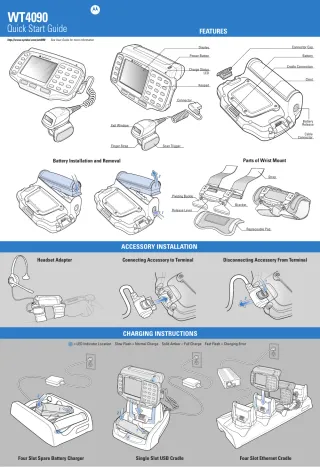
- Installing, charging and removing the main battery p. 21, 22, 23
- Reading the charge status LED p. 28
- Using the two-color and triple-tap keypads p. 29
- Performing a warm boot or cold boot p. 40
- Scanning bar codes with a laser scanner p. 41
- Using the Single Slot USB cradle and its spare battery LED p. 46, 47
- Connecting the RS409 and RS309 scanners for arm or hip wear p. 51, 53
- Troubleshooting the terminal, cradles and spare battery charger p. 63, 64, 65, 66, 67, 68, 69
- Technical specifications p. 71, 72
Good to know
- Do not remove the main battery within the first 15 hours of use, or data may be lost. p. 22
- A cold boot erases records and entries in RAM; data in flash memory or a memory card is kept. p. 40
- Put the terminal in suspend mode before removing the battery. p. 23
- A fully depleted Extended Life Battery can take up to six hours to recharge in the Four Slot Ethernet cradle. p. 66
- Connecting by ActiveSync drops the WLAN connection; disconnect from the WLAN first. p. 65
Questions this manual answers
How do I reset a Motorola WT4090?
For a warm boot hold the Power button about five seconds. For a cold boot hold the 1, 9 and Power buttons together; RAM data is erased. p. 40
How long does the WT4090 battery take to charge?
The standard capacity battery fully charges in less than four hours. p. 22
What does a fast blinking amber light mean on the WT4090?
A charging error: the temperature is too low or too high, or charging has run too long (typically eight hours). p. 28
Why does the WT4090 turn itself off?
It turns off after a set period of inactivity, set under Control Panel > Power > Power Off; a depleted or badly seated battery also causes it. p. 64
What cable does the WT4090 USB cradle need for ActiveSync?
A cable with a USB A connector on one end and a USB mini B connector on the other. p. 69
Contents
Chapters and sections
Each line opens the PDF at its page.
The whole text · 13 parts
Read the manual here as text
Its text as extracted from the PDF, unedited, in parts; each page opens the PDF at that page.
- Pages 1 to 31-3
- Pages 4 to 64-6
- Table of Contents7-10
- About This Guide11-16
- Getting Started17-26
- Using the Wearable Terminal, pages 27 to 3527-35
- Using the Wearable Terminal, pages 36 to 4436-44
- Accessories, pages 45 to 5245-52
- Accessories, pages 53 to 6053-60
- Maintenance & Troubleshooting61-70
- Specifications71-76
- Regulatory Information, pages 77 to 8577-85
- Regulatory Information, pages 86 to 9486-94
The file