Manual · Motorola
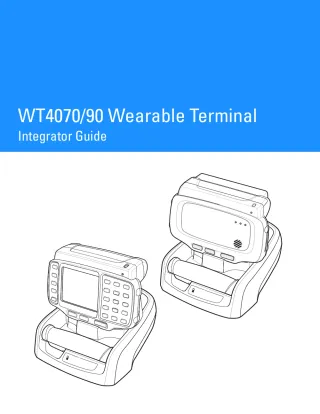
WT4070/90 Wearable Terminal Integrator Guide
Manual206 pagesPDF 7.2 MB
Integrator guide for setting up and configuring the WT4070 and WT4090 wearable terminals, including the Voice Only WT4090, and their accessories.
Covers · 1 model
The models it covers
Summary
What is in it
Integrator guide for the WT4070 and WT4090 wearable terminals, including the Voice Only WT4090 without a display. It covers unpacking, batteries and booting, cradles, chargers and the wall mount bracket, ActiveSync, remote control of the Voice Only WT4090, WLAN profiles and wireless tools, Bluetooth, application deployment, staging and provisioning, maintenance and troubleshooting, and technical specifications for the terminal, the RS309, RS409 and RS507 scanners and the accessories.
Its parts
- About This Guide
- Getting Started
- Accessories
- ActiveSync
- Voice Only WT4090 Remote Control
- Wireless Applications
- Using Bluetooth
- Application Deployment
- Staging and Provisioning
- Special Considerations
- Maintenance & Troubleshooting
- Technical Specifications
From the manual
Key facts from this manual
Each line names its page in the PDF.
The WT4070/90 Wearable Terminal Integrator Guide (72E-87638-07 Rev. A, April 2015, Zebra) covers the WT4070 and the WT4090, including the Voice Only WT4090 without a display. It explains batteries and charging, the cradles and charger, ActiveSync, wireless and Bluetooth setup, application deployment, troubleshooting, and full technical specifications with connector pin-outs and the RS309, RS409 and RS507 scanners.
- Device
- Wearable terminal running Microsoft Windows CE 5.0 Professional; also made as a Voice Only WT4090 with no display p. 15, 180
- CPU
- XScale PXA270 processor at 520 MHz p. 179
- Memory
- 64 MB Flash/128 MB RAM or 128 MB Flash/128 MB RAM p. 180
- Main battery
- Removable rechargeable 3.7 VDC lithium ion; standard 2330 mAh, extended 4600 mAh (minimum) p. 179
- Display
- Color 2.8 inch QVGA, non-touch or touch screen; none on the Voice Only WT4090 p. 179
- Keypad
- Two-color or triple-tap alphanumeric keypad; Voice Only WT4090 has three programmable function keys p. 179
- Radios
- WT4090: Zebra 802.11a/b/g WLAN, 100 mW; Bluetooth Version 1.2 p. 180, 181
- Scanners
- RS309 scanner, RS409 scanner, RS507 Hands-free Imager p. 180
- Cradles and charger
- Single Slot USB cradle (charges terminal and a spare battery, USB sync); Four Slot Ethernet cradle; Four Slot Spare Battery Charger p. 31
- Size and weight
- 5.7 x 3.7 x 1.0 inches and 11.3 oz. (320 g) with standard battery; 5.7 x 4.2 x 1.0 inches and 12.2 oz. (345 g) with extended p. 179
- Operating temperature
- -4 °F to 122°F (-20 °C to 50 °C); battery charging 32 °F to 104 °F (0 °C to +40 °C) p. 180
- Ruggedness
- Multiple 4 ft.(1.2 m) drops to concrete; 500 half-meter tumbles; IP54 Category 2 p. 180
- Interface connector
- 12 pins: USB host, scanner serial, 3.3 VDC scanner power, mic and headphone audio p. 188
- Voice use
- Runs voice recognition and text-to-speech engines for voice picking p. 180
What this manual walks you through
- Installing the main battery and charging it with the backup battery p. 24, 25
- Reading the charge status LED p. 25
- Setting up and using the Single Slot USB cradle p. 32
- Troubleshooting the terminal: power, charging, display, sound, memory and scanning p. 172, 173, 174, 175
- Troubleshooting the spare battery charger and the Ethernet and USB cradles p. 176, 177, 178
- Technical specifications of the terminal, RS309, RS409 and RS507 scanners and accessories p. 179, 182, 183, 184, 185, 186, 187
- Interface connector and cradle connector pin-outs p. 188, 189
- Cleaning cradle connectors p. 172
Good to know
- Do not remove the main battery within the first 15 hours of use, or data may be lost. p. 25
- The Single Slot USB cradle needs an approved power supply rated 12 VDC and at least 3.3 A. p. 32
- A partially inserted battery may cause data loss. p. 24
- Connecting by ActiveSync drops the WLAN connection; disconnect from the WLAN first. p. 175
- Batteries charge only between 0 °C and 40 °C ambient. p. 173
Questions this manual answers
What does a fast blinking amber LED mean on the WT4090?
A charging error: the temperature is too low or too high, or charging ran too long (typically eight hours). p. 25
Why won't my WT4090 ActiveSync with the PC?
Check that ActiveSync 4.1 or greater is installed and set to allow USB, that the cable is USB A to USB mini B, and the terminal is firmly seated. p. 178
What battery does the Motorola WT4090 use?
A removable rechargeable 3.7 VDC lithium ion battery, 2330 mAh standard or 4600 mAh extended. p. 179
Which scanners work with the WT4090?
The RS309 and RS409 scanners and the RS507 Hands-free Imager. p. 180
How long does the WT4090 keep data with the battery removed?
The memory backup battery keeps data for at least 30 minutes when the main battery is removed or fully discharged. p. 25
Contents
Chapters and sections
Each line opens the PDF at its page.
The whole text · 26 parts
Read the manual here as text
Its text as extracted from the PDF, unedited, in parts; each page opens the PDF at that page.
- Pages 1 to 41-4
- Pages 5 to 115-11
- Pages 12 to 1412-14
- About This Guide15-20
- Getting Started21-30
- Accessories, pages 31 to 3931-39
- Accessories, pages 40 to 4840-48
- Accessories, pages 49 to 5649-56
- ActiveSync57-62
- Voice Only WT4090 Remote Control63-66
- Wireless Applications, pages 67 to 7667-76
- Wireless Applications, pages 77 to 8677-86
- Wireless Applications, pages 87 to 9687-96
- Wireless Applications, pages 97 to 10697-106
- Using Bluetooth, pages 107 to 114107-114
- Using Bluetooth, pages 115 to 122115-122
- Using Bluetooth, pages 123 to 130123-130
- Using Bluetooth, pages 131 to 138131-138
- Application Deployment, pages 139 to 146139-146
- Application Deployment, pages 147 to 154147-154
- Application Deployment, pages 155 to 160155-160
- Pages 161 to 166161-166
- Maintenance & Troubleshooting167-178
- Technical Specifications179-190
- Glossary191-200
- Index201-206
The file