Manual · Monarch
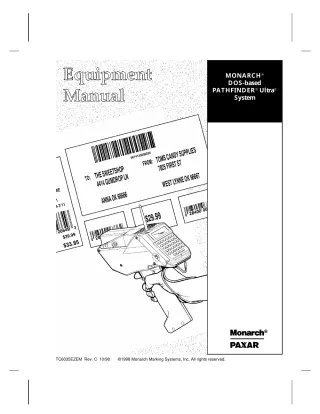
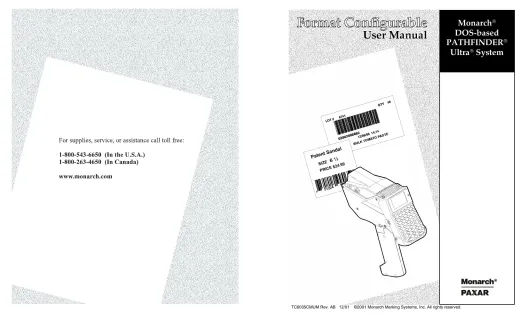
Monarch DOS-based PATHFINDER Ultra System
Manual210 pagesPDF 4.6 MB
User guide for the Monarch DOS-based Pathfinder Ultra configurable label printer: designing, printing and editing label formats.
Names · 1 model
The models it names
Filed with · 1 model
Also filed with these models on the old site
Summary
What is in it
The user guide for the Monarch DOS-based Pathfinder Ultra Configurable printer, a portable printer used for merchandise marking, shelf labels, restocking and carton labels. It walks through the keypad and display, printer configuration, and designing label formats with text, bar code, constant text, line, price and date/time fields, then applying data edits, editing formats and reading error codes. Appendices give sample formats and font information.
Its parts
- Introduction
- Getting Started
- Configuring the Printer
- Designing a Format
- Defining Text Fields
- Defining Bar Code Fields
- Defining Constant Text Fields
- Defining Line Fields
- Defining Special Fields
- Applying Data Edits
- Editing a Format
- Troubleshooting
From the manual
Key facts from this manual
Each line names its page in the PDF.
Format design manual (TC6035CMUM Rev. AB, 12/01) for the Monarch DOS-based Pathfinder Ultra Configurable printer, model 6035; it does not name the 6030. It shows how to configure the printer and design label formats with text, bar code, line and special fields on the printer itself. It ends with troubleshooting and a list of numbered error codes.
- What it is
- Configurable label printer that lets you design custom label formats on the printer p. 9
- Label widths
- 1.20, 1.50 and 2.00 inches p. 11
- Label lengths
- .55, .785, 1.1, 1.5, 2.0, 3.0 and 4.0 inches p. 11
- Fonts
- 14 fonts, monospaced or proportionally spaced p. 9
- Bar code choices
- UPC-A, UPC-E, EAN-8, EAN-13 (with +2 or +5 versions), Interleaved 2 of 5, Code 39, Code 39-Mod 43, Codabar, Code 128, Code 93, MSI p. 60
- Print methods
- Auto Print 1 Label, Print Strips, Print Loop - Trigger (default), On-Demand Printing, On-Demand w/Limit, Full Auto p. 27
- Supply types
- Paper Label/Tag (default), Fax Paper, Synthetic Label p. 29
- Currency symbols
- US Dollars (default), French Francs, Spanish Pesetas, Belgian Francs, German Marks, British Pounds, Euro, Swedish Krona, Danish Marks, Austrian Schilling, Japanese Yen p. 28
- Printhead width
- 1.83 inches p. 169
- Battery
- 12-volt battery p. 169
- Fields per format
- Up to 50; lines and constant text fields count as fields p. 170
- Maximum line length
- 3.72 inches p. 167
- Error code ranges
- 001-499 data errors, 571-619 formatting failures, 700-799 machine faults, 900-999 hard printer failures p. 165, 171, 172, 174
What this manual walks you through
- Getting started: loading labels, charging, configuring and testing a format p. 13
- Setting backlight, print method, date, time, currency and supply type p. 25, 26, 27, 28, 29
- Setting the two valid scan lengths for I2 of 5 bar codes p. 28
- Defining simple and combination bar code fields p. 59, 60
- Solving common format design and startup messages p. 163, 164
- Preparing to call Technical Support p. 164, 165
Good to know
- Deleting all formats with Reset/Clear Formats cannot be undone. p. 28
- Both I2 of 5 scan lengths must be even numbers. p. 28
- The two on-demand print methods work in peel mode only. p. 27
- The manual asks you to read the Equipment Manual that came with the printer first. p. 13
- Errors 900-999 are hard printer failures that need Technical Support. p. 174
Questions this manual answers
What does error 762 mean on a Monarch 6035?
Low battery: recharge the battery. p. 173
What does error 750 mean on the Pathfinder Ultra?
The printhead is overheated. Turn the printer off to let it cool; if the error persists, call Technical Support. p. 172
What does error 704 mean on the 6035 printer?
The printer has not sensed a supply mark within the set distance, or it is out of supplies. Check supply tracking, marks, the black mark sensor and the roll, then change the supply if it continues. p. 172
What label sizes does the DOS-based Pathfinder Ultra print?
Widths of 1.20, 1.50 and 2.00 inches, and lengths from .55 to 4.0 inches in set steps. p. 11
Why won't I2 of 5 bar codes scan on the 6035?
Check the scanning technique in the Equipment Manual and make sure both I2 of 5 scan lengths in the configuration are even numbers. p. 164
The whole text · 21 parts
Read the manual here as text
Its text as extracted from the PDF, unedited, in parts; each page opens the PDF at that page.
- Pages 1 to 101-10
- Pages 11 to 2011-20
- Pages 21 to 3021-30
- Pages 31 to 4031-40
- Pages 41 to 5041-50
- Pages 51 to 6051-60
- Pages 61 to 7061-70
- Pages 71 to 8071-80
- Pages 81 to 9081-90
- Pages 91 to 10091-100
- Pages 101 to 110101-110
- Pages 111 to 120111-120
- Pages 121 to 130121-130
- Pages 131 to 140131-140
- Pages 141 to 150141-150
- Pages 151 to 160151-160
- Pages 161 to 170161-170
- Pages 171 to 180171-180
- Pages 181 to 190181-190
- Pages 191 to 200191-200
- Pages 201 to 210201-210
The file