Manual · Intermec
6400 Hand-Held Computer User's Guide
Manual196 pagesPDF 2.7 MB
User's guide for the Intermec 6400 Hand-Held Computer: keyboard, batteries, scanning, terminal emulation menus and troubleshooting.
Covers · 1 model
The models it covers
Summary
What is in it
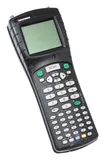
The user's guide for the Intermec 6400 Hand-Held Computer. It describes the main components, 41-key and 51-key keyboards, display annunciators, battery management, memory and accessories, then explains first-time setup, charging, downloading programs and scanning with an integrated or tethered scanner. A section covers the terminal emulation menu screens, followed by maintenance and troubleshooting. Appendices give connector pin-outs, the Norand utilities program and keyboard overlays.
Its parts
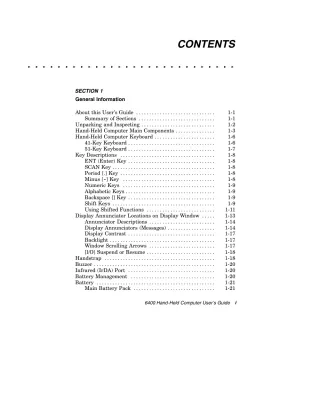
- General Information
- Operation
- Terminal Emulation Menu Screens
- Maintenance and Troubleshooting
From the manual
Key facts from this manual
Some pages are scans or cannot be read; this says only what the readable text supports. Each line names its page in the PDF.
User's guide (PN 961-047-093, Revision E) for the Intermec 6400 hand-held computer, used as a batch terminal or with a radio for real-time work. It covers the keyboard, display, batteries and charging, scanning, parameter setup, terminal emulation, maintenance and troubleshooting. It also lists the specifications, accessories and supported tethered scanners.
- Device
- Hand-held computer that stores data for batch upload or works in real time over an optional radio; optional integrated scanner p. 33
- Processor
- AM386SC300, mixed 3.3 and 5 volt, 33 MHz p. 40
- Memory
- Flash 1, 2, or 4 MB; DRAM 2, 4 or 8 MB p. 40
- Display
- CGA compatible LCD, 160 by 128 pixels p. 40
- Interfaces
- Asynchronous RS-232 and RS-485, IrDA, wireless LAN; xmodem, ymodem, zmodem and Kermit over RS-232; TCP/IP for RF p. 39, 40
- Radio
- 902 MHz or 2.4 GHz; 2.4 GHz Open Air: FHSS, 100 mW, up to 500 feet, 800 kbps or 1.6 Mbps; 802.11 DS: up to 800 feet, 1 or 2 Mbps p. 33, 40
- Main battery
- 2 cell lithium ion pack (standard); 4 cell pack or 4 cell pack in the scanner handle (optional) p. 39
- Backup battery
- 150 mA nickel-metal hydride; protects data for at least 100 hours; not user-replaceable p. 30, 39, 53
- Charge time
- 1.5 hours for a 2 cell pack, 3 hours for a 4 cell pack; charges only from 0 to 40 C (32 to 104 F) p. 28, 29
- Size
- 8.8 inches (22.35 cm) long; 3.3 inches (8.4 cm) wide at the display, 2.9 inches (7.4 cm) at the keyboard; 2.2 inches (5.6 cm) tall p. 39
- Weight
- 17 to 20 ounces (481 to 567 g), depending on options p. 39
- Operating temperature
- -20 to +50 C (-4 to +122 F) with Open Air or 900 MHz; 0 to +45 C (32 to +113 F) with the DSSS radio (printed 800.11 DSSS) p. 39
- Charging devices
- 6400 Series single dock, multidock and vehicle dock; Communication Adapter with ac wall charger or cigarette lighter adapter; single pack and eight-pack chargers p. 50, 51
- Tethered scanners
- Symbol LS-3203ER-I200A (858-042-800) and LS-3603-I200A (858-079-901) with cable 321-518-001; PSC5300 IP Series scanners p. 60
What this manual walks you through
- Caring for main and backup batteries p. 28, 29, 30, 31
- Using the IrDA port with printers and PCs p. 28
- Fitting the Communication Adapter and scanner handle p. 34, 35
- Charging battery packs in the computer or an external charger p. 50, 51
- Reading battery charger LED error codes p. 52, 53
- Connecting a tethered bar code scanner p. 60
- Troubleshooting power, battery and boot problems p. 140, 141, 142, 143
- Troubleshooting scanning problems p. 143, 144, 145
Good to know
- The lithium battery can explode if incorrectly replaced; replace it only with the same or an equivalent kind. p. 30
- Suspend the computer with the [I/O] key before changing the battery, or it reboots. p. 141
- Charge the computer for 12 hours before first use so the backup battery is full. p. 53
- Below 0 C, use the computer only two shifts a day so the backup battery gets eight hours to recharge at room temperature. p. 29
- Interleaved 2 of 5 decodes only the lengths set; the defaults are 14 and 0, so only 14 character codes read. p. 144
Questions this manual answers
How long does an Intermec 6400 battery take to charge?
About 1.5 hours for a 2 cell pack and 3 hours for a 4 cell pack; charge until the charger LED turns green. p. 28
What do the 6400 battery charger lights mean?
Red means charging and green means fully charged; blinking red and orange means a bad connection, a faulty battery or a charging error. p. 52
Why does my 6400 reboot when I change the battery?
It was not suspended with the [I/O] key first; a backup battery that is not fully charged can also cause a reset. p. 141, 142
Which tethered scanners work with the Intermec 6400?
Serial, decoded scanners such as the Symbol LS-3203ER-I200A and LS-3603-I200A and the PSC5300 IP Series, plugged into the Communication Adapter. p. 60
How long does the 6400 keep data without a main battery?
The backup battery keeps data for about 100 hours once fully charged. p. 53
The whole text · 20 parts
Read the manual here as text
Its text as extracted from the PDF, unedited, in parts; each page opens the PDF at that page.
- Pages 1 to 101-10
- Pages 11 to 2011-20
- Pages 21 to 3021-30
- Pages 31 to 4031-40
- Pages 41 to 5041-50
- Pages 51 to 6051-60
- Pages 61 to 7061-70
- Pages 71 to 8071-80
- Pages 81 to 9081-90
- Pages 91 to 10091-100
- Pages 101 to 110101-110
- Pages 111 to 120111-120
- Pages 121 to 130121-130
- Pages 131 to 140131-140
- Pages 141 to 150141-150
- Pages 151 to 160151-160
- Pages 161 to 170161-170
- Pages 171 to 180171-180
- Pages 181 to 190181-190
- Pages 191 to 196191-196
The file