Manual · Intermec
Decoding Laser Scanner User's Manual
Manual110 pagesPDF 318 KB
User's manual for Intermec decoding laser scanners, including the 1551 models: connecting, operating, configuring and troubleshooting.
Covers · 1 model
The models it covers
Summary
What is in it
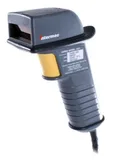
Intermec's user's manual for its decoding laser scanners, revised to include the 1551 scanners. It explains how to connect the RS-232 (15XXX02), IBM point-of-sale (15XXX03) and keyboard wedge (15XXX07) versions, how to operate the scanner hand-held or hands-free, troubleshooting and maintenance, and how to configure symbologies, prefixes and suffixes, operating and serial parameters by scanning bar codes or from a host, wand emulation and use with Intermec 94XX and 95XX readers.
Its parts
- Connecting the Scanner
- Operating the Scanner
- Configuring the Scanner
From the manual
Key facts from this manual
Each line names its page in the PDF.
The Intermec Decoding Laser Scanner User's Manual (P/N 063496-003), revised to include the 1551 scanners. It covers the 15XXX02 (RS-232), 15XXX03 (IBM point-of-sale) and 15XXX07 (keyboard wedge) versions as printed, and shows how to connect, operate, troubleshoot, clean and configure them by scanning bar codes or sending serial commands.
- Device type
- Hand-held decoding laser scanner, also usable hands-free in a scanner stand p. 17, 30
- Interface versions
- 15XXX02: RS-232 serial; 15XXX03: IBM 4683/4684/4693/4694 point-of-sale; 15XXX07: keyboard wedge for PCs or a laptop auxiliary port p. 17
- RS-232 cable
- Modular plug at the scanner, D-type connector at the terminal serial port, external power supply on the side of the D-type p. 19
- IBM POS cable
- 8-pin SDL connector for port 5B, or 4-pin SDL connector for port 9A or 9B p. 20
- OCIA
- 1551X03: also connects to OCIA ports with NCR S, NCR F, DTS, ICL or Nixdorf formats p. 17, 21, 22
- Wedge terminals
- 15XXX07: Apple Mac ADB, DEC VT220/320/420, DEC VT510, IBM 3151, IBM 3477, IBM 317X/8X/9X, IBM PC/AT, PS/2 and PC/XT p. 23, 24
- Default symbologies
- UPC-A, UPC-E (not expanded), Code 39 and Code 128; 15XXX03 defaults to UPC-A and UPC-E only p. 19, 21
- Serial settings
- 15XXX02: 7 or 8 data bits, 1 or 2 stop bits, odd, even, mark, space or no parity; XON/XOFF, CTS or RTS protocol p. 7, 63, 64, 65
- Wand emulation
- For portable readers: white or black high polarity, 5 to 70 ips (default 50), optional conversion to Code 39 p. 67, 68, 69
- External trigger
- Scan started by a signal at the CTS input, timing out after about 6 seconds; not on 15XXX03 or 1551X07 p. 57, 58
- Humidity
- Operate and store at 5% to 95% relative humidity p. 34
- Indicator light
- Yellow while scanning, green on a good read p. 29
- Configuration
- By scanning Code 128 command bar codes in the manual, or by serial commands STX ESC XX ETX p. 12
- Manual part number
- P/N 063496-003 p. 1
What this manual walks you through
- Connecting the RS-232 version to a terminal serial port p. 19
- Connecting to an IBM 4683/4684/4693/4694 point-of-sale terminal p. 20, 21
- Connecting the 1551X03 to an OCIA port and choosing a format p. 21, 22
- Connecting as a keyboard wedge or to a laptop or pen-based terminal p. 23, 24, 25
- Hand-held and stand (hands-free) scanning p. 30, 31, 32
- Troubleshooting common scanning problems p. 33, 34
- Cleaning and maintaining the scanner window p. 34
- Setting power consumption, beep volume, laser redundancy, spotter beam and external trigger p. 55, 56, 57, 58
- Setting the serial data format, label buffer and protocol p. 63, 64, 65, 66
- Using wand emulation with a portable reader or an Intermec 94XX or 95XX reader p. 67, 68, 69, 70
Good to know
- Do not look into the window or at a reflection of the laser beam while it is scanning. p. 29
- Interface cables are ordered separately; the box holds only the scanner and a quick reference guide. p. 17
- Turn off the terminal before disconnecting the scanner, or the terminal may register a failure or be damaged. p. 67
- Do not wipe the window with a dry tissue, and do not immerse the scanner in water. p. 34
- An external trigger must be off for at least 50 ms between scans. p. 58
Questions this manual answers
What do three beeps from the Intermec scanner mean?
Three medium beeps mean the data was not sent to the terminal; check that the cables are secure and the terminal is ready to receive. p. 30, 34
How do I reset the Intermec 1551 to factory defaults?
Scan the Reset to Default Values bar code (ZA) printed in the manual. p. 19
What cable connects the scanner to an IBM 4683 or 4694 register?
A cable with an 8-pin SDL connector for port 5B or a 4-pin SDL connector for port 9A or 9B. p. 20
Why does the scanner type lowercase letters instead of capitals?
If Caps Lock is used on the terminal, enable the Shift Alphabetic Characters (EO) command so the scanner decodes uppercase letters correctly. p. 33
How do I use the scanner with an Intermec 94XX or 95XX reader?
With a smart cable connected, scan Reset to Default Values (ZA), then Wand Emulation, White High (WB). p. 70
The whole text · 11 parts
Read the manual here as text
Its text as extracted from the PDF, unedited, in parts; each page opens the PDF at that page.
The file