Manual · Datalogic
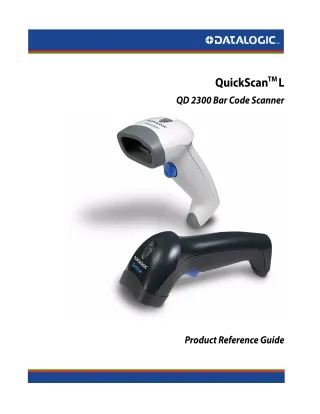
QuickScan L QD 2300 Bar Code Scanner Product Reference Guide
Manual192 pagesPDF 3.7 MB
Product reference guide for the Datalogic QuickScan L QD 2300 handheld laser bar code scanner: setup, interfaces and programming.
Covers · 1 model
The models it covers
Summary
What is in it
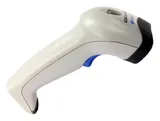
Datalogic product reference guide for the QuickScan L QD 2300 handheld laser bar code scanner. It covers unpacking and cable setup, operation in Trigger Single and Stand modes, LED and beeper indications, problem isolation, and programming by scanning bar codes: general features, RS-232, Keyboard Wedge and USB interface settings and symbology options. Appendices give technical specifications, cable pinouts, factory defaults and host commands.
Its parts
- Introduction
- Getting Started
- Operation
- Problem Isolation
- General Features
- RS-232
- Keyboard Wedge Interface
- USB Interface
- Symbologies
From the manual
Key facts from this manual
Each line names its page in the PDF.
This is the Product Reference Guide for the Datalogic QuickScan L QD 2300 laser bar code scanner. It explains connecting the scanner to RS-232, keyboard wedge and USB hosts, reading its beeper and LED signals, troubleshooting, programming by scanning bar code menus, and its technical specifications.
- Device
- Lightweight laser bar code scanner, used in Trigger Single or Stand mode p. 11
- Interfaces
- RS-232 (TTL signal levels), Keyboard Wedge, USB p. 11, 153
- Power
- 5.0 VDC +/-10%; standby under 35 mA, operating 100 mA, max 175 mA p. 153
- Scan engine
- 650nm laser diode, 100 scans per second, 47° scan width p. 153
- Symbologies
- UPC/EAN with supplementals, UCC/EAN 128, Code 39, Code 128, Codabar, Interleaved 2 of 5, Code 93, MSI, Code 11, GS1 DataBar and others p. 153
- Dimensions
- 2.79 in. H x 6.71 in. L x 2.59 in. W (7.09 x 17.04 x 6.69 cm) p. 153
- Weight
- About 4.5 oz. (128 g) without cable p. 153
- Operating temperature
- 32° to 122° F (0° to 50° C) p. 154
- Storage temperature
- -40° to 158° F (-40° to 70° C) p. 154
- Humidity
- 5% to 95% relative humidity, non-condensing p. 154
- Drop rating
- Multiple 5 ft. (1.524 m) drops to concrete p. 154
- Tilt tolerances
- Roll ± 30°, pitch ± 65°, skew ± 60° p. 153
- Cable connector
- Modular cable port on the bottom of the handle; 10-pin pinout for RS-232, Keyboard Wedge and USB p. 12, 156
- Color
- Black or White p. 153
What this manual walks you through
- Installing and removing the interface cable p. 12, 13
- Connecting an external power supply when the host gives no power p. 13
- Reading the beeper and LED signals p. 16, 17
- Choosing Trigger Single or Stand scan mode p. 17
- Aiming the scanner and avoiding the dead zone p. 18, 19
- Cleaning the scan window p. 20
- Troubleshooting beeps, decoding and host problems p. 21, 22, 23
- Connecting the scanner to an RS-232 host p. 38
- Connecting a keyboard wedge with a Y-cable p. 61
- Connecting the scanner to a USB host p. 81
Good to know
- The scanner does not read PDF417 bar codes or their variants. p. 11
- Use only a Datalogic power supply approved for this scanner. p. 38
- Do not hold the scanner square to the bar code; reflected light can stop it decoding. p. 19
- Do not spray water or cleaning liquids straight onto the scanner or its window. p. 20
- The manual states the laser is IEC Class 2 and cautions not to stare into the beam. p. 154
Questions this manual answers
What interfaces does the QD 2300 support?
RS-232 (at TTL signal levels), Keyboard Wedge and USB. p. 11
Does the QD 2300 need a power supply on USB?
No. On USB it is powered by the host or a powered USB hub, so no extra power supply is needed. p. 81
Can the QD 2300 read PDF417?
No. The guide says it does not support PDF417 bar codes or their variants. p. 11
What does a red LED on the QD 2300 mean?
A data transmission error or a scanner malfunction occurred. p. 17
Why does the QD 2300 give four short high beeps on USB?
The scanner has not finished starting up; wait several seconds and scan again. p. 21
Contents
Chapters and sections
Each line opens the PDF at its page.
- Introduction7
- Getting Started11
- Operation15
- Problem Isolation21
- General Features25
- User Preferences25
- Scanning Sequence Examples25
- Errors While Scanning25
- User General Feature Defaults26
- Default Parameters27
- Beeper Tone28
- Beeper Volume28
- Power Mode29
- Scan Mode29
- Scan Line Width31
- Laser On Time31
- Beep After Good Read32
- Transmit Label ID32
- Prefix/Suffix Values33
- Global Prefix/Suffix34
- FN1 Substitution Values36
- Transmit “No Read” Message36
- RS-23237
55 more lines, from page 38 on
- Connecting an RS-232 Interface38
- Keyboard Wedge Interface61
- USB Interface81
- Symbologies101
- Introduction101
- Scanning Sequence Examples101
- Errors While Scanning101
- Symbology Parameter Defaults102
- UPC/EAN105
- Code 128117
- Code 39118
- Code 93126
- Code 11128
- Interleaved 2 of 5 (ITF)132
- Discrete 2 of 5 (DTF)136
- Chinese 2 of 5138
- Codabar (NW - 7)139
- MSI142
- GS1 DataBar (RSS)146
- Symbology - Specific Security Levels148
- Symbology - Intercharacter Gap152
- Technical Specifications153
- Standard Defaults157
- Programming Reference163
- Sample Bar Codes167
- Keypad171
- ASCII Character Sets173
- RS-232 Host Commands185
- Index187
The whole text · 25 parts
Read the manual here as text
Its text as extracted from the PDF, unedited, in parts; each page opens the PDF at that page.
- Pages 1 to 61-6
- Introduction7-10
- Getting Started11-14
- Operation15-20
- Problem Isolation21-24
- General Features25-36
- RS-232, pages 37 to 4437-44
- RS-232, pages 45 to 5245-52
- RS-232, pages 53 to 6053-60
- Keyboard Wedge Interface, pages 61 to 7061-70
- Keyboard Wedge Interface, pages 71 to 8071-80
- USB Interface, pages 81 to 9081-90
- USB Interface, pages 91 to 10091-100
- Symbologies, pages 101 to 109101-109
- Symbologies, pages 110 to 118110-118
- Symbologies, pages 119 to 127119-127
- Symbologies, pages 128 to 136128-136
- Symbologies, pages 137 to 145137-145
- Symbologies, pages 146 to 152146-152
- Technical Specifications153-156
- Standard Defaults157-162
- Programming Reference163-166
- Sample Bar Codes167-170
- Pages 171 to 184171-184
- Pages 185 to 192185-192
The file