Manual · Allen-Bradley
Scanners 2755-LD1, -LD2; 2755-G3, -G6 Bar Code Programming Guide
Manual26 pagesPDF 745 KB
Multilingual bar code programming guide for the Allen-Bradley 2755-LD1, -LD2, -G3 and -G6 bar code scanners.
What this file really is
The old site listed this file as “37” for the Allen-Bradley 2755-DS. The file is named for the 2755-DS, but the document is the programming guide for the 2755-LD1, -LD2, -G3 and -G6 scanners and does not mention the 2755-DS.
Filed with · 1 model
Also filed with these models on the old site

Summary
What is in it
Allen-Bradley's bar code programming guide for the 2755-LD1 and -LD2 and 2755-G3 and -G6 scanners, with headings in several languages. Each page holds programming bar codes that the scanner reads to change a setting: wedge mode and terminal type, factory defaults, system status, power consumption, beeper, capture count, spotter beam, autosense and external trigger, baud rate and serial transmission, RTS protocol, delays and buffers, prefix and suffix, identifiers and messages, and each symbology (Code 39, UPC, EAN/JAN, 2 of 5, Code 128, Codabar), plus digits, letters and test symbols.
Its parts
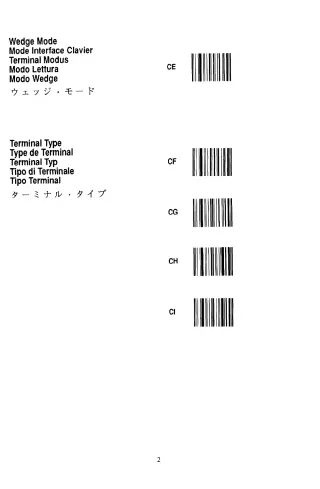
- Wedge Mode
- Terminal Type
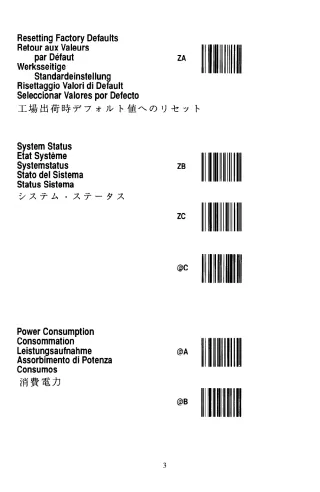
- Resetting Factory Defaults
- System Status
- Power Consumption
- Beeper Operation
- Capture Count
- Spotter Beam
- Autosense Mode
- External Trigger Operation
- Baud Rate
- Serial Transmission
- RTS Protocol
- Intercharacter Delay
- Serial Transmit Buffer
From the manual · read page by page
Key facts from this manual
Some pages are scans or cannot be read; this says only what the readable text supports. Each line names its page in the PDF.
Bar code programming guide for the Allen-Bradley 2755-LD1 and -LD2 and 2755-G3 and -G6 scanners, with headings in several languages. It is a book of setting bar codes grouped by topic: interface and terminal type, serial transmission, data formatting, reading options and the bar code types the scanner decodes. It ends with test symbols.
- Document
- Bar code programming guide for 2755-LD1, -LD2, 2755-G3 and -G6 scanners p. 1
- Output modes
- Wedge mode or serial transmission, with terminal type, baud rate and RTS protocol settings p. 2, 6, 7, 9
- Symbologies
- Code 39, UPC (A and E), EAN/JAN, Interleaved 2 of 5, Standard 2 of 5, Code 128, Codabar p. 15, 16, 17, 18, 19, 20, 21
- Data formatting
- Prefix, suffix, scanner identifier, code identifier, preamble, postamble, no read message p. 11, 12, 13, 14
- Reading options
- Beeper, capture count, spotter beam, autosense mode, external trigger p. 4, 5
- Serial options
- Intercharacter delay and serial transmit buffer p. 10
- Test symbols
- UPC-E, UPC-A, EAN-8, EAN-13, Code 39, Code 128, Interleaved 2 of 5 p. 24, 25
What this manual walks you through
- Resetting factory defaults p. 3
- Choosing wedge mode and terminal type p. 2
- Setting the baud rate and serial transmission format p. 6, 7, 8
- Setting RTS protocol and intercharacter delay p. 9, 10
- Adding prefixes, suffixes, preambles and postambles p. 11, 12, 13, 14
- Enabling and setting each bar code type p. 15, 16, 17, 18, 19, 20, 21
- Setting beeper and capture count p. 4
- Setting spotter beam, autosense and external trigger p. 5
- Checking system status and power consumption p. 3
- Scanning digit and letter codes p. 22, 23
Questions this manual answers
How do I reset a 2755-LD1 scanner to factory defaults?
The guide has a Resetting Factory Defaults section of setting bar codes. p. 3
Which bar code types can the 2755-LD1, -LD2, 2755-G3 and -G6 scanners be set for?
Code 39, UPC (A and E), EAN/JAN, Interleaved 2 of 5, Standard 2 of 5, Code 128 and Codabar. p. 15, 16, 17, 18, 19, 20, 21
Contents
Chapters and sections
Each line opens the PDF at its page.
- Scanners 2755-LD1, -LD2; 2755-G3, -G61
- Wedge Mode2
- Terminal Type2
- Resetting Factory Defaults3
- System Status3
- Power Consumption3
- Beeper Operation4
- Capture Count4
- Spotter Beam5
- Autosense Mode5
- External Trigger Operation5
- Baud Rate6
- Serial Transmission7
- RTS Protocol9
- Intercharacter Delay10
- Serial Transmit Buffer10
- Prefix11
- Suffix12
- Scanner Identifier13
- Code Identifier13
- Preamble13
- Postamble14
- No Read Message14
- Code 3915
- UPC (A and E)16
- EAN/JAN17
- Interleaved 2 of 518
- Standard 2 of 519
- Code 12820
- Codabar21
- Digits22
- Letters23
- Test Symbols24
- Back Cover26
The whole text · 3 parts
Read the manual here as text
Its text as extracted from the PDF, unedited, in parts; each page opens the PDF at that page.
The file