Manual · Allen-Bradley
Downloading Match Codes from Attended Workstation to Enhanced Decoder Application Note
Manual8 pagesPDF 99 KB
Application note on downloading match codes from an Allen-Bradley 2708-DH5 Attended Workstation to a 2755-DS/DD Enhanced Decoder.
Covers · 1 model
The models it covers

Summary
What is in it
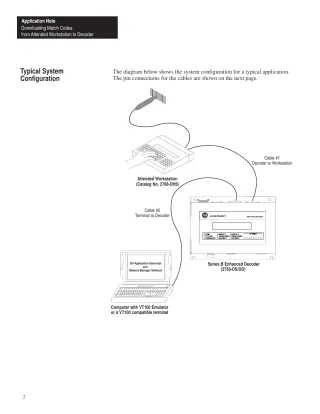
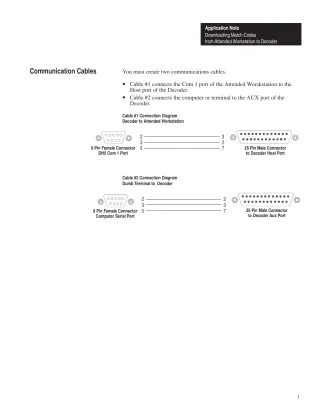
Allen-Bradley application note describing how to use an Attended Workstation (2708-DH5) to change the match code table in a Series B Enhanced Bar Code Decoder (2755-DS/DD) without the decoder configuration screens. It lists what you need, shows the typical system setup and the two communication cable diagrams, gives the workstation and decoder settings, and includes a documented sample BASIC program that sends match codes to the decoder.
Its parts
- Overview
- Intended Audience
- What You Need
- Typical System Configuration
- Communication Cables
- Configuring the Attended Workstation
- Configuring the Enhanced Decoder
- Sample Application Program
From the manual · read page by page
Key facts from this manual
Some pages are scans or cannot be read; this says only what the readable text supports. Each line names its page in the PDF.
This is an Allen-Bradley application note (Publication 2755-2.59, March 1995) on using a 2708-DH5 Attended Workstation to load match codes into a Series B Enhanced Bar Code Decoder (2755-DS/DD). It covers the two cables, the workstation and decoder settings, and a sample BASIC program that sends match codes typed at the keyboard.
- Purpose
- Load match codes into a Series B 2755-DS/DD decoder from a 2708-DH5 Attended Workstation, without the decoder configuration screens p. 1
- What you need
- 2708-DH5 Attended Workstation, 2755-DS/DD decoder, 2708-NAG and 2708-NNM software, cables, VT100 terminal or emulator p. 1
- Cable #1
- Workstation Com 1 port (9-pin female) to decoder Host port (25-pin male) p. 3
- Cable #2
- Computer or terminal serial port (9-pin female) to decoder AUX port (25-pin male) p. 3
- Workstation settings
- Type Terminal Master, Terminal Number 1, Comm. Port Mode Polled, CRLF, Echo and Handshake Disabled p. 4
- Decoder settings
- Host baud rate, parity and stop bits must match the workstation; set under option 7 p. 5
- Match code message
- MW, then output number, constant 1, symbology code, number of characters and match string (example MW 1 1 02 04 4567) p. 6
- Status reply
- =00 means the decoder recognized the command p. 7
- Programming tools
- BASIC program written with 2708-NAG and downloaded with 2708-NNM p. 6
- Decoder manual
- 2755-833, Series B Enhanced Decoder User Manual p. 1
What this manual walks you through
- Making the workstation-to-decoder and terminal-to-decoder cables p. 3
- Configuring the Attended Workstation p. 4
- Matching the decoder host communication settings p. 5
- Using the sample BASIC program to download match codes p. 6, 7
- Checking that a match code was received p. 7
Good to know
- After the BASIC program is downloaded, the workstation Comm. Port Mode must be changed to XON/XOFF. p. 4
- The decoder host baud rate, parity and stop bits must match the workstation. p. 5
Questions this manual answers
How can I load match codes into a 2755-DS decoder without the setup screens?
Send them from a 2708-DH5 Attended Workstation running a BASIC program that writes MW commands to the decoder Host port. p. 1, 6
What does a 2755 decoder match code download command look like?
An example is MW 1 1 02 04 4567: the MW command, output number, a constant, symbology code, number of characters and the match string. p. 6
What does status =00 mean from the 2755 decoder?
It means the decoder recognized the command sent. p. 7
Which decoder port does the Attended Workstation connect to?
The workstation Com 1 port connects to the decoder Host port; a terminal for setup connects to the AUX port. p. 3
Contents
Chapters and sections
Each line opens the PDF at its page.
The whole text · 1 part
Read the manual here as text
Its text as extracted from the PDF, unedited, in parts; each page opens the PDF at that page.
The file