Manual · VeriFone
PINpad 1000SE Reference and Programmers Guide
Manual229 pagesPDF 8.4 MB
Reference and programmer's guide for the VeriFone PINpad 1000SE PIN entry device: setup, message packets and key management.
Covers · 1 model
The models it covers
Summary
What is in it
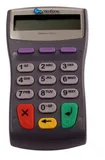
VeriFone's reference and programmers guide for the PINpad 1000SE, a handheld PIN entry device that connects to a controller such as a POS terminal or ECR. It covers setup and mounting, the keys and display, programming considerations, management, Master/Session, MAC and DUKPT message packets, customizable prompts and characters, communication examples, and troubleshooting. Appendices give specifications, key insertion, prompt tables, manual diagnostics and pinouts.
Its parts
- Preface
- Introduction
- Setup
- Using the Interface
- Programming Considerations
- Management Packets
- Master/Session Message Packets
- MAC Packets
- DUKPT Message Packets
- Customizable Command Specification
- Communication Examples
- Troubleshooting and Service
From the manual
Key facts from this manual
Each line names its page in the PDF.
The VeriFone Reference and Programmers Guide (part number 22903, Revision E) for the PINpad 1000SE PIN entry device. It covers setup, the keys and display, programming the controller with management, Master/Session, MAC and DUKPT message packets, troubleshooting, accessories, specifications, key insertion and prompts.
- Device
- Peripheral PIN entry device run by a controller such as a TRANZ or OMNI terminal or other microcomputer-based system p. 11
- Key management
- Master/Session and DUKPT with the ANSI x3.92 DES algorithm; 3DES Master/Session and 3DES DUKPT; MAC p. 12, 189
- Connector pinout
- Modular four-position, four-conductor: pin 1 circuit ground, 2 serial receive, 3 serial transmit, 4 +9 VDC unregulated power p. 187, 219
- Power
- 6-14 V DC, maximum 36.5 mA p. 187
- Display
- 8-character LCD showing up to 16 characters by scrolling; numerals, letters, * and # p. 19
- Keypad
- 10 keys (0 to 9, also used for letters A to Z), function keys PF1 to PF3, cancel, backspace and enter keys p. 19, 20
- Serial interface
- Software UART driving a transmit output port and a receive interrupt pin p. 187
- Terminal cables
- 07042-xx coiled (Omni 32xx, 33xx, 36xx, 37xx); 10441-xx coiled and 01582-xx straight 6-pin DIN (most Tranz); 03021-xx coiled mini-DIN (Omni 4xx, 7000MPD, Everest, Everest Plus) p. 185
- Coiled cable lengths
- 10441-01: .6 M, stretches to about 7 ft; 10441-02: 1.1 M, about 15 ft; 03021-00: .75 M, about 9 ft p. 188
- PC interface kits
- 10776-01 (25-pin serial port), 10776-02 (9-pin serial port) p. 188
- Power supply
- CPS04951-1B DC power supply p. 185
- Accessories
- E-100674051 stand adapter, E-100675051 privacy shield, 02746-01 cleaning kit p. 185
- Key loading software
- SecureKit Key Insertion, Part P006-216-11-MK, SecureKit 2.1 p. 189
- Size and weight
- 150 x 68 x 37 mm (5.90 x 2.68 x 1.46 in); 190 g (6.67 oz) p. 187
What this manual walks you through
- Choosing a location and protecting the unit from power noise and ESD p. 13, 14
- Connecting the unit to a controller or an IBM PC/AT p. 15, 16
- Mounting the stand adapter p. 16, 17
- Using the display, programmable function keys and function keys p. 19, 20
- Planning the controller application: key management, prompts, languages and baud rate p. 21, 22
- Troubleshooting a dead display or an unresponsive keypad p. 181, 182
- Cleaning the unit p. 182
- Returning a unit for repair with an MRA number p. 183, 184
- Inserting master keys or DUKPT keys p. 189, 191
- What the display prompts and error messages mean p. 195
Good to know
- Battery-backed memory can be corrupted if the unit is stored warmer than 50 °C (122 °F) or cooler than 10 °C (50 °F). p. 187
- Noisy power, blackouts or brownouts and ESD can corrupt memory, so keys and the custom idle prompt may need reloading. p. 14
- Manual key insertion gives a lower level of security and is not available when the unit is set for DUKPT. p. 189
- Remove the controller's power cord before connecting the PIN pad. p. 15
- The unit is not waterproof or dustproof and is for indoor use only. p. 13
Questions this manual answers
What is the pinout of the PINpad 1000SE connector?
Pin 1 is circuit ground, pin 2 serial receive (data to the PIN pad), pin 3 serial transmit (data from the PIN pad), and pin 4 +9 VDC unregulated power. p. 219
What power does the PINpad 1000SE need?
6 to 14 V DC, with a maximum of 36.5 mA. p. 187
How are encryption keys loaded into a PINpad 1000SE?
With the PC-based SecureKit Key Insertion product; master keys can also be entered from the keypad, but not when the unit is set for DUKPT. p. 189, 191
What does BAD RAM mean on a PINpad 1000SE?
The RAM test has failed. p. 195
Does the PINpad 1000SE support DUKPT?
Yes, it supports both DUKPT and Master/Session key management. p. 22
Contents
Chapters and sections
Each line opens the PDF at its page.
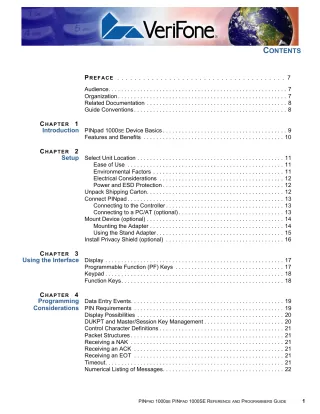
- PINpad 1000se1
- Preface9
- Introduction11
- Setup13
- Using the Interface19
- Programming Considerations21
- Management Packets25
- Master/Session Message Packets103
- MAC Packets131
- DUKPT Message Packets143
- Customizable Command Specification171
- Communication Examples177
- Troubleshooting and Service181
- Pinouts219
- Glossary221
- Index225
- Contact VeriFone229
The whole text · 23 parts
Read the manual here as text
Its text as extracted from the PDF, unedited, in parts; each page opens the PDF at that page.
- Pages 1 to 101-10
- Pages 11 to 2011-20
- Pages 21 to 3021-30
- Pages 31 to 4031-40
- Pages 41 to 5041-50
- Pages 51 to 6051-60
- Pages 61 to 7061-70
- Pages 71 to 8071-80
- Pages 81 to 9081-90
- Pages 91 to 10091-100
- Pages 101 to 110101-110
- Pages 111 to 120111-120
- Pages 121 to 130121-130
- Pages 131 to 140131-140
- Pages 141 to 150141-150
- Pages 151 to 160151-160
- Pages 161 to 170161-170
- Pages 171 to 180171-180
- Pages 181 to 190181-190
- Pages 191 to 200191-200
- Pages 201 to 210201-210
- Pages 211 to 220211-220
- Pages 221 to 229221-229
The file