Manual · Symbol
PDT 6800 Series Product Reference Guide
Manual139 pagesPDF 2.5 MB
Product reference guide for the Symbol PDT 6800 Series hand-held data collection terminals: setup, cradles, operation and troubleshooting.
Names · 4 models
The models it names
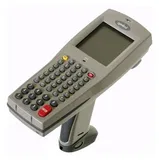 Symbol PDT-6800Portable batch data collection terminal from$695.0091 in stock Symbol PDT-6810900 MHz wireless portable data collection terminal from$895.0022 in stock Symbol PDT-6842802.11 (2 Mbps) wireless portable data collection terminal from$895.0011 in stock Symbol PDT-6846802.11b wireless portable data collection terminal from$895.0027 in stock
Filed with · 1 model
Also filed with these models on the old site
Summary
What is in it
The product reference guide for the Symbol PDT 6800 Series, hand-held battery-powered data collection terminals with a keyboard and integrated laser scanner. It covers the batch PDT 6800, the Spectrum One PDT 6810 and the Spectrum24 radio models PDT 6842, 6845 and 6846. Chapters explain setting up the CCM 38/6860 and CRD 38/6865 and 38/6866 cradles and PC adapter, batch and RF terminal setup, operating, booting and scanning, battery care, and troubleshooting. Appendices give keyboard layouts, specifications and 2D scanner drivers.
Its parts
- About This Guide
- Getting Started
- Accessories Setup
- Batch and Spectrum One Terminal Setup
- Spectrum24 RF Terminal Setup
- Operating the PDT 6800 Series
- Maintaining the Terminal
- Error Recovery and Troubleshooting
From the manual
Key facts from this manual
Each line names its page in the PDF.
Symbol's Product Reference Guide for the PDT 6800 Series hand-held terminals: the PDT 6800 batch terminal, the PDT 6810 (Spectrum One) and the PDT 6842, PDT 6845 and PDT 6846 (Spectrum24). It covers setting up the cradles and charging module, batteries and charging, boot procedures, error messages, troubleshooting, status codes and specifications.
- Device
- Hand-held, battery-powered data collection terminal with keyboard and integrated laser scanner, running Caldera DR DOS p. 18
- Radio
- PDT 6800: no radio; PDT 6810: Spectrum One; PDT 6842: 2 Mb Spectrum24; PDT 6846: 11 Mb Spectrum24 p. 18
- Battery
- NiCd six-cell 600 mAh pack p/n 21-36474-01 or Lithium Ion pack p/n 21-40340-01; up to 8 hours of continuous use p. 66, 68
- Charging
- NiCd: about 7 hours in a CCM 38/6860, CRD 38/6865, CRD 38/6866 or PC Adapter; Lithium Ion: out of the terminal in a UBC 2000 battery adapter p/n 21-32665-24 p. 66, 71, 72
- Operating temperature
- -13°F to 122°F (-25°C to 50°C; the manual prints -20°C) p. 100
- Environment
- Storage -13°F to 140°F (-25°C to 60°C; the manual prints -20°C); 95% relative humidity noncondensing; up to 10,000 feet; multiple 4-foot drops to concrete p. 100
- RF specifications
- PDT 6810: 902-928 MHz, 60.6 Kbps, 250 mW; PDT 6842: 1 or 2 Mbps; PDT 6846: 11 Mbps; Spectrum24 typically 2.4 to 2.5 GHz, 500 mW (US) p. 101
- Flash disk
- PDT 6842 and PDT 6846 (Spectrum24): an additional megabyte of flash disk, seen as drive E: through FLASHDSK.SYS p. 20, 46
- Scan engine
- Integrated laser, decode zones charted for the SE 1200 standard engine; a 2D scan engine option needs its own drivers p. 21, 102
- Cradle kits
- CRD 38/6865 single-slot: 3865-110 (US), 3865-111 (intl); CRD 38/6866 four-slot: 3866-100 (US), 3866-101 (intl); CCM 38/6860: 3860-100 (US), 3860-101 (intl); CCM add-on kit 3861-101 p. 23
- Power supplies
- CRD 38/6865: 59915-00-00 (US), 60507-00-00 (intl); CRD 38/6866: 60153-00-00 (US), 60174-00-00 (intl); CCM 38/6860: 58690-00-00 (US), 58690-01-00 (intl) p. 23
- Cables
- Null modem DB25 male to DB25 female 25-19297-01; DB25 male to DB9 female 25-19299-01; for the CCM DB-25 female to DB-25 female 59846-00-00 and DB-25 female to DB-9 female 25-19298-01 p. 23
- Cradle chaining
- Up to 24 CRD 38/6866 cradles in series with inter-cradle cable p/n 60427-00-00, each with its own power supply p. 31
- Cradle modem
- Optional internal modem in some cradles, up to 14,400 bps, RJ-11 port; the four-slot cradle has none p. 30
What this manual walks you through
- Setting up cradles, power supplies and serial cables p. 22, 23, 28, 29
- Connecting a cradle's internal modem to a phone line p. 30, 31
- Using the flash disk on Spectrum24 terminals p. 46
- Removing, installing and charging the battery pack p. 68, 69, 70, 71, 72
- Cleaning and storing the terminal p. 72, 73
- Understanding the error messages p. 75
- Troubleshooting startup, boot and Spectrum24 problems p. 76, 77
- Null modem cable pin-outs p. 88, 89
- Reading program loader status codes p. 98, 99
- Warm boot, cold boot and command mode key sequences p. 104, 105
Good to know
- The manual states the optional cradles are not certified for potentially hazardous environments; remove the terminal from such an area before charging it. p. 72
- Series 3800 NiCd battery packs cannot be used in the 6800 Series. p. 68
- Without the battery, memory is kept for at least 15 minutes; send programs and data to a host before a longer removal. p. 73
- Flash disk writes take 3-4 seconds, and writing during a power interruption could corrupt the disk. p. 46
- Charge and store batteries between 0°C and 38°C (32°F to 100°F); voltage does not show charge level. p. 70
Questions this manual answers
What battery does the PDT 6800 take?
A NiCd six-cell 600 mAh pack (p/n 21-36474-01) or a Lithium Ion pack (p/n 21-40340-01). A full charge gives up to 8 hours of continuous use. p. 66, 68
How long does a PDT 6800 battery take to charge?
A NiCd pack takes about 7 hours in a cradle or on the PC Adapter. The Lithium Ion pack charges out of the terminal in a UBC 2000 battery adapter. p. 71, 72
What is the PDT 6800 operating temperature range?
-13°F to 122°F (-25°C to 50°C; the manual prints -20°C). p. 100
Contents
Chapters and sections
Each line opens the PDF at its page.
- About This Guide10
- Chapter 1 Getting Started18
- Chapter 2 Accessories Setup22
- Chapter 3 Batch and Spectrum One Terminal Setup40
- Chapter 4 Spectrum24 RF Terminal Setup46
- Chapter 5 Operating the PDT 6800 Series48
- Chapter 6 Maintaining the Terminal66
- Chapter 7 Error Recovery and Troubleshooting74
- Appendix A Null Modem Pin-outs88
- Appendix B Keyboard Layouts90
- Appendix C Communications Status Codes98
- Appendix D Specifications100
- Appendix E Boot-Up Quick Reference104
- Appendix F 2D Scanner Drivers and Applications106
The whole text · 16 parts
Read the manual here as text
Its text as extracted from the PDF, unedited, in parts; each page opens the PDF at that page.
- Pages 1 to 91-9
- About This Guide10-17
- Chapter 1 Getting Started18-21
- Chapter 2 Accessories Setup, pages 22 to 3022-30
- Chapter 2 Accessories Setup, pages 31 to 3931-39
- Chapter 3 Batch and Spectrum One Terminal Setup40-45
- Pages 46 to 5546-55
- Pages 56 to 6556-65
- Chapter 6 Maintaining the Terminal66-73
- Chapter 7 Error Recovery and Troubleshooting74-87
- Pages 88 to 9788-97
- Pages 98 to 10398-103
- Pages 104 to 113104-113
- Pages 114 to 123114-123
- Pages 124 to 133124-133
- Numerics134-139
The file