Manual · Symbol
LS 9100 Product Reference Guide
Manual249 pagesPDF 1.4 MB
Product reference guide for the Symbol LS 9100 projection scanner: setup, operation, maintenance and bar code programming.
Covers · 1 model
The models it covers
Summary
What is in it
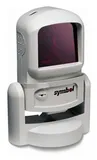
The product reference guide for the Symbol LS 9100, a projection scanner for point-of-sale counters that can also be lifted from its cradle and used hand-held. It covers unpacking, mounting, installing and connecting the scanner, the scan zone and hands-free or hand-held use, controls, LED and beeper indications, maintenance and specifications, and a long parameter chapter of programming bar codes for host types, RS-232 settings, symbologies, decode options and data transmission formats.
Its parts
- About This Guide
- Setting Up the LS 9100
- Using the LS 9100
- Maintenance and Specifications
- Programming
- Parameters
From the manual
Key facts from this manual
Each line names its page in the PDF.
Symbol's product reference guide for the LS 9100, an omnidirectional projection scanner for point-of-sale counters that also lifts out of its stand for hand-held use. It walks through unpacking, mounting, connecting to a POS terminal, LED and beeper signals, troubleshooting, the technical specifications and programming the scanner by scanning parameter bar codes.
- Device
- Omnidirectional projection scanner for POS counters, used hands-free in its stand or lifted out for hand-held scanning p. 19, 34
- Scan pattern
- 20-line, 5-direction dynamic cross pattern p. 41
- Symbologies
- UPC/EAN with and without supplementals, Code 128, Code 39, Interleaved 2 of 5, Codabar, EAN/UCC 128 p. 41
- Power
- 5.2 volts at 500 mA nominal (2.6 watts), from the POS terminal or an AC power supply on the interface cable p. 22, 41
- IBM hosts
- IBM 46XX in non-IBM, hand-held or table-top scanner emulation p. 53, 54, 55
- RS-232C hosts
- Standard, ICL, Nixdorf, Fujitsu and Beetle RS-232C p. 56, 57, 58, 59, 60
- RS-232 defaults
- 9600 baud, even parity, 1 stop bit, 8 bit ASCII, no hardware or software handshaking p. 44
- Dimensions
- 6.7 in. (17 cm) high, 4.7 in. (11.9 cm) wide, 3.6 in. (9.1 cm) deep p. 41
- Weight
- 9.75 oz. (277 gm) p. 41
- Operating temperature
- 32° to 104°F (0° to 40°C); storage -40° to 140°F (-40° to 60°C); humidity 5% to 95% non-condensing p. 41
- Durability
- Survives 4 ft. (1.2 meter) drops to concrete p. 41
- Controls
- No on/off switch; a volume button on top selects one of three beep volumes p. 35
- Related guides
- Quick Reference Guide 70-12495-0X or 70-19797-0X; Advanced Programmer's Guide 70-15600-0X p. 11
What this manual walks you through
- Checking the scanner works before installing it p. 22
- Setting the scanner free-standing on a counter p. 24, 25
- Mounting the plate permanently with screws p. 25, 26, 27
- Mounting the plate with double-sided tape p. 27, 28
- Connecting the scanner to a POS terminal, with or without a power supply p. 29, 30, 31
- Scanning hands-free and hand-held p. 34
- Changing the beeper volume p. 35
- Reading the LED and beeper signals p. 36, 37
- Troubleshooting a scanner that does not decode or transmit p. 40
- Programming parameters and restoring the defaults p. 43
Good to know
- Clean the scan window only with mild soap and water on a soft cloth, never applied directly to the window. p. 39
- Four beeps mean a transmission error: the decoded bar code is not sent to the host. p. 37
- On RS-232, the guide says to make sure a flash download cable is not in use. p. 40
- With IBM 468X/9X terminals, the driver for the port in use must be loaded and enabled. p. 53
- The 8 inch scan zone is for a 100% UPC/EAN bar code and varies with code type and density. p. 33
Questions this manual answers
What power does the LS 9100 need?
5.2 volts at 500 mA nominal (2.6 watts), supplied by the POS terminal or by an AC power supply plugged into the interface cable. p. 22, 41
How far away can the LS 9100 read a bar code?
Within 8 inches (20.3 cm) of the scanner face, based on a 100% UPC/EAN bar code. p. 34
How do I reset the LS 9100 to factory defaults?
Scan the SET DEFAULT bar code; the defaults are kept in Flash memory. p. 43
What does a fast flashing green LED on the LS 9100 mean?
Fast sequential flashing means a scanner malfunction has occurred. p. 36
Can the LS 9100 be used as a handheld scanner?
Yes. Lift it out of its cradle and bring it within 8 inches of the bar code. p. 34
Contents
Chapters and sections
Each line opens the PDF at its page.
- About This Guide5
- About This Guide11
- Chapter 1 Setting Up the LS 910019
- Chapter 2 Using the LS 910033
- Chapter 3 Maintenance and Specifications39
- Chapter 4 Programming43
- Chapter 5 Parameters51
- Appendix A Programming Reference229
1 more line, from page 236 on
The whole text · 28 parts
Read the manual here as text
Its text as extracted from the PDF, unedited, in parts; each page opens the PDF at that page.
- Pages 1 to 41-4
- Contents5-10
- About This Guide11-18
- Chapter 1 Setting Up the LS 910019-32
- Chapter 2 Using the LS 910033-38
- Chapter 3 Maintenance and Specifications39-42
- Chapter 4 Programming43-50
- Chapter 5 Parameters, pages 51 to 6051-60
- Chapter 5 Parameters, pages 61 to 7061-70
- Chapter 5 Parameters, pages 71 to 8071-80
- Chapter 5 Parameters, pages 81 to 9081-90
- Chapter 5 Parameters, pages 91 to 10091-100
- Chapter 5 Parameters, pages 101 to 110101-110
- Chapter 5 Parameters, pages 111 to 120111-120
- Chapter 5 Parameters, pages 121 to 130121-130
- Chapter 5 Parameters, pages 131 to 140131-140
- Chapter 5 Parameters, pages 141 to 150141-150
- Chapter 5 Parameters, pages 151 to 160151-160
- Chapter 5 Parameters, pages 161 to 170161-170
- Chapter 5 Parameters, pages 171 to 180171-180
- Chapter 5 Parameters, pages 181 to 190181-190
- Chapter 5 Parameters, pages 191 to 200191-200
- Chapter 5 Parameters, pages 201 to 210201-210
- Chapter 5 Parameters, pages 211 to 220211-220
- Chapter 5 Parameters, pages 221 to 228221-228
- Appendix A Programming Reference, pages 229 to 235229-235
- Appendix A Programming Reference, pages 236 to 242236-242
- Appendix A Programming Reference, pages 243 to 249243-249
The file