Manual · Symbol
Spectrum24 CB 1000 User Guide
Manual134 pagesPDF 1.1 MB
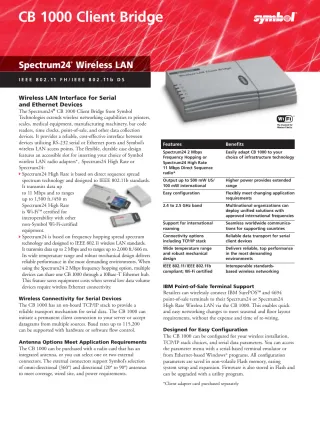
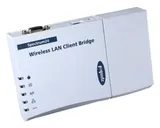
User guide for the Symbol Spectrum24 CB 1000 Client Bridge, linking Ethernet and RS-232 devices to Spectrum24 radio LANs.
Covers · 1 model
The models it covers
Summary
What is in it
Symbol user guide for the Spectrum24 Client Bridge 1000 (CB 1000), which connects Ethernet and RS-232 serial devices to Spectrum24 wireless LANs using an LA-41X1 direct-sequence or LA-302X frequency-hopping radio card. It covers radio basics, operating modes, hardware and configurator installation, radio and network settings, serial port protocols (RMP and TCP pipes, Telnet client, LPD printing, packet conversion), serial configuration screens, troubleshooting and regulatory compliance.
Its parts
- Introduction
- Operating Modes
- Installing the Hardware
- Installing the CB 1000 Configurator Utility
- Windows Configurator Utility
- Basic Radio Configuration
- Network Configuration
- Serial Port Protocol Configuration
- Serial Telnet Client Configuration
- LPD Print Server for Serial Printing
- Serial Stream To Network Packet Conversion
- Serial Configuration of the CB 1000
- Main Menu Configuration Screens
From the manual
Key facts from this manual
Each line names its page in the PDF.
The Symbol Spectrum24 CB 1000 User Guide for the client bridge that links Ethernet and RS-232 serial devices to Spectrum24 wireless LANs. It covers radio card installation, the Windows Configurator and serial configuration menus, network and serial port settings, the serial protocols and LPD printing, the LED indicators and troubleshooting with the event log errors.
- Device
- Client bridge between Ethernet devices, RS-232 serial devices and Spectrum24 radio LANs p. 9
- Radio cards
- Spectrum24 LA-41X1 direct-sequence or LA-302X frequency-hopping cards, not included p. 9
- Power supply
- 5.2 V, 1 A, into the port labeled 5V DC p. 27, 29
- Serial port
- RS-232 DB9, 300 to 115200 bps; 7 or 8 data bits, 1 or 2 stop bits, none, even or odd parity p. 10, 53
- Ethernet port
- 10Base-T, RJ45; 100BaseT not supported p. 10, 116
- Ethernet cable
- Straight-through cable to a PC, crossover cable to a hub p. 29
- Included
- CD with configuration utility and user guide; RS-232 serial cable p. 9, 83
- Protocols
- TCP, IP, UDP, LPD and Telnet; pass through serial mode for protocol-less devices p. 10
- Serial applications
- RMP Pipe for serial cable replacement, TCP Pipe, Telnet client, LPD print server for serial printers p. 57, 75
- Encryption
- Open System, 40-bit and 128-bit (DS only) WEP p. 10, 24
- Indicators
- Power, Status, Associated/Radio Activity, Wired LAN Attached/In Use, Serial Activity LEDs p. 22
- Configurator
- Windows 95/98 or 2000 utility; finds units on the network, edits and saves configurations, updates firmware p. 31
- Serial setup
- ANSI terminal, 9600 baud, 8 data bits, no parity, 1 stop bit, no flow control; press the Config hole with a paper clip p. 83, 84
- DS MU mode
- 2 Mbps FH card only; one AP supports four CBs, each with four Ethernet clients p. 25, 26
What this manual walks you through
- Installing a radio card in the CB 1000 p. 27, 28, 29
- Installing and starting the Windows Configurator p. 31, 33
- Setting the IP address, netmask and gateway p. 51, 52
- Matching the serial port settings to the attached device p. 52, 53
- Replacing a serial cable with a pair of CB 1000s (RMP Pipe) p. 57
- Printing wirelessly to a serial printer with LPD p. 75
- Configuring the CB 1000 through the serial port menus p. 83, 84, 85, 86, 87
- Enabling Distributed System Mobile Unit mode p. 25, 26
- Reading the LED indicators p. 22
- Troubleshooting setup, hardware errors and event log errors p. 115, 116, 117, 118, 119
Good to know
- Run Reset configuration to default each time a new radio card is installed, or the CB 1000 will not work. p. 85
- Insert the radio card firmly without forcing; forcing can damage the unit or the card. p. 29
- The serial port configuration menus do not enable flow control, so enter data slowly to avoid UART errors. p. 119
- The LPD print server is one-way: it ignores data from the printer except software flow control characters. p. 75
Questions this manual answers
Does the Symbol CB 1000 come with a radio card?
No, the LA-41X1 DS and LA-302X FH radio cards are not included. p. 9
What power supply does the CB 1000 client bridge use?
A 5.2 V, 1 A supply plugged into the port labeled 5V DC. p. 27, 29
Does the CB 1000 support 100BaseT Ethernet?
No, it needs a 10BaseT Ethernet device. p. 116
CB 1000 Ethernet link LED not lit
Check both cable ends; use a crossover cable to a hub and a straight-through cable directly to a PC or Ethernet printer. p. 116
CB 1000 not working after installing a new radio card
Run Reset configuration to default, which loads the correct firmware for the installed radio card. p. 85
Contents
Chapters and sections
Each line opens the PDF at its page.
- Spectrum24 CB 10001
- About This Document3
- Chapter 1 Introduction9
- Chapter 2 Operating Modes19
- Chapter 3 Installing the Hardware27
- Chapter 4 Installing the CB 1000 Configurator Utility31
- Chapter 5 Windows Configurator Utility33
- Chapter 6 Basic Radio Configuration45
- Chapter 7 Network Configuration51
- Chapter 8 Serial Port Protocol Configuration57
- Chapter 9 Serial Telnet Client Configuration69
- Chapter 10 LPD Print Server for Serial Printing75
- Chapter 11 Serial Stream To Network Packet Conversion79
- Chapter 12 Serial Configuration of the CB 100083
- Chapter 13 Main Menu Configuration Screens89
The whole text · 18 parts
Read the manual here as text
Its text as extracted from the PDF, unedited, in parts; each page opens the PDF at that page.
- Pages 1 to 81-8
- Chapter 1 Introduction9-18
- Chapter 2 Operating Modes19-26
- Chapter 3 Installing the Hardware27-30
- Pages 31 to 4431-44
- Chapter 6 Basic Radio Configuration45-50
- Chapter 7 Network Configuration51-56
- Chapter 8 Serial Port Protocol Configuration57-68
- Chapter 9 Serial Telnet Client Configuration69-74
- Chapter 10 LPD Print Server for Serial Printing75-78
- Chapter 11 Serial Stream To Network Packet Conversion79-82
- Chapter 12 Serial Configuration of the CB 100083-88
- Chapter 13 Main Menu Configuration Screens, pages 89 to 9789-97
- Chapter 13 Main Menu Configuration Screens, pages 98 to 10698-106
- Chapter 13 Main Menu Configuration Screens, pages 107 to 114107-114
- Appendix A Troubleshooting115-120
- Pages 121 to 128121-128
- Index129-134
The file