Manual · Microscan
MS-5000 Multidrop Concentrator User's Manual
Manual94 pagesPDF 1.3 MB
User's manual for the Microscan MS-5000 multidrop concentrator: setup, multidrop communications and configuration by menu, command or card.
Covers · 1 model
The models it covers
Summary
What is in it
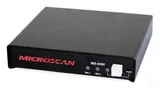
The user's manual for the Microscan MS-5000 multidrop concentrator, which networks decoders, scanners and other devices and passes their data to a host over a serial link. It gives step-by-step setup and installation, explains poll and select sequences on single and multiple concentrator networks, and shows how to configure the concentrator by menu, by serial command or with a Microscan profile card. Appendixes give specifications, quick reference tables, defaulting, grounding and shielding, the terminal resistor and interface standards.
Its parts
- Setup and Installation
- Multidrop Communications
- Menu Configuration
- Serial Commands
- Profile Card Configuration
From the manual
Key facts from this manual
Each line names its page in the PDF.
The Microscan user's manual (P/N 83-005000 REV G) for the MS-5000 Multidrop Concentrator, which links scanners and decoders on an RS-485 multidrop network to a host computer or PLC. It covers planning and cabling the network, multidrop polling, configuring the concentrator by menu, serial command or profile card, and mounting it. Appendices give specifications, reference tables, the default procedure and grounding advice.
- Device
- Multidrop concentrator for up to 50 scanners, decoders or other devices on one network p. 10, 78
- Connectors
- Power (5-pin DIN), LAN (modular 6-pin RJ-11), Host (25-pin D-subminiature), Monitor (9-pin D-subminiature) p. 13
- Host port
- RS-232, RS-422, RS-485; 600 to 38.4K baud; Point-to-Point, Polling Mode D, Multidrop, User Defined, User Defined Multidrop p. 78
- LAN port
- 4-wire RS-485 or RS-422, 6-pin modular; 600 to 38.4K baud p. 78
- Monitor port
- RS-232, 9-pin D-subminiature; 2400 to 38.4K baud; point-to-point p. 17, 78
- Default settings
- 9600 baud, seven data bits, even parity, one stop bit p. 18
- Power
- +5 VDC, +12 VDC and -12 VDC from an AC power pack; mating plug Switchcraft #05BL5M or Microscan 20-600099-01 p. 11, 14
- Power pins
- 1 DC ground, 2 chassis ground, 3 +5 VDC, 4 -12 VDC, 5 +12 VDC p. 14
- LAN pins
- 1 ground, 2 receive data (–), 3 receive data (+), 4 transmit data (–), 5 transmit data (+) p. 15
- Cable lengths
- RS-232 to host 50’ (15.2 m); RS-422 to host 4000’ (1219 m); RS-485 trunk 4000’ (1219 m); drops 10’ (3 m) p. 13
- Termination
- 68 ohm terminal resistor at the last device p. 12
- Size and weight
- 6.2 in. (157.5 mm) long, 6.61 in. (167.9 mm) wide, 1.36 in. (34.5 mm) high; 16 oz. (453 grams) p. 78
- Environment
- Operating 32° to 113°F (0° to 45°C); storage –58° to 158°F; humidity 0% to 95% non-condensing p. 78
- Status lights
- IND 1 flashes green on data to the host; IND 2 red when ready or polling, off when the buffer is full; PWR red p. 78
What this manual walks you through
- Planning a multidrop scanning network and its layout rules p. 10, 11, 12
- Attaching the power, LAN, host and monitor cables p. 13, 14, 15, 16, 17
- Wiring the RS-485 trunk with a crossed first cable p. 12, 15
- Talking to the concentrator from an ASCII terminal p. 18
- Configuring by menu, serial command or Microscan profile card p. 6
- Mounting the concentrator with or without its housing p. 20, 21
- Serial configuration and operational commands p. 80
- Poll and select characters for multidrop addresses 01 to 50 p. 81
- Resetting the concentrator to factory defaults p. 82
- Grounding, shielding and avoiding ground loops p. 83
Good to know
- There are no user serviceable parts inside the concentrator. p. 7
- The concentrator sends data to the host only when ±12V is present, though it receives commands without it. p. 17
- Use a host cable with no more wires than the application needs; extra outputs could cause damage. p. 17
- Switching power supplies with 75 mV or more noise on +5 VDC, or 30 mV or more on ±12 VDC, are not recommended. p. 14
- The 6-32 mounting screws must not go more than 0.12 in. (3 mm) into the case. p. 20
Questions this manual answers
How do I reset an MS-5000 to factory defaults?
Use a profile card in the host connector, or short pins 7 and 11 of the host connector twice within 3 seconds; the manual warns that shorting the wrong pins can damage the unit. p. 82
What are the MS-5000 default communication settings?
9600 baud, seven data bits, even parity and one stop bit. p. 18
How many scanners can one MS-5000 concentrator poll?
Up to 50 devices per concentrator on the LAN port. p. 78
How long can an MS-5000 multidrop cable be?
The main trunk can run 4000 feet from the concentrator to the last device, and drops to each scanner are limited to 10 feet. p. 12
What terminates the end of an MS-5000 multidrop network?
A 68 ohm terminal resistor at the last device. p. 12
Contents
Chapters and sections
Each line opens the PDF at its page.
The whole text · 10 parts
Read the manual here as text
Its text as extracted from the PDF, unedited, in parts; each page opens the PDF at that page.
The file