Manual · Metrologic
MS1690 Focus Area Imaging Bar Code Scanner Installation and User's Guide
Manual52 pagesPDF 5.0 MB
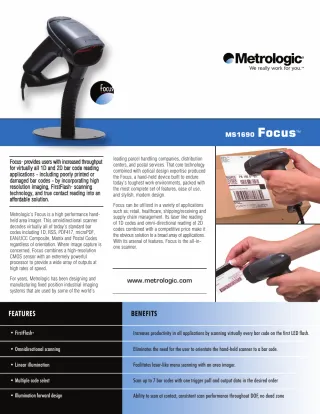
Installation and user's guide for the Metrologic MS1690 Focus hand-held area imaging bar code scanner for 1D and 2D codes.
Covers · 1 model
The models it covers

Summary
What is in it
The installation and user's guide for the Metrologic MS1690 Focus, a hand-held area imaging bar code scanner that reads 1D and 2D symbologies. It lists the interface versions, kit and accessories, then explains the PowerLink cable, installation to RS232, keyboard wedge, IBM and USB hosts, the presentation stand kit, the two default modes of operation, indicators, depth of field, troubleshooting, design specifications, default communication settings, configuration modes, flash firmware upgrades, pinouts and product safety.
Its parts
- Introduction
- Installing the Scanner to the Host System
- Stand Kits
- Scanner Operation
- Troubleshooting Guide
- Design Specifications
- Applications and Protocols
- Default Settings - Communication Parameters
- Configuration Modes
- Upgrading the Flash ROM Firmware
- Scanner and Cable Terminations
- Limited Warranty
- Product Safety
- Patents
From the manual
Key facts from this manual
Each line names its page in the PDF.
Installation and user's guide for the Metrologic MS1690 Focus area imaging bar code scanner in its RS232, keyboard wedge, IBM and USB versions. It shows how to connect the scanner to a host, set up the stand, read the beeps and LEDs, troubleshoot, and upgrade the firmware. It also gives the specifications, accessory part numbers and connector pinouts.
- Device type
- Hand-held area imaging bar code scanner with a CMOS sensor, for 1D and 2D codes p. 5
- Interface versions
- MS1690-11 IBM 468X/469X; MS1690-14 RS232; MS1690-38 low speed USB; MS1690-40 full speed USB; MS1690-47 keyboard wedge and stand-alone keyboard p. 3, 5
- Scanner connector
- 10-pin RJ45 female socket p. 8, 38
- Input voltage
- 5.0VDC ± 0.25V p. 30
- Current draw
- 330 mA operating, 160 mA idle or standby, 400 mA peak (typical) p. 30
- Power supplies
- Regulated 5.2VDC @ 650 mA: 45-45593 (120V US), 45-45591 (Continental Europe), 45-45592 (UK), 46-46803 (Australia), 46-46983 (China) p. 6
- PowerLink cables
- 53-53000-3 RS232 with power jack; 53-53002-3 keyboard wedge with adapter cable; 53-53020-3 stand-alone keyboard; each 2.7 m (9 ft) coiled p. 6
- USB cables
- 53-53213x-N-3 and 53-53214x-N-3 USB power/communication; 53-53235x-N-3 low speed USB non-locking p. 7
- IBM cable
- MVC-2MPC-IB9 Metrologic Voltage Converter cable, ±12VDC to +5.2VDC p. 7, 14
- Stand
- 46-00147 modular presentation stand; installation guide 00-02001 p. 7
- Reading range
- 0 to 230 mm (0 to 9 in) for 0.330 mm (13 mil) bar codes at the default setting p. 29
- Temperature
- Operating 0°C to 40° (32° to 104°F); storage -40°C to 60°C (-40°F to 140°F) p. 30
- Default symbologies
- UPC/EAN, Code 39, interleaved 2 of 5, Code 93, Code 128, Codabar and PDF p. 26
- Firmware upgrade
- MetroSet2 over a PC serial port; needs a power supply and PowerLink cable 54-54014 p. 37
What this manual walks you through
- Connecting the RS232 model (MS1690-14) to a host p. 11
- Connecting the keyboard wedge and stand-alone keyboard model (MS1690-47) p. 12, 13
- Connecting the IBM model (MS1690-11) with the MVC cable p. 14
- Connecting the USB models (MS1690-38 and MS1690-40) p. 15
- Releasing the PowerLink cable from the scanner p. 9
- Mounting and assembling the presentation stand p. 16, 17, 18
- Reading the beeps and LED indicators p. 20, 21, 22
- Troubleshooting power, scanning and host communication problems p. 25, 26, 27, 28
- Upgrading the firmware with MetroSet2 p. 37
- Scanner and host cable pinouts p. 38, 39, 40, 41
Good to know
- A PowerLink cable that is not fully latched can make the unit power on and off. p. 9
- Before removing the cable, the manual recommends turning off the host and disconnecting the power supply. p. 9
- Some hosts cannot supply enough current for the scanner, so a power supply may be needed. p. 25
- The manual states that all circuits connected to the scanner must meet SELV requirements per EN/IEC 60950. p. 11
- A razz or beep during a firmware upgrade means the scanner did not upgrade properly. p. 37
Questions this manual answers
How do I remove the cable from an MS1690?
Push a bent paperclip into the small pin-hole on the handle near the cable until it clicks, then pull gently on the cable's strain relief. p. 9
What power supply does the MS1690 Focus use?
A regulated AC to DC transformer with 5.2VDC @ 650 mA output; the 120V US part is 45-45593. p. 6
What does a long razzberry tone at power-up mean?
The scanner failed to initialize or configure. If it still does not respond after reprogramming, the manual says to return it for repair. p. 22
Why does the scanner lock up after the first scan with the white LED on?
It is set for host handshaking (ACK/NAK, RTS/CTS or XON/XOFF) but is not getting the signal; check that the host cable and host support it. p. 26
How do I upgrade the MS1690 firmware?
Connect the scanner to a PC serial port and run MetroSet2. Every version can be upgraded with a power supply and PowerLink cable 54-54014; RS232 units can use the standard PowerLink cable. p. 37
Contents
Chapters and sections
Each line opens the PDF at its page.
The whole text · 6 parts
Read the manual here as text
Its text as extracted from the PDF, unedited, in parts; each page opens the PDF at that page.
The file