Manual · Intermec
Getting Started (Chapter 1 of the JANUS 2010 Hand-Held Computer User's Manual)
Manual14 pagesPDF 351 KB
Getting Started chapter for the Intermec JANUS 2010 (J2010) hand-held computer: features, models, accessories and first setup.
Covers · 1 model
The models it covers
Summary
What is in it
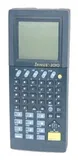
Chapter 1, Getting Started, of Intermec's JANUS 2010 hand-held computer user's manual. It introduces the J2010, a PC-compatible DOS bar code reader and computer, its features, accessories (communications dock, battery charger, optical link adapter, COM2 adapter, PC cards) and models, including RF and PCMCIA versions. It then walks through first use: unpacking, charging and installing the NiCad battery pack, the first boot, setting the time and date, attaching a wand or scanner and checking that the reader works.
From the manual · read page by page
Key facts from this manual
Each line names its page in the PDF.
This is Getting Started, chapter 1 of the JANUS 2010 Hand-Held Computer User's Manual (4MB). It introduces the JANUS 2010 reader family, including the J2010 with 900 MHz RF back, the JG2010 with 2.4 GHz radio and the J2010 with a PCMCIA back, lists the accessories, and walks through first-time setup.
- What it is
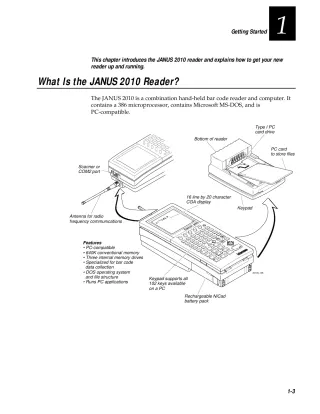
- Hand-held bar code reader and computer with a 386 microprocessor and MS-DOS, PC-compatible p. 3
- Memory
- 640K conventional memory; three internal memory drives p. 3
- Display
- 16 line by 20 character CGA display p. 3
- Keypad
- Supports all 102 PC keys; alphanumeric in English, French, German, Italian, Spanish; large numeric in English p. 3, 5
- Model versions
- Basic J2010 with Type I PC card drive; J2010 with 900 MHz RF back or JG2010 with 2.4 GHz radio; J2010 with PCMCIA back (Type II drive) p. 5
- Battery
- Rechargeable NiCad battery pack, plus a lithium bridge battery p. 3, 9
- Charge times
- About 2 hours in the dock slot or battery charger; about 15 hours inside the reader (turned off) on external power p. 7
- Communications dock
- JD2010: two serial ports, charges the reader's pack and a spare p. 4
- Battery charger
- JZ2010: charges up to four NiCad packs at once p. 4
- Optical link adapter
- JL2010: RS-232 serial link to a host; can power the reader and charge the pack p. 4
- COM2 adapter
- Part No. 061799, uses the scanner port as COM2 p. 4
- Wands and scanners
- 1260-, 1270- and 1280-series wands; 146x CCD; 1500 infrared; 151x, 1545, 155x laser; 1354 and 1355 badge scanners p. 11
- Terminal emulation
- Optional TE software and keypads to emulate an IBM 3270 or 5250 terminal p. 5
- PC cards
- Certified Type I and Type II memory, modem and network cards; memory cards add disk space, not executable memory p. 4
What this manual walks you through
- Unpacking and first-time setup steps p. 6
- Charging the NiCad battery pack four ways p. 7
- Installing the battery pack p. 8
- Turning on the reader for the first time p. 9
- Setting the time and date from the DOS prompt p. 10
- Attaching a wand or scanner p. 11
- Checking that the reader works p. 12
- Turning the reader on and off with Suspend/Resume p. 13
Good to know
- The battery pack ships completely discharged and must be charged before use. p. 7
- Attaching a wand or scanner while the reader is on could damage the reader or the input device. p. 11
- The battery pack locks must be closed to use the reader. p. 8
- During first start-up, if no key is pressed within 60 seconds of a screen, the reader shuts off. p. 9
Questions this manual answers
How long does a JANUS 2010 battery take to charge?
About 2 hours in the communications dock slot or battery charger, or about 15 hours inside the reader (turned off) on external power. p. 7
Which scanners work with the Intermec JANUS 2010?
1260-, 1270- and 1280-series wands, 146x CCD scanners, 1500 infrared, 151x, 1545 and 155x laser scanners, and 1354 and 1355 badge scanners. p. 11
What is the part number of the JANUS 2010 COM2 adapter?
Part No. 061799; it lets the scanner port serve as COM2. p. 4
What is the difference between the J2010 and the JG2010?
The JG2010 adds a 2.4 GHz radio for RF network communication; the basic J2010 uses a serial port for data communications. p. 5
Does turning the JANUS 2010 off reboot it?
No. The Suspend/Resume key puts it in Suspend mode and it resumes exactly where it was. p. 13
The whole text · 2 parts
Read the manual here as text
Its text as extracted from the PDF, unedited, in parts; each page opens the PDF at that page.
The file