


Manual · Intermec
Intermec 2420 and 2425 Standard Scanner
Manual2 pagesPDF 122 KB
Both pages are below, each with its text.
Filed with · 2 models
Also filed with these models on the old site


From the manual · read page by page
Key facts from this manual
Each line names its page in the PDF.
A two-page instruction sheet (P/N 064220-002) for the standard range scan module, an add-on that gives the Trakker Antares 2420 and 2425 terminals bar code scanning. It shows how to fit the module to the terminal and how to scan a bar code with it.
- Device
- Standard range scan module, an accessory that adds bar code scanning to the terminal p. 1
- Fits
- Trakker Antares 2420 and 2425 terminals p. 1
- Mounting
- Guide pins and a connector seat into the terminal; secured with screws in 3 places p. 1
- Laser power
- Automatic Laser Power Control adjusts the beam brightness p. 2
- Good-read signal
- Green LEDs above the keypad light for two seconds, the terminal beeps and the laser turns off p. 2
- Sheet part number
- P/N 064220-002 (1996-1997) p. 2
What this manual walks you through
- Installing the scan module on the terminal p. 1
- Scanning a bar code with the standard range scan module p. 2
Good to know
- Take static electricity precautions before installing the module. p. 1
- Do not force the module into the connector; doing so can damage the module connector, the terminal connector, or both. p. 1
- On a reflective label or when scanning straight on, the beam may dim or vanish for a moment but still reads. p. 2
Questions this manual answers
Which terminals take the standard range scan module?
The sheet says it fits the Trakker Antares 2420 and 2425 data collection terminals. p. 1
How do I install the 2420 scan module?
With the terminal off and face down, remove the existing module, line up the guides, press the new module gently onto the connector, and secure it. p. 1
How do I know the 2425 read a bar code?
The green LEDs at the top of the keypad light for two seconds, the terminal beeps, and the laser beam turns off. p. 2
Why does the scanner beam dim on shiny labels?
Automatic Laser Power Control dims the beam on reflective surfaces or straight-on scans, but the scanner can still read the code. p. 2
The file
Size and text
Every page · 2
Read it here
Each page as it is printed, and its words beside it, so a phone can search and copy them.
Page1of 2
Open in the PDF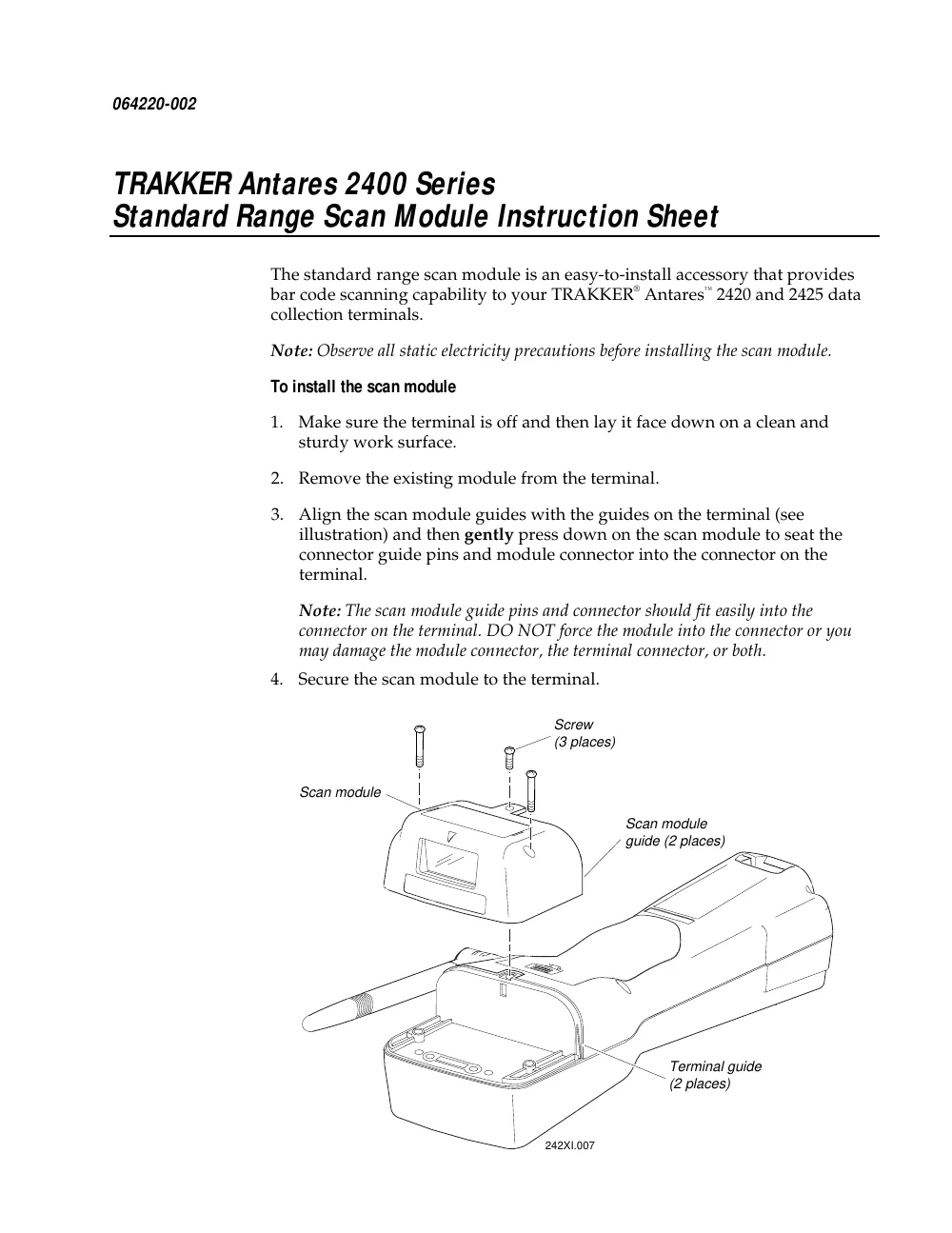
The text of page 1, from the PDF itself
064220-002BarCodeFont1234
TRAKKER Antares 2400 Series Standard Range Scan Module Instruction Sheet The standard range scan module is an easy-to-install accessory that provides bar code scanning capability to your TRAKKER® Antares™ 2420 and 2425 data collection terminals. Note: Observe all static electricity precautions before installing the scan module. To install the scan module 1. Make sure the terminal is off and then lay it face down on a clean and sturdy work surface. 2. Remove the existing module from the terminal. 3. Align the scan module guides with the guides on the terminal (see illustration) and then gently press down on the scan module to seat the connector guide pins and module connector into the connector on the terminal. Note: The scan module guide pins and connector should fit easily into the connector on the terminal. DO NOT force the module into the connector or you may damage the module connector, the terminal connector, or both. 4. Secure the scan module to the terminal. Screw (3 places)
Scan module Scan module guide (2 places)
Terminal guide (2 places)
242XI.007
Page2of 2
Open in the PDF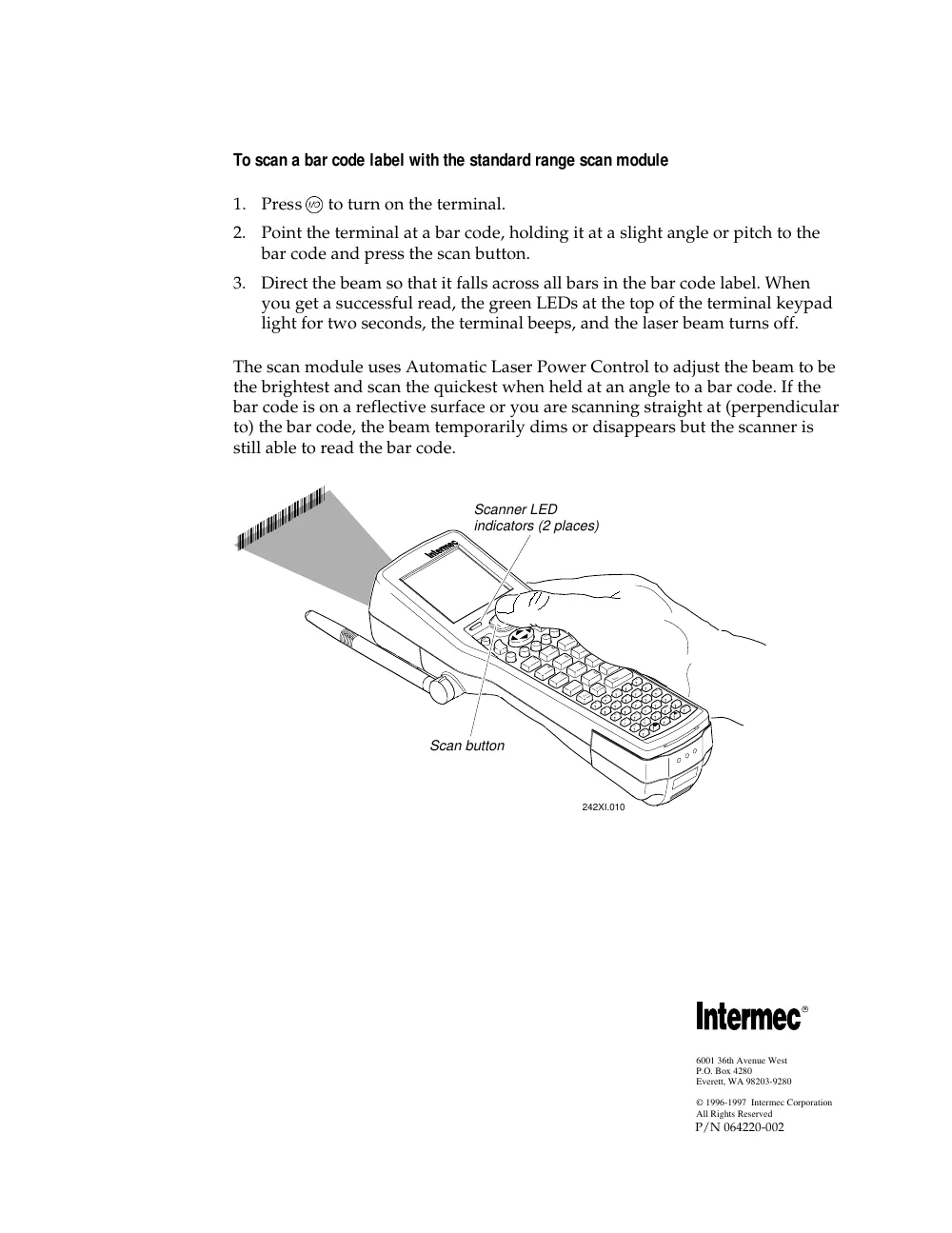
The text of page 2, from the PDF itself
0123456789 To scan a bar code label with the standard range scan module
L to turn on the terminal.
1. Press
2. Point the terminal at a bar code, holding it at a slight angle or pitch to the bar code and press the scan button. 3. Direct the beam so that it falls across all bars in the bar code label. When you get a successful read, the green LEDs at the top of the terminal keypad light for two seconds, the terminal beeps, and the laser beam turns off. The scan module uses Automatic Laser Power Control to adjust the beam to be the brightest and scan the quickest when held at an angle to a bar code. If the bar code is on a reflective surface or you are scanning straight at (perpendicular to) the bar code, the beam temporarily dims or disappears but the scanner is still able to read the bar code.
Scanner LED indicators (2 places)
F59I/OF46F38F21042753F1erEnt Fn FnLE JDR CAOILXRPEscWQKYSMG FTNHBVbTaU ZScan button242XI.010R
6001 36th Avenue West P.O. Box 4280 Everett, WA 98203-9280 © 1996-1997 Intermec Corporation All Rights Reserved
P/N 064220-002*B02418*





