


Manual · Intermec
Escáner estándar Intermec 2420 y 2425
Manual2 páginasPDF 122 KB
Las dos páginas están más abajo, cada una con su texto.
Archivado con · 2 modelos
También archivado con estos modelos en el sitio anterior


Del manual · leído página por página
Datos clave de este manual
Cada línea indica su página en el PDF.
Una hoja de instrucciones de dos páginas (P/N 064220-002) del módulo de escaneo de alcance estándar, un accesorio que da a las terminales Trakker Antares 2420 y 2425 la capacidad de escanear códigos de barras. Muestra cómo instalar el módulo en la terminal y cómo escanear un código de barras con él.
- Dispositivo
- Módulo de escaneo de alcance estándar, un accesorio que agrega el escaneo de códigos de barras a la terminal pág. 1
- Compatible con
- Terminales Trakker Antares 2420 y 2425 pág. 1
- Montaje
- Pasadores guía y un conector que encajan en la terminal; se fija con tornillos en 3 puntos pág. 1
- Potencia del láser
- El control automático de potencia del láser (Automatic Laser Power Control) ajusta el brillo del haz pág. 2
- Señal de lectura correcta
- Los LED verdes sobre el teclado se encienden durante dos segundos, la terminal emite un pitido y el láser se apaga pág. 2
- Número de pieza de la hoja
- P/N 064220-002 (1996-1997) pág. 2
Lo que este manual le explica
- Instalar el módulo de escaneo en la terminal pág. 1
- Escanear un código de barras con el módulo de escaneo de alcance estándar pág. 2
Conviene saber
- Tome precauciones contra la electricidad estática antes de instalar el módulo. pág. 1
- No fuerce el módulo en el conector; hacerlo puede dañar el conector del módulo, el conector de la terminal o ambos. pág. 1
- Con una etiqueta reflectante o al escanear de frente, el haz puede atenuarse o desaparecer un momento, pero aun así lee. pág. 2
Preguntas que responde este manual
¿Qué terminales admiten el módulo de escaneo de alcance estándar?
La hoja dice que es compatible con las terminales de recolección de datos Trakker Antares 2420 y 2425. pág. 1
¿Cómo instalo el módulo de escaneo de la 2420?
Con la terminal apagada y boca abajo, retire el módulo existente, alinee las guías, presione el módulo nuevo con suavidad sobre el conector y fíjelo. pág. 1
¿Cómo sé que la 2425 leyó un código de barras?
Los LED verdes de la parte superior del teclado se encienden durante dos segundos, la terminal emite un pitido y el haz láser se apaga. pág. 2
¿Por qué el haz del escáner se atenúa en etiquetas brillantes?
El control automático de potencia del láser (Automatic Laser Power Control) atenúa el haz en superficies reflectantes o al escanear de frente, pero el escáner aún puede leer el código. pág. 2
El archivo
Tamaño y texto
Todas las páginas · 2
Léalo aquí
Cada página tal como está impresa, y su texto al lado, para que en un teléfono se pueda buscar y copiar.
Página1de 2
Abrir en el PDF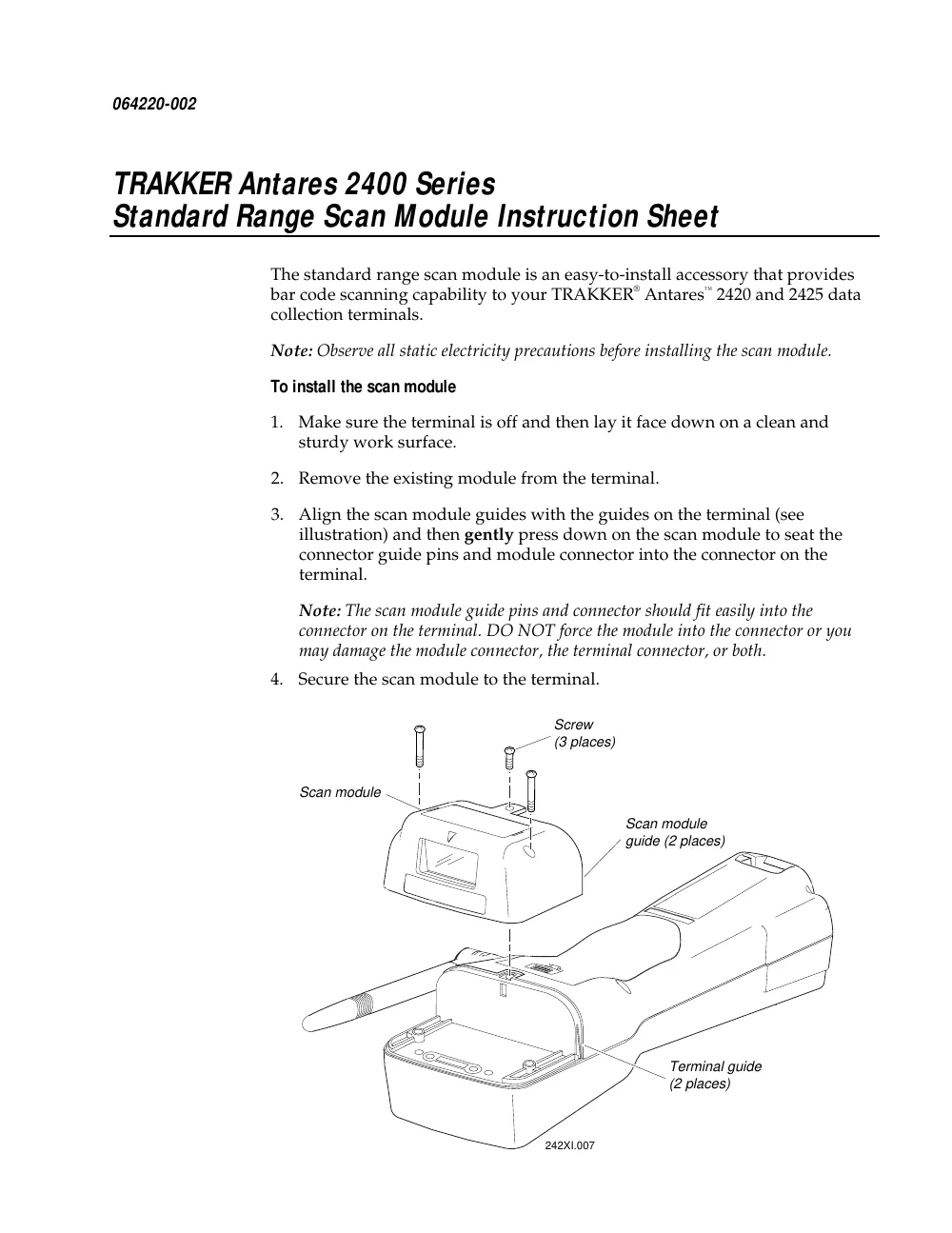
El texto de la página 1, del propio PDF
064220-002BarCodeFont1234
TRAKKER Antares 2400 Series Standard Range Scan Module Instruction Sheet The standard range scan module is an easy-to-install accessory that provides bar code scanning capability to your TRAKKER® Antares™ 2420 and 2425 data collection terminals. Note: Observe all static electricity precautions before installing the scan module. To install the scan module 1. Make sure the terminal is off and then lay it face down on a clean and sturdy work surface. 2. Remove the existing module from the terminal. 3. Align the scan module guides with the guides on the terminal (see illustration) and then gently press down on the scan module to seat the connector guide pins and module connector into the connector on the terminal. Note: The scan module guide pins and connector should fit easily into the connector on the terminal. DO NOT force the module into the connector or you may damage the module connector, the terminal connector, or both. 4. Secure the scan module to the terminal. Screw (3 places)
Scan module Scan module guide (2 places)
Terminal guide (2 places)
242XI.007
Página2de 2
Abrir en el PDF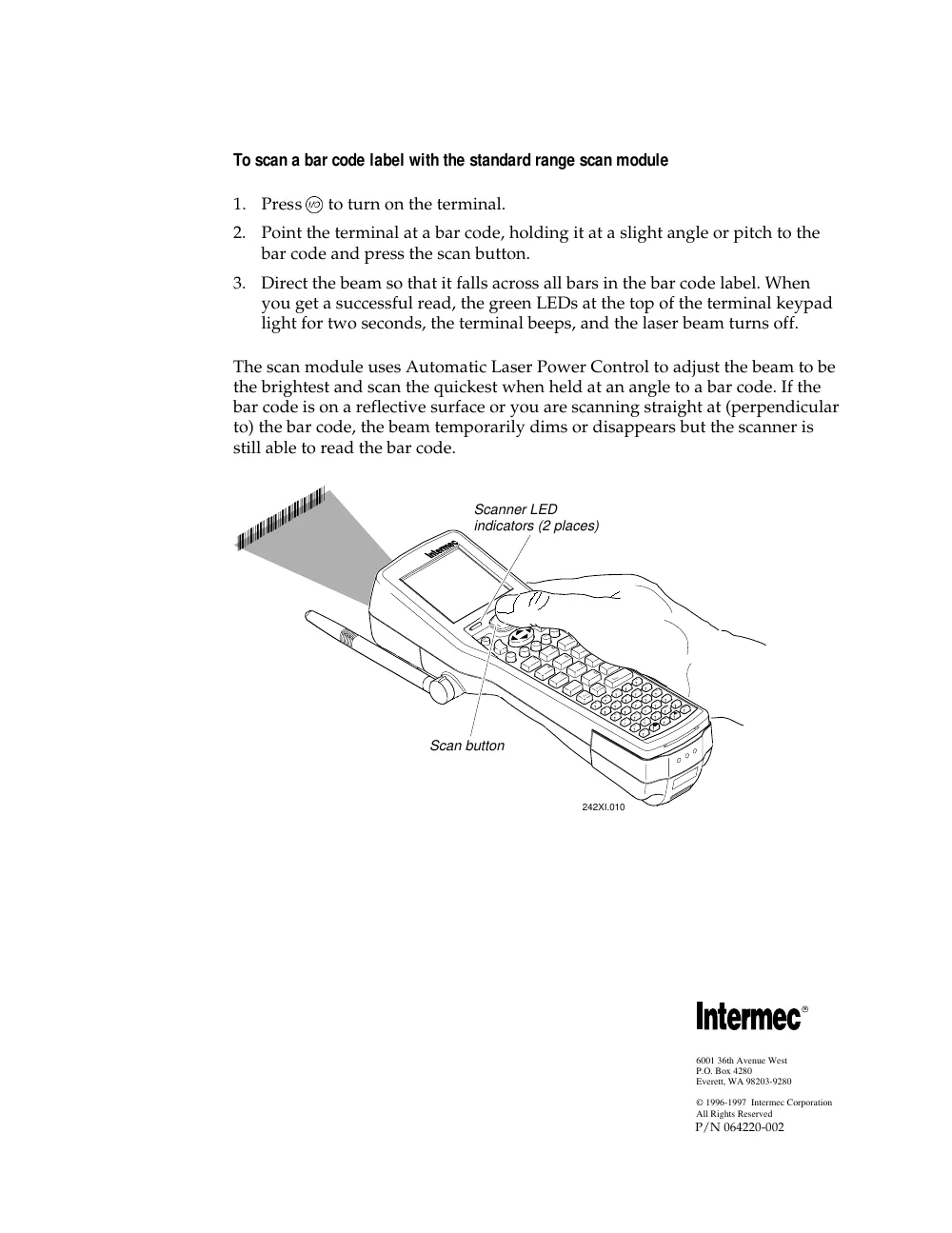
El texto de la página 2, del propio PDF
0123456789 To scan a bar code label with the standard range scan module
L to turn on the terminal.
1. Press
2. Point the terminal at a bar code, holding it at a slight angle or pitch to the bar code and press the scan button. 3. Direct the beam so that it falls across all bars in the bar code label. When you get a successful read, the green LEDs at the top of the terminal keypad light for two seconds, the terminal beeps, and the laser beam turns off. The scan module uses Automatic Laser Power Control to adjust the beam to be the brightest and scan the quickest when held at an angle to a bar code. If the bar code is on a reflective surface or you are scanning straight at (perpendicular to) the bar code, the beam temporarily dims or disappears but the scanner is still able to read the bar code.
Scanner LED indicators (2 places)
F59I/OF46F38F21042753F1erEnt Fn FnLE JDR CAOILXRPEscWQKYSMG FTNHBVbTaU ZScan button242XI.010R
6001 36th Avenue West P.O. Box 4280 Everett, WA 98203-9280 © 1996-1997 Intermec Corporation All Rights Reserved
P/N 064220-002*B02418*





