


Manual · Intermec
Intermec PDF 417 Scanner
Manual2 pagesPDF 302 KB
Both pages are below, each with its text.
Covers · 2 models
The models it covers


From the manual · read page by page
Key facts from this manual
Each line names its page in the PDF.
Intermec's instruction sheet for the PDF 417 scan module accessory for Trakker Antares 2420 and 2425 terminals. It shows how to swap in the scan module, set the terminal's scanner selection, enable PDF 417 with printed bar codes, and scan PDF 417 labels using a sample code.
- What it is
- PDF 417 scan module accessory for the 2420 and 2425 p. 2
- Firmware needed
- Terminal firmware version 6.20 or later p. 2
- Scanner selection
- Set to Intermec 1551E in the Terminal Menu p. 2
- Enable PDF 417 code
- *$+CQ1*, then save with *.+1* p. 2
- Mounting
- Replaces the existing module; held by 3 screws p. 2
- Good read signal
- Scanner LEDs green for 2 seconds, a beep, and the laser turns off p. 1
- Aiming aid
- An audible crackle when range and angle are right p. 1
- Sheet part number
- Part No. 071975-001 p. 1
What this manual walks you through
- Installing the scan module p. 2
- Configuring the terminal and enabling PDF 417 p. 2
- Scanning PDF 417 bar codes with a sample label p. 1
Good to know
- Do not force the module into the connector; it can damage the module, the terminal or both. p. 2
- Static electricity precautions apply when installing the module. p. 2
- The terminal must be off and face down on a clean, sturdy surface for installation. p. 2
Questions this manual answers
What firmware does the Intermec 2420 need to read PDF 417?
The PDF 417 scan module needs terminal firmware version 6.20 or later. p. 2
What scanner setting do I use for the 2420 PDF 417 scan module?
Set Scanner Selection to Intermec 1551E, save, then scan the Enable PDF 417 and Save Configuration bar codes. p. 2
How do I scan a PDF 417 code with a Trakker Antares?
Aim slightly above or below the label, press the scan button and sweep the beam steadily over it; the LEDs turn green on a good read. p. 1
The file
Size and text
Every page · 2
Read it here
Each page as it is printed, and its words beside it, so a phone can search and copy them.
Page1of 2
Open in the PDF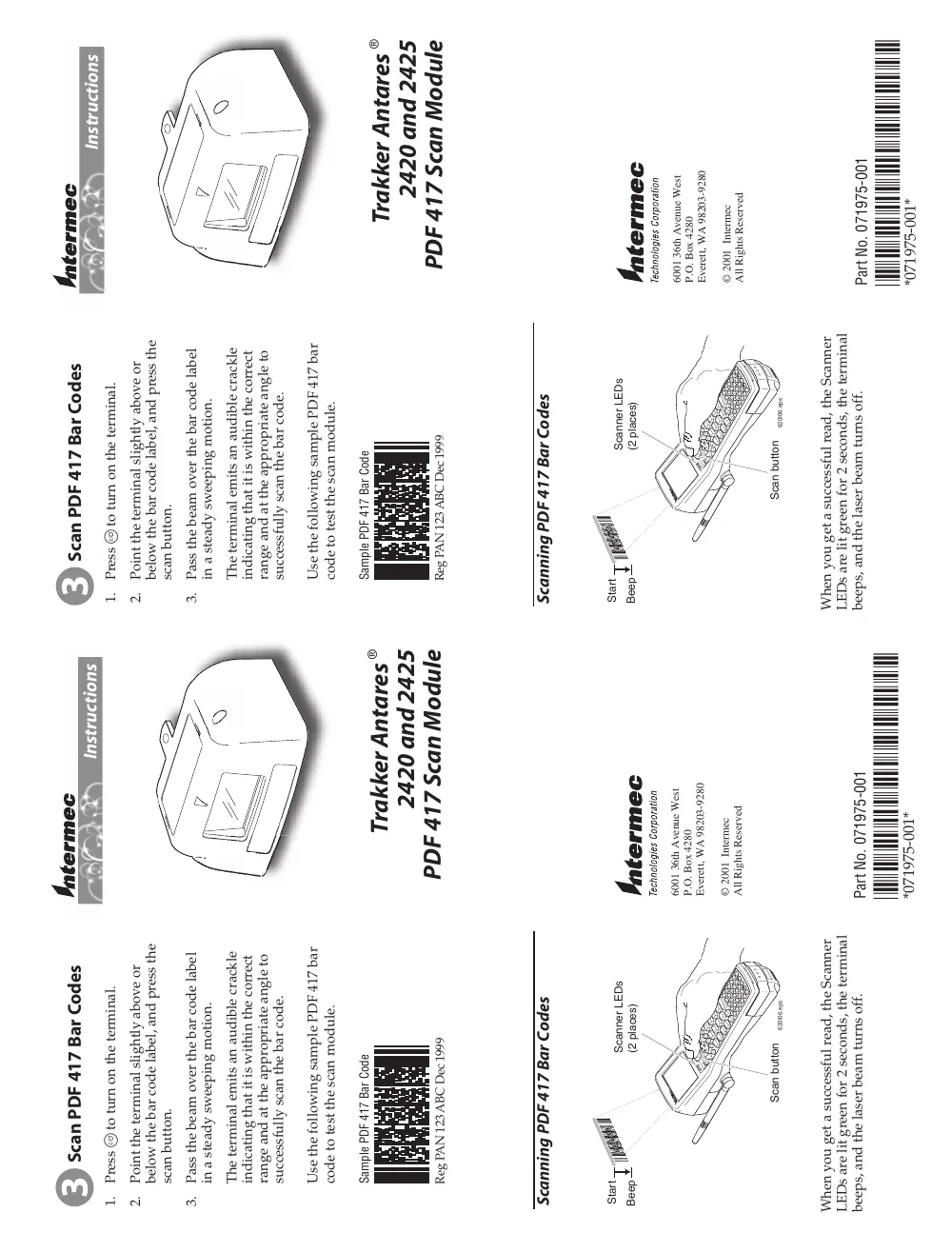
The text of page 1, from the PDF itself
2524RK EKT R AAN TARESF2F3F4FnLAFnRBFKGCer Ent620I06.eps9PLHDUQMIENRVZJOSWTXTabYEsc
When you get a successful read, the Scanner LEDs are lit green for 2 seconds, the terminal beeps, and the laser beam turns off.
Scan buttonF184I/O7F562*071975-001**071975-001*Part No. 071975-001
© 2001 Intermec All Rights Reserved
SI/OF1F2F3F4F5AFnRBF KGCer Ent620I06.epsFnLPLHDUQMIENRVZJWSOTabXT
Scanner LEDs (2 places)
Scan buttonAN TAY Esc
When you get a successful read, the Scanner LEDs are lit green for 2 seconds, the terminal beeps, and the laser beam turns off.
BeepStart24 2 RE 5 R K E K R ABeep
Scanner LEDs (2 places)
9StartT
Scanning PDF 417 Bar Codes
7
Scanning PDF 417 Bar Codes
3
0
Reg PAN 123 ABC Dec 1999
8 4
Reg PAN 123 ABC Dec 1999
6001 36th Avenue West P.O. Box 4280 Everett, WA 98203-9280
Use the following sample PDF 417 bar code to test the scan module.
Use the following sample PDF 417 bar code to test the scan module.
5
1
Sample PDF 417 Bar Code
The terminal emits an audible crackle indicating that it is within the correct range and at the appropriate angle to successfully scan the bar code.
The terminal emits an audible crackle indicating that it is within the correct range and at the appropriate angle to successfully scan the bar code.
6 2
Trakker Antares ® 2420 and 2425 PDF 417 Scan Module
3. Pass the beam over the bar code label in a steady sweeping motion.
3. Pass the beam over the bar code label in a steady sweeping motion.
3 0
Sample PDF 417 Bar Code
2. Point the terminal slightly above or below the bar code label, and press the scan button.
2. Point the terminal slightly above or below the bar code label, and press the scan button.
Scan PDF 417 Bar Codes 1. Press q to turn on the terminal.
Instructions
1. Press q to turn on the terminal.
Scan PDF 417 Bar Codes5 1*071975-001**071975-001*Part No. 071975-001
© 2001 Intermec All Rights Reserved
6001 36th Avenue West P.O. Box 4280 Everett, WA 98203-9280
Trakker Antares ® 2420 and 2425 PDF 417 Scan Module
Instructions
Page2of 2
Open in the PDF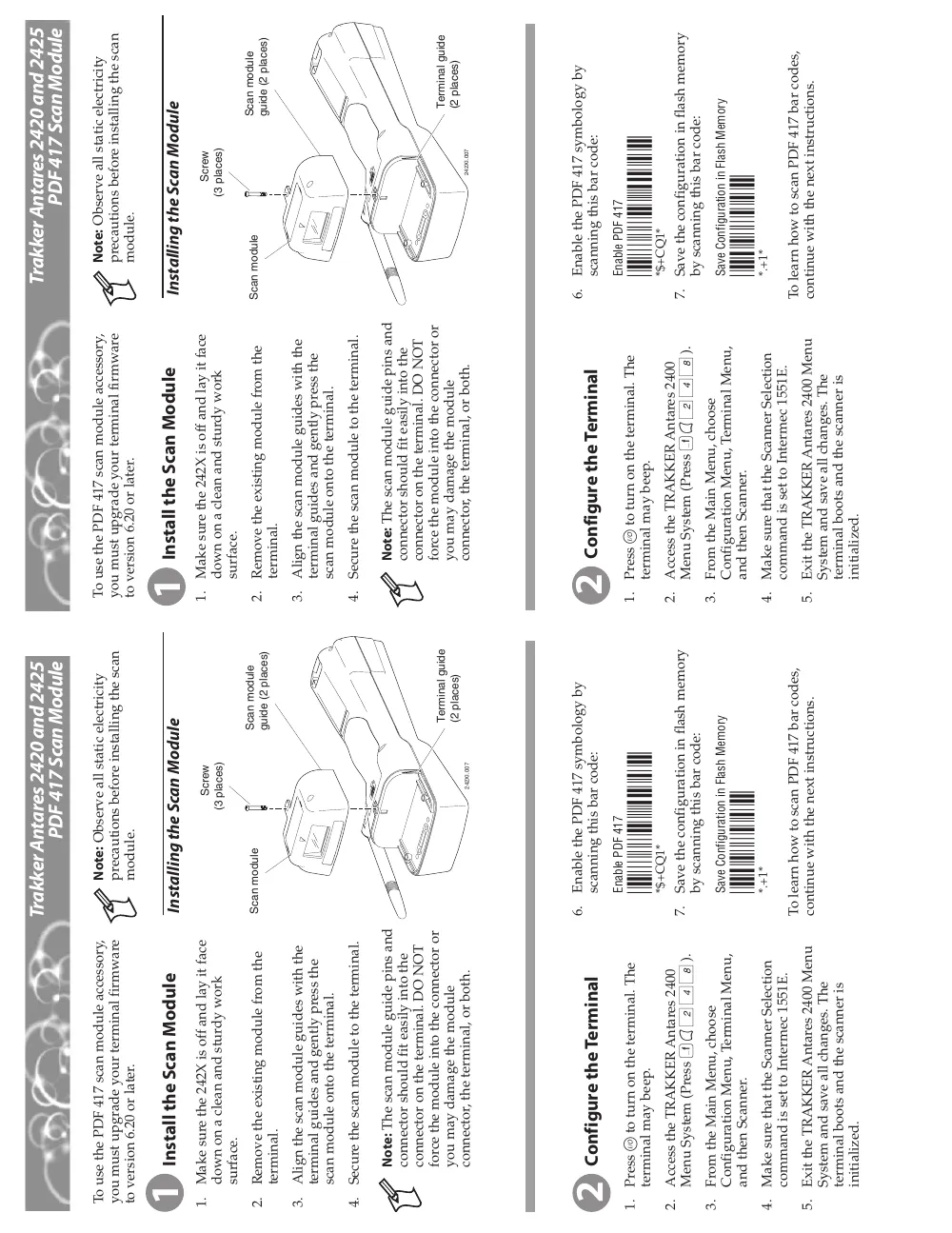
The text of page 2, from the PDF itself
5. Exit the TRAKKER Antares 2400 Menu System and save all changes. The terminal boots and the scanner is initialized.
4. Make sure that the Scanner Selection command is set to Intermec 1551E.
3. From the Main Menu, choose Configuration Menu, Terminal Menu, and then Scanner.
2. Access the TRAKKER Antares 2400 Menu System (Press ) y 2 4 8 ).
1. Press q to turn on the terminal. The terminal may beep.
2 Configure the Terminal
Note: The scan module guide pins and connector should fit easily into the connector on the terminal. DO NOT force the module into the connector or you may damage the module connector, the terminal, or both. 242XI.007
To learn how to scan PDF 417 bar codes, continue with the next instructions.
*.+1* *.+1*
Save Configuration in Flash Memory
7. Save the configuration in flash memory by scanning this bar code:
*$+CQ1* *$+CQ1*
Enable PDF 417
6. Enable the PDF 417 symbology by scanning this bar code:
Terminal guide (2 places)
5. Exit the TRAKKER Antares 2400 Menu System and save all changes. The terminal boots and the scanner is initialized.
4. Make sure that the Scanner Selection command is set to Intermec 1551E.
3. From the Main Menu, choose Configuration Menu, Terminal Menu, and then Scanner.
2. Access the TRAKKER Antares 2400 Menu System (Press ) y 2 4 8 ).
1. Press q to turn on the terminal. The terminal may beep.
2 Configure the Terminal
Note: The scan module guide pins and connector should fit easily into the connector on the terminal. DO NOT force the module into the connector or you may damage the module connector, the terminal, or both.
4. Secure the scan module to the terminal.
2. Remove the existing module from the terminal.
4. Secure the scan module to the terminal.
Scan module guide (2 places)
1. Make sure the 242X is off and lay it face down on a clean and sturdy work surface.
1 Install the Scan Module
To use the PDF 417 scan module accessory, you must upgrade your terminal firmware to version 6.20 or later.
3. Align the scan module guides with the terminal guides and gently press the scan module onto the terminal.
Scan module
Screw (3 places)
Installing the Scan Module
Note: Observe all static electricity precautions before installing the scan module.
3. Align the scan module guides with the terminal guides and gently press the scan module onto the terminal.
2. Remove the existing module from the terminal.
1. Make sure the 242X is off and lay it face down on a clean and sturdy work surface.
1 Install the Scan Module
To use the PDF 417 scan module accessory, you must upgrade your terminal firmware to version 6.20 or later.
Trakker Antares 2420 and 2425 PDF 417 Scan Module
242XI.007
Terminal guide (2 places)
Scan module guide (2 places)
To learn how to scan PDF 417 bar codes, continue with the next instructions.
*.+1* *.+1*
Save Configuration in Flash Memory
7. Save the configuration in flash memory by scanning this bar code:
*$+CQ1* *$+CQ1*
Enable PDF 417
6. Enable the PDF 417 symbology by scanning this bar code:
Scan module
Screw (3 places)
Installing the Scan Module
Note: Observe all static electricity precautions before installing the scan module.
Trakker Antares 2420 and 2425 PDF 417 Scan Module





