


Manual · Intermec
Intermec 2420 and 2425 Handle Assembly
Manual2 pagesPDF 114 KB
Both pages are below, each with its text.
Covers · 2 models
The models it covers


From the manual · read page by page
Key facts from this manual
Each line names its page in the PDF.
Intermec's instruction sheet for the TRAKKER Antares 242X handle, part number 069028, an accessory for the 2420 and 2425 terminals (the sheet also names the 2425CS). It shows how to latch the handle on and adjust it, and how to check that the terminal's scan module is one the handle works with.
- Handle part number
- 069028 p. 1
- Compatible scan modules
- 069223 Standard Range, 069224 Long Range, 069225 High Visibility, 069226 High Density p. 1
- Mounting
- Two latches lock it to the terminal; two latch adjustment screws set the fit p. 1
- Module part number
- Printed on the underside of the scan module p. 1
- Sheet part number
- Part No. 069586-001 p. 2
What this manual walks you through
- Attaching the handle to the terminal p. 1
- Tightening or loosening the latch adjustment screws p. 1
- Checking the scan module part number p. 1
Good to know
- Older 2420 or 2425 terminals may have a scan module the handle does not work with. p. 1
- The handle may loosen with repeated use and need the latch screws readjusted. p. 1
- The sheet says the T2425CS scan modules are compatible and need no check. p. 1
Questions this manual answers
What is the part number of the Intermec 2420 handle?
The 242X handle is part number 069028. p. 1
Why does the 2420 pistol handle not fit my terminal?
The terminal may have an older, incompatible scan module; the handle works only with scan modules 069223, 069224, 069225 and 069226. p. 1
How do I tighten a loose 2420 handle?
Unlatch and remove it, turn the latch adjustment screws 1/4 turn clockwise, and reattach until it is secure. p. 1
The file
Size and text
Every page · 2
Read it here
Each page as it is printed, and its words beside it, so a phone can search and copy them.
Page1of 2
Open in the PDF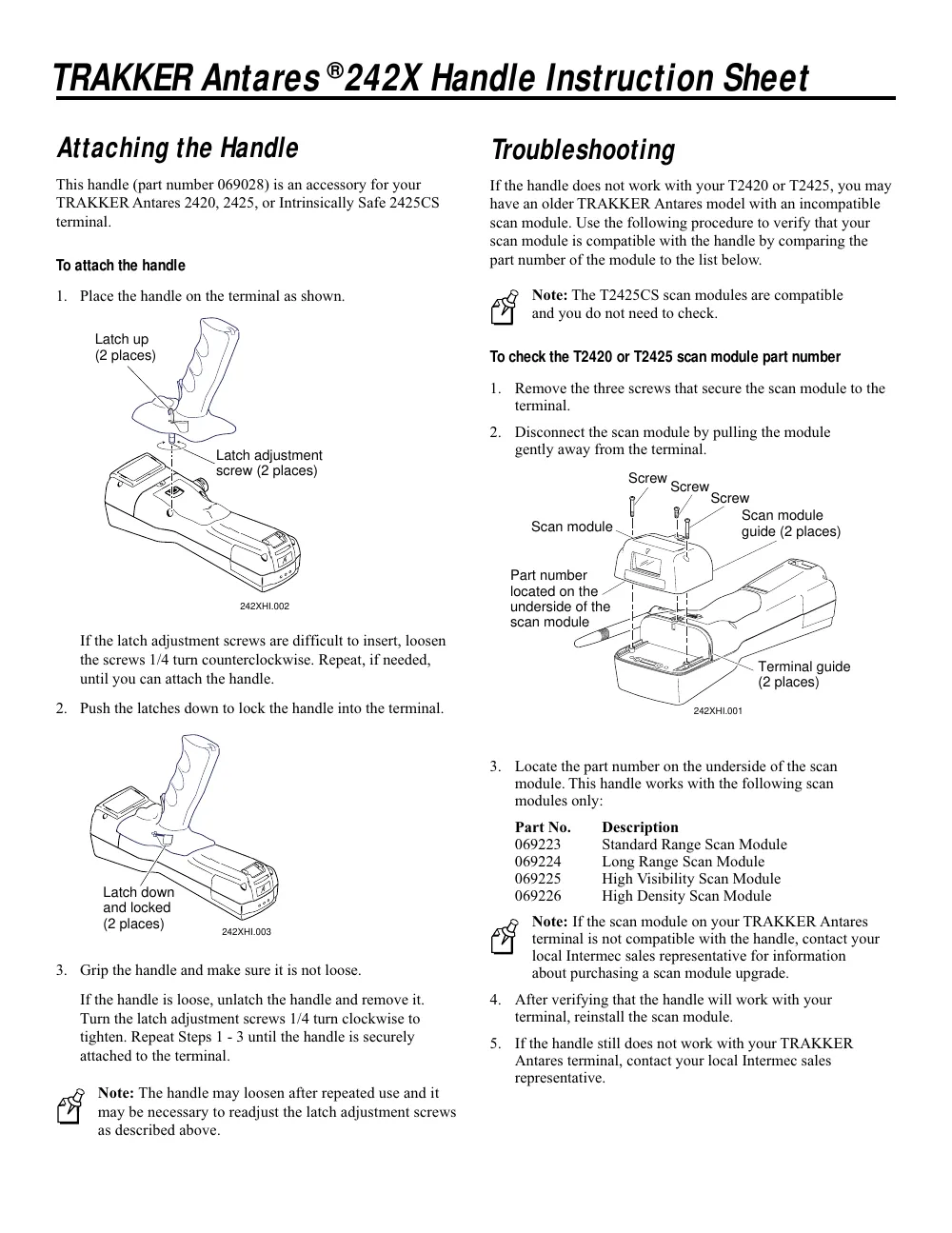
The text of page 1, from the PDF itself
TRAKKER Antares ®242X Handle Instruction Sheet Attaching the Handle
Troubleshooting
This handle (part number 069028) is an accessory for your TRAKKER Antares 2420, 2425, or Intrinsically Safe 2425CS terminal.
If the handle does not work with your T2420 or T2425, you may have an older TRAKKER Antares model with an incompatible scan module. Use the following procedure to verify that your scan module is compatible with the handle by comparing the part number of the module to the list below.
To attach the handle 1. Place the handle on the terminal as shown. Latch up (2 places)
Note: The T2425CS scan modules are compatible and you do not need to check. To check the T2420 or T2425 scan module part number 1. Remove the three screws that secure the scan module to the terminal.
Latch adjustment screw (2 places)
2. Disconnect the scan module by pulling the module gently away from the terminal. Screw
Scan module242XHI.002Screw
Screw Scan module guide (2 places)
Part number located on the underside of the scan module
If the latch adjustment screws are difficult to insert, loosen the screws 1/4 turn counterclockwise. Repeat, if needed, until you can attach the handle.
Terminal guide (2 places)
2. Push the latches down to lock the handle into the terminal.
242XHI.001
3. Locate the part number on the underside of the scan module. This handle works with the following scan modules only:
Latch down and locked (2 places)
Part No. 069223 069224 069225 069226 242XHI.003
3. Grip the handle and make sure it is not loose. If the handle is loose, unlatch the handle and remove it. Turn the latch adjustment screws 1/4 turn clockwise to tighten. Repeat Steps 1 - 3 until the handle is securely attached to the terminal. Note: The handle may loosen after repeated use and it may be necessary to readjust the latch adjustment screws as described above.
Description Standard Range Scan Module Long Range Scan Module High Visibility Scan Module High Density Scan Module
Note: If the scan module on your TRAKKER Antares terminal is not compatible with the handle, contact your local Intermec sales representative for information about purchasing a scan module upgrade. 4. After verifying that the handle will work with your terminal, reinstall the scan module. 5. If the handle still does not work with your TRAKKER Antares terminal, contact your local Intermec sales representative.
Page2of 2
Open in the PDF
The text of page 2, from the PDF itself
Part No. 069586-001
*069586-001* *069586-001*
6001 36th Avenue West P.O. Box 4280 Everett, WA 98203-9280 © 1999 Intermec All Rights Reserved





