


Manual · Intermec
Montaje del mango del Intermec 2420 y 2425
Manual2 páginasPDF 114 KB
Las dos páginas están más abajo, cada una con su texto.
Abarca · 2 modelos
Los modelos que abarca


Del manual · leído página por página
Datos clave de este manual
Cada línea indica su página en el PDF.
La hoja de instrucciones de Intermec para el mango TRAKKER Antares 242X, número de pieza 069028, un accesorio para las terminales 2420 y 2425 (la hoja también menciona la 2425CS). Muestra cómo enganchar el mango y ajustarlo, y cómo comprobar que el módulo de escaneo de la terminal sea uno con el que funciona el mango.
- Número de pieza del mango
- 069028 pág. 1
- Módulos de escaneo compatibles
- 069223 de alcance estándar, 069224 de largo alcance, 069225 de alta visibilidad, 069226 de alta densidad pág. 1
- Montaje
- Dos pestillos lo fijan a la terminal; dos tornillos de ajuste de los pestillos regulan el ajuste pág. 1
- Número de pieza del módulo
- Impreso en la parte inferior del módulo de escaneo pág. 1
- Número de pieza de la hoja
- N.º de pieza 069586-001 pág. 2
Lo que este manual le explica
- Colocar el mango en la terminal pág. 1
- Apretar o aflojar los tornillos de ajuste de los pestillos pág. 1
- Comprobar el número de pieza del módulo de escaneo pág. 1
Conviene saber
- Las terminales 2420 o 2425 más antiguas pueden tener un módulo de escaneo con el que el mango no funciona. pág. 1
- El mango puede aflojarse con el uso repetido y requerir un nuevo ajuste de los tornillos de los pestillos. pág. 1
- La hoja dice que los módulos de escaneo de la T2425CS son compatibles y no requieren comprobación. pág. 1
Preguntas que responde este manual
¿Cuál es el número de pieza del mango de la Intermec 2420?
El mango 242X tiene el número de pieza 069028. pág. 1
¿Por qué el mango tipo pistola de la 2420 no se ajusta a mi terminal?
Es posible que la terminal tenga un módulo de escaneo antiguo e incompatible; el mango solo funciona con los módulos de escaneo 069223, 069224, 069225 y 069226. pág. 1
¿Cómo aprieto un mango de la 2420 que está flojo?
Desengánchelo y retírelo, gire los tornillos de ajuste de los pestillos 1/4 de vuelta en el sentido de las manecillas del reloj y vuelva a colocarlo hasta que quede firme. pág. 1
El archivo
Tamaño y texto
Todas las páginas · 2
Léalo aquí
Cada página tal como está impresa, y su texto al lado, para que en un teléfono se pueda buscar y copiar.
Página1de 2
Abrir en el PDF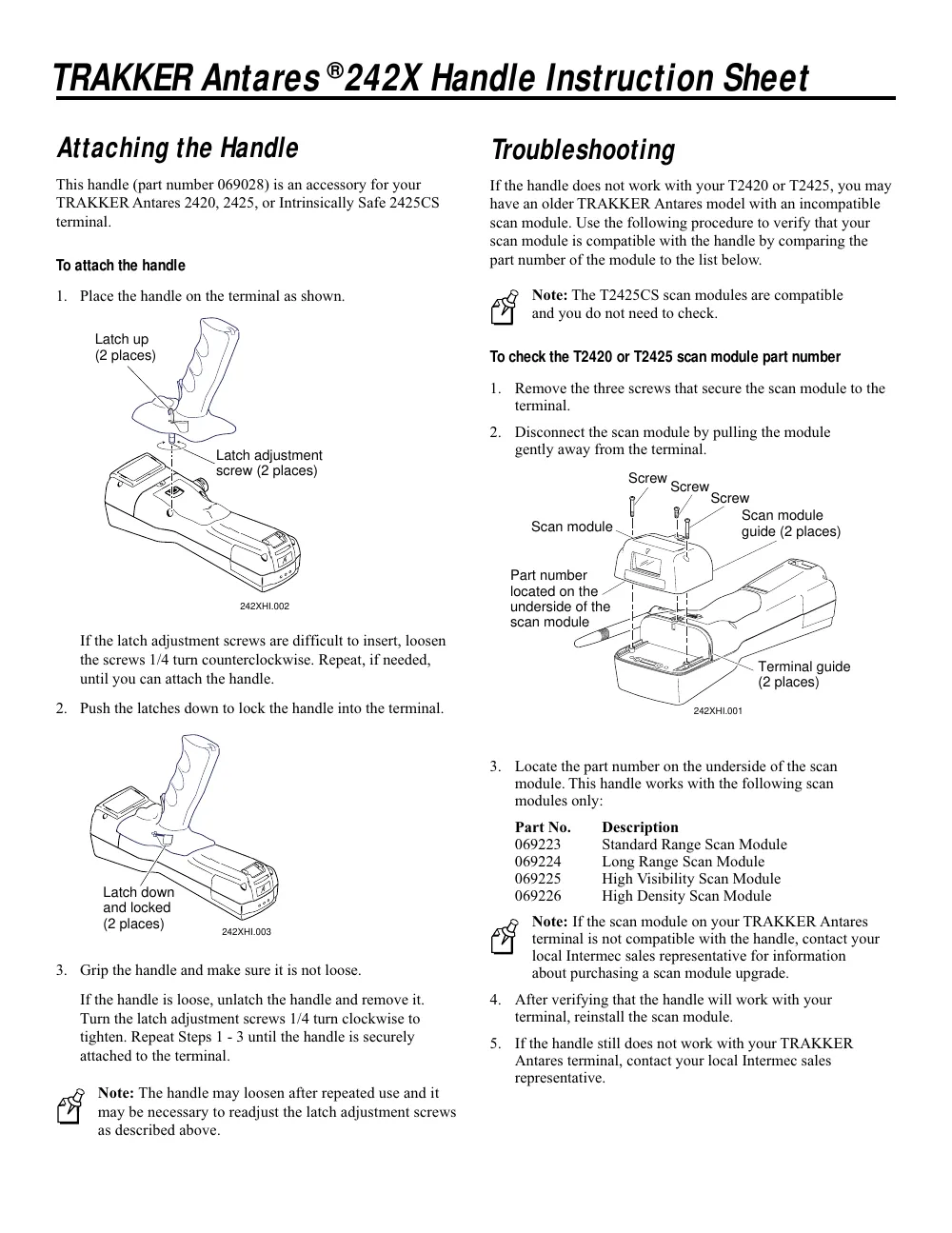
El texto de la página 1, del propio PDF
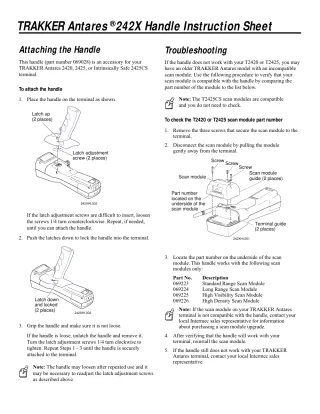
TRAKKER Antares ®242X Handle Instruction Sheet Attaching the Handle
Troubleshooting
This handle (part number 069028) is an accessory for your TRAKKER Antares 2420, 2425, or Intrinsically Safe 2425CS terminal.
If the handle does not work with your T2420 or T2425, you may have an older TRAKKER Antares model with an incompatible scan module. Use the following procedure to verify that your scan module is compatible with the handle by comparing the part number of the module to the list below.
To attach the handle 1. Place the handle on the terminal as shown. Latch up (2 places)
Note: The T2425CS scan modules are compatible and you do not need to check. To check the T2420 or T2425 scan module part number 1. Remove the three screws that secure the scan module to the terminal.
Latch adjustment screw (2 places)
2. Disconnect the scan module by pulling the module gently away from the terminal. Screw
Scan module242XHI.002Screw
Screw Scan module guide (2 places)
Part number located on the underside of the scan module
If the latch adjustment screws are difficult to insert, loosen the screws 1/4 turn counterclockwise. Repeat, if needed, until you can attach the handle.
Terminal guide (2 places)
2. Push the latches down to lock the handle into the terminal.
242XHI.001
3. Locate the part number on the underside of the scan module. This handle works with the following scan modules only:
Latch down and locked (2 places)
Part No. 069223 069224 069225 069226 242XHI.003
3. Grip the handle and make sure it is not loose. If the handle is loose, unlatch the handle and remove it. Turn the latch adjustment screws 1/4 turn clockwise to tighten. Repeat Steps 1 - 3 until the handle is securely attached to the terminal. Note: The handle may loosen after repeated use and it may be necessary to readjust the latch adjustment screws as described above.
Description Standard Range Scan Module Long Range Scan Module High Visibility Scan Module High Density Scan Module
Note: If the scan module on your TRAKKER Antares terminal is not compatible with the handle, contact your local Intermec sales representative for information about purchasing a scan module upgrade. 4. After verifying that the handle will work with your terminal, reinstall the scan module. 5. If the handle still does not work with your TRAKKER Antares terminal, contact your local Intermec sales representative.
Página2de 2
Abrir en el PDF
El texto de la página 2, del propio PDF
Part No. 069586-001
*069586-001* *069586-001*
6001 36th Avenue West P.O. Box 4280 Everett, WA 98203-9280 © 1999 Intermec All Rights Reserved





