


Manual · Intermec
Intermec 2420 and 2425 Cabled Scanner Adapter
Manual2 pagesPDF 62 KB
Both pages are below, each with its text.
Filed with · 2 models
Also filed with these models on the old site


From the manual · read page by page
Key facts from this manual
Each line names its page in the PDF.
Intermec instruction sheet (P/N 064219-002) for the TRAKKER Antares 2400 Series Module for Cabled Scanners, an accessory for the 2420 and 2425 terminals that adds a scanner port for a wand, laser scanner, CCD scanner or the JANUS 7010 imager. It shows how to install the module, which scanners work with it, and how to set up the J7010.
- What it is
- Module that adds a scanner port to the terminal for a wand or scanner p. 1
- Fits
- TRAKKER Antares 2420 and 2425 terminals p. 1
- Compatible scanners
- Intermec 12XX wands, 146X CCD scanners, 151X, 1545, 155X and 1565 laser scanners, J7010 imager p. 2
- Interface cable
- Needed for each scanner and sold separately; J7010 uses wedge cable P/N 062168 p. 2
- J7010 setting
- Cable ID set to "Force 97XX Wedge" ($+VC4), then cycle power p. 2
- Mounting
- Replaces the existing module; held by screws in 3 places; scanner port under a rubber boot p. 1
- Sheet number
- P/N 064219-002 p. 2
What this manual walks you through
- Installing the module on the terminal p. 1
- Attaching a laser scanner or wand to the scanner port p. 2
- Setting up the JANUS 7010 imager with the module p. 2
Good to know
- Observe static electricity precautions before installing the module. p. 1
- Do not force the module into the connector; it can damage the module or terminal connector. p. 1
- Turn the terminal off before installing the module. p. 1
Questions this manual answers
Which scanners work with the Intermec 2420 cabled scanner module?
Intermec 12XX wands, 146X CCD scanners, 151X, 1545, 155X and 1565 laser scanners, and the J7010 hand-held imager. p. 2
Do I need a cable for the module for cabled scanners?
Yes. An interface cable must be bought to connect each listed scanner to the module. p. 2
How do I connect a JANUS 7010 to a Trakker Antares 2425?
Use wedge interface cable P/N 062168, set the J7010 Cable ID to Force 97XX Wedge ($+VC4), and cycle its power. p. 2
The file
Size and text
Every page · 2
Read it here
Each page as it is printed, and its words beside it, so a phone can search and copy them.
Page1of 2
Open in the PDF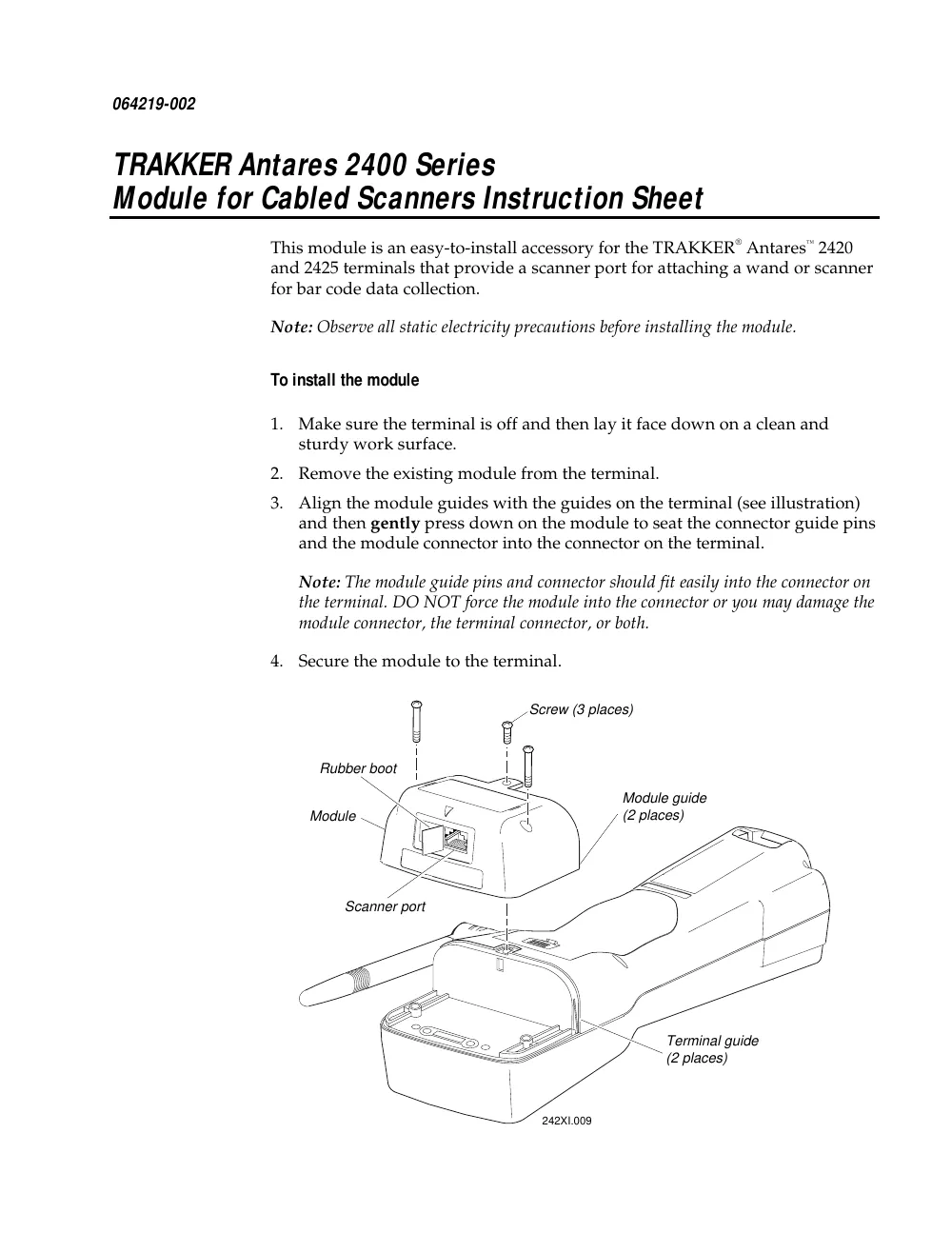
The text of page 1, from the PDF itself
064219-002
TRAKKER Antares 2400 Series Module for Cabled Scanners Instruction Sheet This module is an easy-to-install accessory for the TRAKKER® Antares™ 2420 and 2425 terminals that provide a scanner port for attaching a wand or scanner for bar code data collection. Note: Observe all static electricity precautions before installing the module. To install the module 1. Make sure the terminal is off and then lay it face down on a clean and sturdy work surface. 2. Remove the existing module from the terminal. 3. Align the module guides with the guides on the terminal (see illustration) and then gently press down on the module to seat the connector guide pins and the module connector into the connector on the terminal. Note: The module guide pins and connector should fit easily into the connector on the terminal. DO NOT force the module into the connector or you may damage the module connector, the terminal connector, or both. 4. Secure the module to the terminal. Screw (3 places)
Rubber boot Module guide (2 places)
Module
Scanner port
Terminal guide (2 places)
242XI.009
Page2of 2
Open in the PDF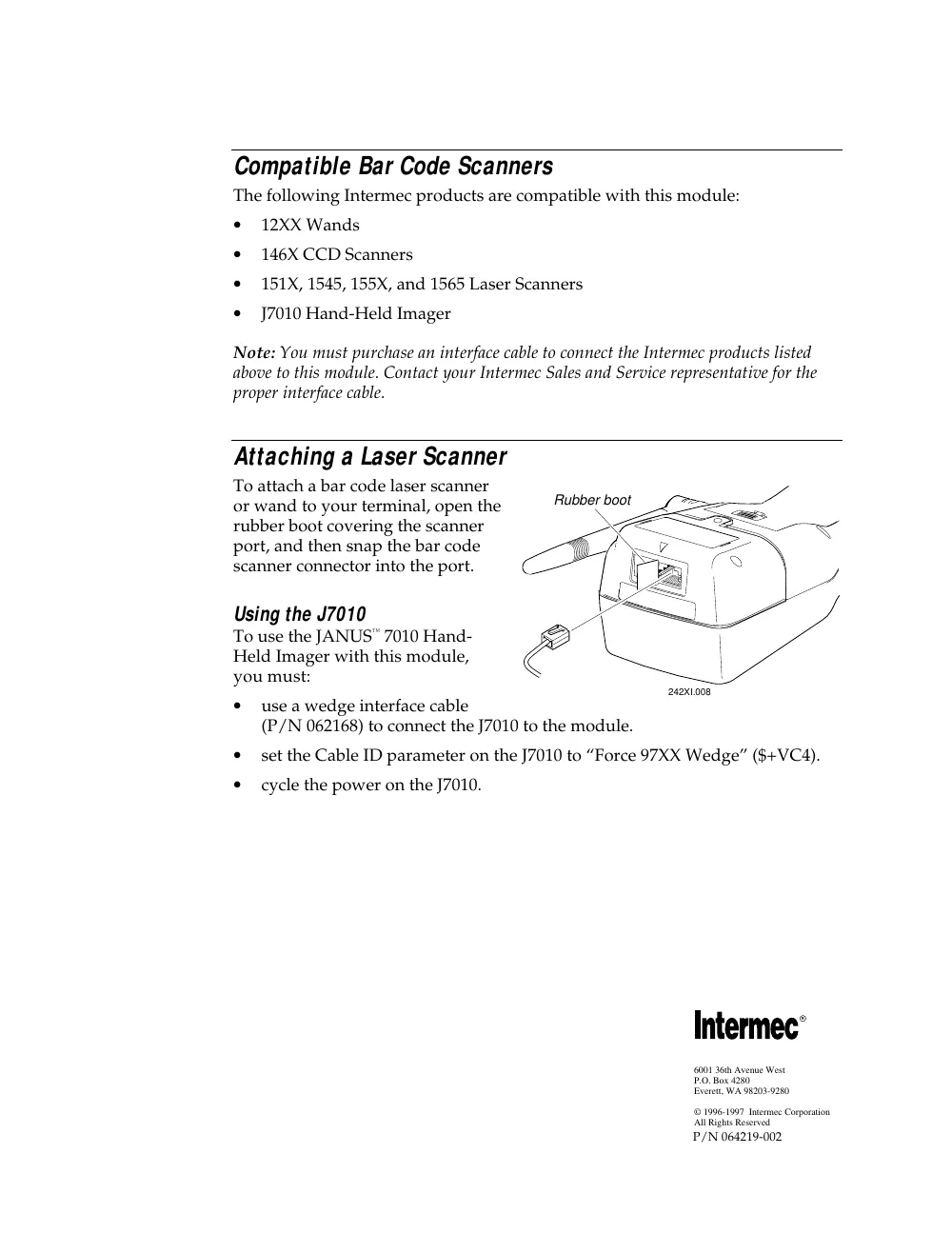
The text of page 2, from the PDF itself
Compatible Bar Code Scanners The following Intermec products are compatible with this module:
12XX Wands•146X CCD Scanners•
151X, 1545, 155X, and 1565 Laser Scanners
J7010 Hand-Held Imager
Note: You must purchase an interface cable to connect the Intermec products listed above to this module. Contact your Intermec Sales and Service representative for the proper interface cable.
Attaching a Laser Scanner To attach a bar code laser scanner or wand to your terminal, open the rubber boot covering the scanner port, and then snap the bar code scanner connector into the port.
Rubber boot
Using the J7010 To use the JANUS™ 7010 HandHeld Imager with this module, you must: 242XI.008
use a wedge interface cable (P/N 062168) to connect the J7010 to the module.
set the Cable ID parameter on the J7010 to “Force 97XX Wedge” ($+VC4).
cycle the power on the J7010.
R
6001 36th Avenue West P.O. Box 4280 Everett, WA 98203-9280 © 1996-1997 Intermec Corporation All Rights Reserved
P/N 064219-002





