


Manual · Intermec
Adaptador para escáneres con cable Intermec 2420 y 2425
Manual2 páginasPDF 62 KB
Las dos páginas están más abajo, cada una con su texto.
Archivado con · 2 modelos
También archivado con estos modelos en el sitio anterior


Del manual · leído página por página
Datos clave de este manual
Cada línea indica su página en el PDF.
Hoja de instrucciones de Intermec (P/N 064219-002) para el módulo para escáneres con cable de la serie TRAKKER Antares 2400, un accesorio para las terminales 2420 y 2425 que agrega un puerto de escáner para un lápiz de contacto, un escáner láser, un escáner CCD o el lector de imágenes JANUS 7010. Muestra cómo instalar el módulo, qué escáneres funcionan con él y cómo configurar el J7010.
- Qué es
- Módulo que agrega a la terminal un puerto de escáner para un lápiz de contacto o un escáner pág. 1
- Compatible con
- Terminales TRAKKER Antares 2420 y 2425 pág. 1
- Escáneres compatibles
- Lápices de contacto Intermec 12XX, escáneres CCD 146X, escáneres láser 151X, 1545, 155X y 1565, lector de imágenes J7010 pág. 2
- Cable de interfaz
- Se necesita uno para cada escáner y se vende por separado; el J7010 usa el cable de cuña P/N 062168 pág. 2
- Ajuste del J7010
- Cable ID ajustado en "Force 97XX Wedge" ($+VC4); luego apague y vuelva a encender pág. 2
- Montaje
- Reemplaza el módulo existente; sujeto con tornillos en 3 puntos; puerto de escáner bajo una cubierta de goma pág. 1
- Número de ficha
- P/N 064219-002 pág. 2
Lo que este manual le explica
- Instalar el módulo en la terminal pág. 1
- Conectar un escáner láser o un lápiz de contacto al puerto de escáner pág. 2
- Configurar el lector de imágenes JANUS 7010 con el módulo pág. 2
Conviene saber
- Tome precauciones contra la electricidad estática antes de instalar el módulo. pág. 1
- No fuerce el módulo dentro del conector; puede dañar el módulo o el conector de la terminal. pág. 1
- Apague la terminal antes de instalar el módulo. pág. 1
Preguntas que responde este manual
¿Qué escáneres funcionan con el módulo para escáneres con cable de la Intermec 2420?
Lápices de contacto Intermec 12XX, escáneres CCD 146X, escáneres láser 151X, 1545, 155X y 1565, y el lector de imágenes de mano J7010. pág. 2
¿Necesito un cable para el módulo para escáneres con cable?
Sí. Hay que comprar un cable de interfaz para conectar al módulo cada escáner de la lista. pág. 2
¿Cómo conecto un JANUS 7010 a una Trakker Antares 2425?
Use el cable de interfaz de cuña P/N 062168, ajuste el Cable ID del J7010 en Force 97XX Wedge ($+VC4) y apáguelo y vuelva a encenderlo. pág. 2
El archivo
Tamaño y texto
Todas las páginas · 2
Léalo aquí
Cada página tal como está impresa, y su texto al lado, para que en un teléfono se pueda buscar y copiar.
Página1de 2
Abrir en el PDF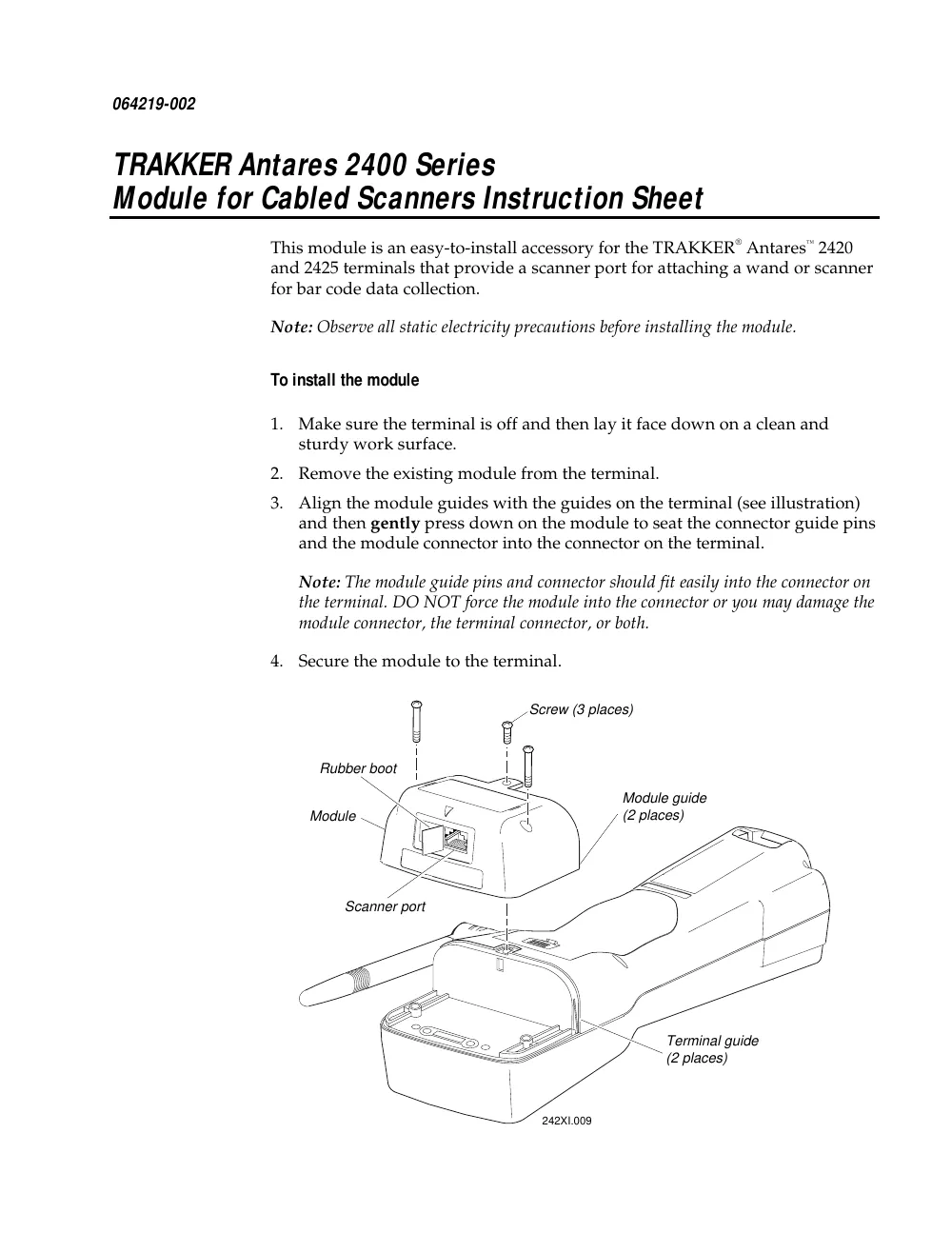
El texto de la página 1, del propio PDF
064219-002
TRAKKER Antares 2400 Series Module for Cabled Scanners Instruction Sheet This module is an easy-to-install accessory for the TRAKKER® Antares™ 2420 and 2425 terminals that provide a scanner port for attaching a wand or scanner for bar code data collection. Note: Observe all static electricity precautions before installing the module. To install the module 1. Make sure the terminal is off and then lay it face down on a clean and sturdy work surface. 2. Remove the existing module from the terminal. 3. Align the module guides with the guides on the terminal (see illustration) and then gently press down on the module to seat the connector guide pins and the module connector into the connector on the terminal. Note: The module guide pins and connector should fit easily into the connector on the terminal. DO NOT force the module into the connector or you may damage the module connector, the terminal connector, or both. 4. Secure the module to the terminal. Screw (3 places)
Rubber boot Module guide (2 places)
Module
Scanner port
Terminal guide (2 places)
242XI.009
Página2de 2
Abrir en el PDF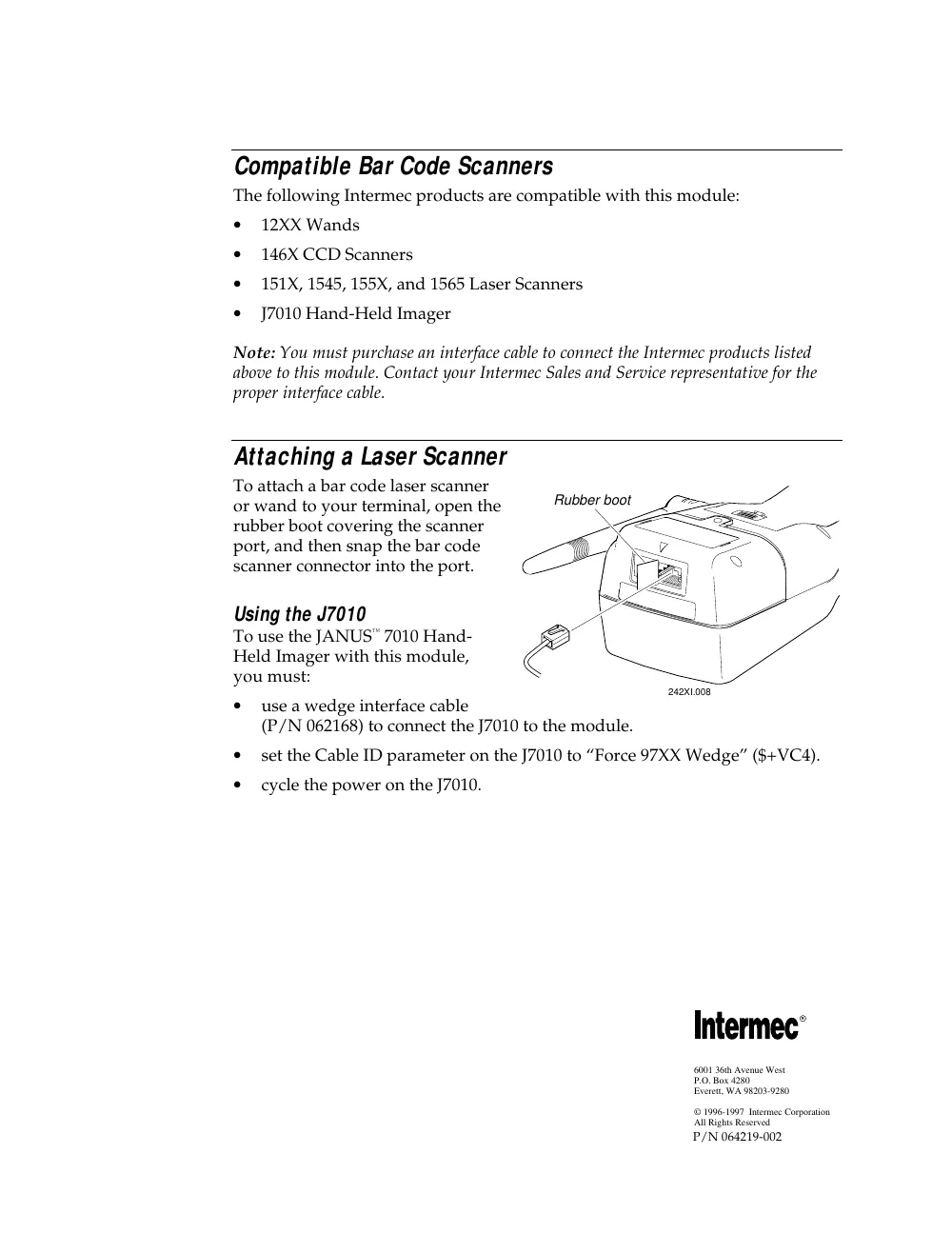
El texto de la página 2, del propio PDF
Compatible Bar Code Scanners The following Intermec products are compatible with this module:
12XX Wands•146X CCD Scanners•
151X, 1545, 155X, and 1565 Laser Scanners
J7010 Hand-Held Imager
Note: You must purchase an interface cable to connect the Intermec products listed above to this module. Contact your Intermec Sales and Service representative for the proper interface cable.
Attaching a Laser Scanner To attach a bar code laser scanner or wand to your terminal, open the rubber boot covering the scanner port, and then snap the bar code scanner connector into the port.
Rubber boot
Using the J7010 To use the JANUS™ 7010 HandHeld Imager with this module, you must: 242XI.008
use a wedge interface cable (P/N 062168) to connect the J7010 to the module.
set the Cable ID parameter on the J7010 to “Force 97XX Wedge” ($+VC4).
cycle the power on the J7010.
R
6001 36th Avenue West P.O. Box 4280 Everett, WA 98203-9280 © 1996-1997 Intermec Corporation All Rights Reserved
P/N 064219-002





