


Manual · Intermec
Intermec 2420 and 2425 Belt & Clip
Manual2 pagesPDF 70 KB
Both pages are below, each with its text.
Filed with · 2 models
Also filed with these models on the old site


From the manual · read page by page
Key facts from this manual
Each line names its page in the PDF.
Intermec instruction sheet (P/N 064218-005, 1998) for the TRAKKER Antares 2400 Series belt clip and belt, which let a 2420 or 2425 terminal hang at the user's side for hands-free work. It shows how to fit the clip on the belt and strap the terminal to it.
- What it is
- Belt and belt clip that hold the terminal at your side, hands free p. 1
- Fits
- TRAKKER Antares 2420 and 2425 terminals p. 1
- How it holds
- Clip snaps around the belt; a Velcro strap through the terminal's bottom case holds it to the clip p. 1
- Release
- Squeeze the buckle to take the terminal off; snap the ends together to reattach p. 1
- Sheet number
- P/N 064218-005 p. 1
What this manual walks you through
- Attaching the belt clip and strapping the terminal to it p. 1
- Removing and reattaching the terminal p. 1
Good to know
- A handstrap on the terminal may need to be released while you thread the Velcro strap. p. 1
Questions this manual answers
Is there a belt clip for the Intermec 2420 or 2425?
Yes. The TRAKKER Antares 2400 Series belt clip and belt hold a 2420 or 2425 terminal at your side. p. 1
How does the terminal attach to the belt clip?
Thread the Velcro strap through the slot on the terminal's bottom case, then through the buckle slot, and press the Velcro ends together. p. 1
How do I take the terminal off the belt clip?
Squeeze the buckle to release it; snap the buckle ends together to put it back. p. 1
The file
Size and text
Every page · 2
Read it here
Each page as it is printed, and its words beside it, so a phone can search and copy them.
Page1of 2
Open in the PDF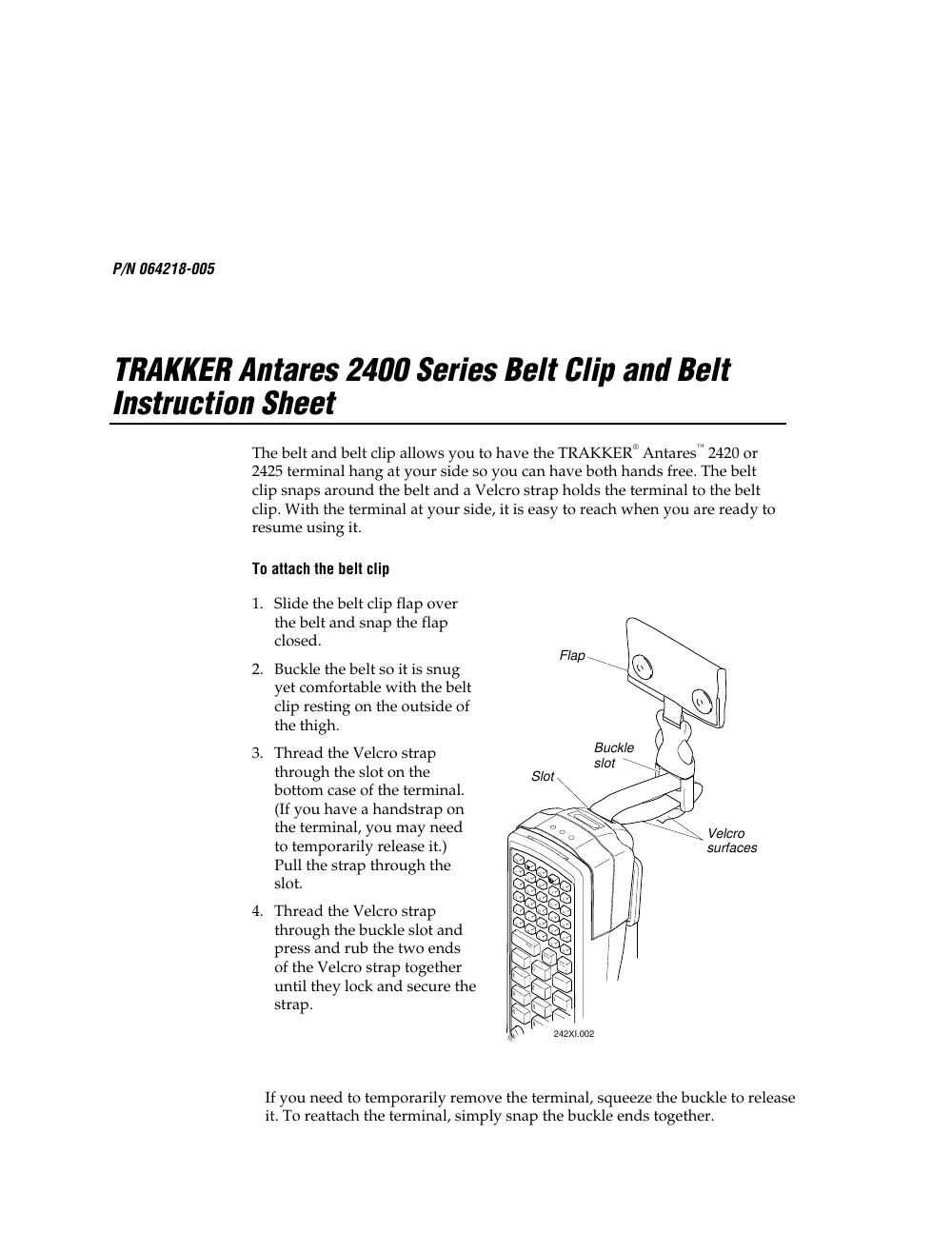
The text of page 1, from the PDF itself
P/N 064218-005
TRAKKER Antares 2400 Series Belt Clip and Belt Instruction Sheet ®
The belt and belt clip allows you to have the TRAKKER Antares 2420 or 2425 terminal hang at your side so you can have both hands free. The belt clip snaps around the belt and a Velcro strap holds the terminal to the belt clip. With the terminal at your side, it is easy to reach when you are ready to resume using it. To attach the belt clip 1. Slide the belt clip flap over the belt and snap the flap closed.
Flap
2. Buckle the belt so it is snug yet comfortable with the belt clip resting on the outside of the thigh. Buckle slot Slot
Velcro surfaces Esc YbTaX TW SVORUNQJMPILEHKDG CFterBEnA Fn nLFR0 3 2 6 1 5 9
4. Thread the Velcro strap through the buckle slot and press and rub the two ends of the Velcro strap together until they lock and secure the strap.
Z
3. Thread the Velcro strap through the slot on the bottom case of the terminal. (If you have a handstrap on the terminal, you may need to temporarily release it.) Pull the strap through the slot.
8242XI.002F5
If you need to temporarily remove the terminal, squeeze the buckle to release it. To reattach the terminal, simply snap the buckle ends together.
Page2of 2
Open in the PDF
The text of page 2, from the PDF itself
6001 36th Avenue West P.O. Box 4280 Everett, WA 98203-9280 © 1998 Intermec All Rights Reserved
P/N 064218-005





