


Manual · Intermec
Cinturón y clip Intermec 2420 y 2425
Manual2 páginasPDF 70 KB
Las dos páginas están más abajo, cada una con su texto.
Archivado con · 2 modelos
También archivado con estos modelos en el sitio anterior


Del manual · leído página por página
Datos clave de este manual
Cada línea indica su página en el PDF.
Hoja de instrucciones de Intermec (P/N 064218-005, 1998) del clip para cinturón y el cinturón de la serie TRAKKER Antares 2400, que permiten llevar una terminal 2420 o 2425 al costado del usuario para trabajar con las manos libres. Muestra cómo colocar el clip en el cinturón y sujetar la terminal a él.
- Qué es
- Cinturón y clip para cinturón que sostienen la terminal a su costado, con las manos libres pág. 1
- Compatible con
- Terminales TRAKKER Antares 2420 y 2425 pág. 1
- Cómo se sujeta
- El clip se cierra alrededor del cinturón; una correa de Velcro que pasa por la carcasa inferior de la terminal la sujeta al clip pág. 1
- Liberación
- Apriete la hebilla para quitar la terminal; una los extremos a presión para volver a colocarla pág. 1
- Número de ficha
- P/N 064218-005 pág. 1
Lo que este manual le explica
- Colocar el clip para cinturón y sujetar la terminal a él pág. 1
- Quitar y volver a colocar la terminal pág. 1
Conviene saber
- Puede ser necesario soltar la correa de mano de la terminal mientras pasa la correa de Velcro. pág. 1
Preguntas que responde este manual
¿Hay un clip para cinturón para la Intermec 2420 o 2425?
Sí. El clip para cinturón y el cinturón de la serie TRAKKER Antares 2400 sostienen una terminal 2420 o 2425 a su costado. pág. 1
¿Cómo se sujeta la terminal al clip para cinturón?
Pase la correa de Velcro por la ranura de la carcasa inferior de la terminal, luego por la ranura de la hebilla, y presione los extremos de Velcro para unirlos. pág. 1
¿Cómo quito la terminal del clip para cinturón?
Apriete la hebilla para soltarla; una a presión los extremos de la hebilla para volver a colocarla. pág. 1
El archivo
Tamaño y texto
Todas las páginas · 2
Léalo aquí
Cada página tal como está impresa, y su texto al lado, para que en un teléfono se pueda buscar y copiar.
Página1de 2
Abrir en el PDF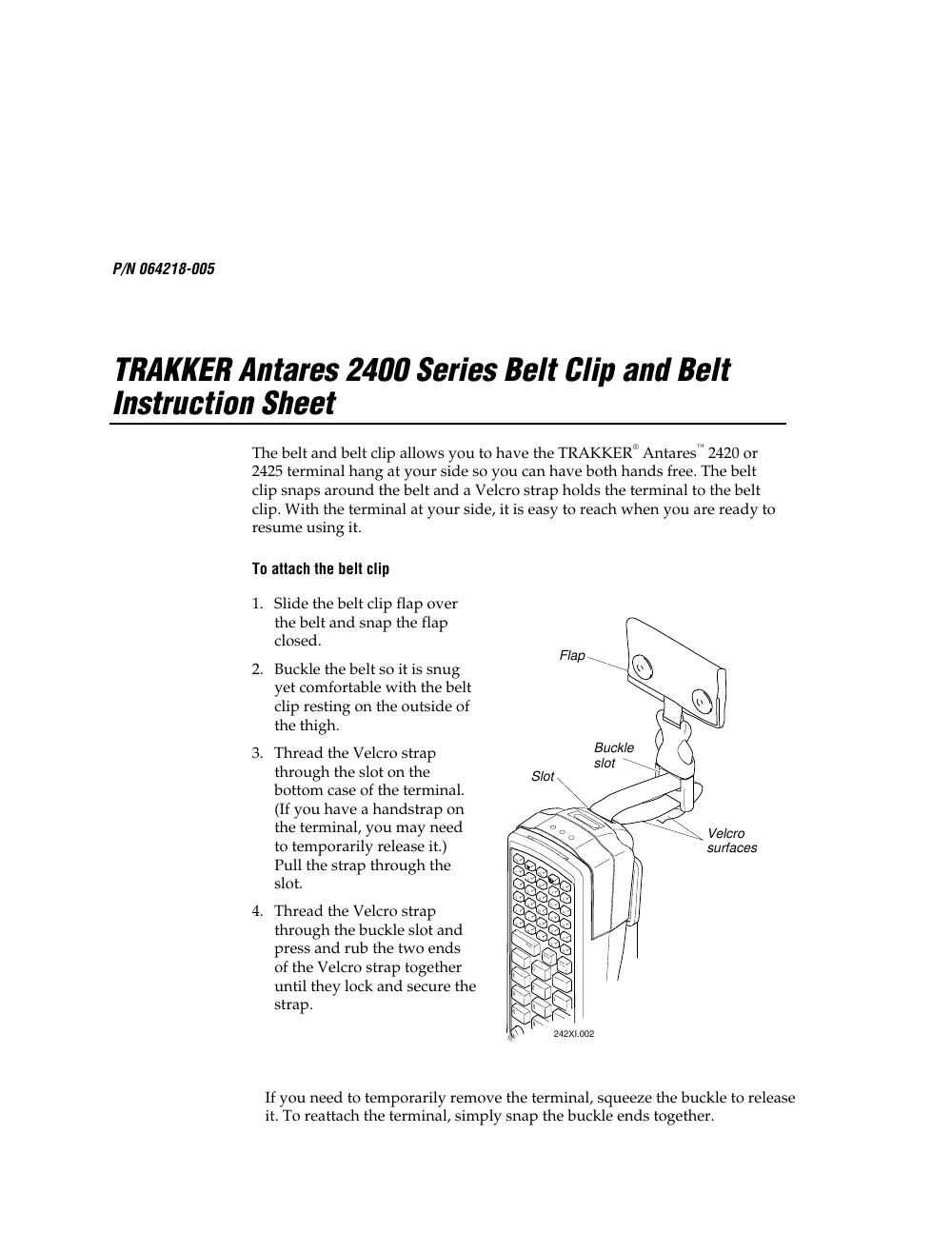
El texto de la página 1, del propio PDF
P/N 064218-005
TRAKKER Antares 2400 Series Belt Clip and Belt Instruction Sheet ®
The belt and belt clip allows you to have the TRAKKER Antares 2420 or 2425 terminal hang at your side so you can have both hands free. The belt clip snaps around the belt and a Velcro strap holds the terminal to the belt clip. With the terminal at your side, it is easy to reach when you are ready to resume using it. To attach the belt clip 1. Slide the belt clip flap over the belt and snap the flap closed.
Flap
2. Buckle the belt so it is snug yet comfortable with the belt clip resting on the outside of the thigh. Buckle slot Slot
Velcro surfaces Esc YbTaX TW SVORUNQJMPILEHKDG CFterBEnA Fn nLFR0 3 2 6 1 5 9
4. Thread the Velcro strap through the buckle slot and press and rub the two ends of the Velcro strap together until they lock and secure the strap.
Z
3. Thread the Velcro strap through the slot on the bottom case of the terminal. (If you have a handstrap on the terminal, you may need to temporarily release it.) Pull the strap through the slot.
8242XI.002F5
If you need to temporarily remove the terminal, squeeze the buckle to release it. To reattach the terminal, simply snap the buckle ends together.
Página2de 2
Abrir en el PDF
El texto de la página 2, del propio PDF
6001 36th Avenue West P.O. Box 4280 Everett, WA 98203-9280 © 1998 Intermec All Rights Reserved
P/N 064218-005





