Manual · HHP
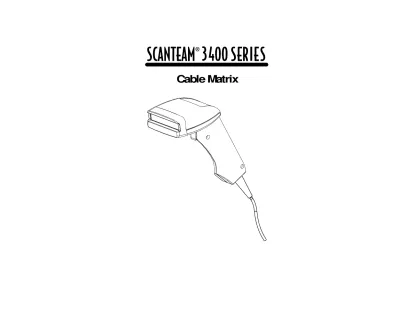
SCANTEAM 3400 Series Cable Matrix
Manual22 pagesPDF 161 KB
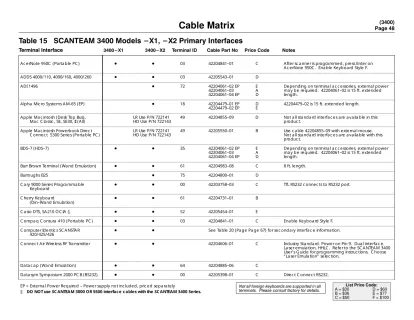
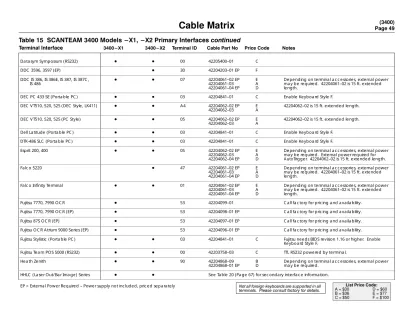
Cable matrix for SCANTEAM 3400 Series scanners: the interface cable part number and terminal ID for each host terminal, PC or POS system.
Covers · 1 model
The models it covers

Summary
What is in it
A cable reference for the SCANTEAM 3400 Series bar code scanners. It is a table listing host terminals, PCs, portable PCs and POS systems by maker (Apple, DEC, Fujitsu, HP, IBM, NCR, Telex, WYSE and many others) with the terminal ID to program, the interface cable part number, whether external power is needed, and notes such as extended cable lengths, pin assignments and keyboard style settings. It also covers RS232 TTL and true RS232 output cables, serial wedge cables and wand emulation cables.
From the manual
Key facts from this manual
Some pages are scans or cannot be read; this says only what the readable text supports. Each line names its page in the PDF.
The cable matrix chapter for the SCANTEAM 3400 Series scanners (ST3400, including the 3400HD, 3400LR and 3400PDF models). For each host terminal or interface it lists the terminal ID to program, the interface cable part number and notes on power and setup, plus secondary interface cables and accessories such as the cloning cable.
- Document
- Cable matrix: host terminal, terminal ID and cable part number for SCANTEAM 3400 scanners p. 15
- IBM 4683 Port 5B
- Cable 42203761-01, 8 Pin SDL connector (E Key), terminal ID 51 p. 4
- IBM 4683 Port 9
- Cable 42205155-01, 4 Pin SDL connector (A Key), 12V p. 4
- IBM 4683 Port 17
- Cable 42203771-01, 16 Pin SDL connector (A Key) p. 4
- PC keyboard wedge
- Din cables 42204061-xx, Mini Din cables 42204062-xx; the -02 versions are 15 ft. p. 5
- IBM AT/XT/PS2 combo
- Cable 42204868-09 (or 42204868-01 EP), fits Din or Mini Din p. 5
- Laptop cable
- 42204841-01, terminal ID 03, with Keyboard Style F enabled p. 9
- True RS232 cables
- 9 pin D 42204253-xx, 25 pin D 42204254-xx; 42204253-05 is 15 ft., -22 is 22 ft. p. 12
- Switched power RS232
- Cables 42204748-01 to -04, only for 3400/X-13X models p. 12
- Wand emulation cables
- 42203764-01 and -04 power on pin 4; -03 and -05 power on pin 9; 7 or 16 ft. p. 10
- HHLC cable
- 42204294-01, industry standard HHLC, power on pin 9, 6 ft. p. 14
- Cloning cable
- 42204559-01 EP, copies firmware between units; 3400HD/LR-X1, -X2, -X3 only p. 21
- Extension cable
- 42204837-01, 15 ft. straight through, 9 pin squeeze female to 9 pin male p. 21
- PC power adapter
- PCPower/MD4, takes +5VDC from a PC mouse or keyboard port p. 21
What this manual walks you through
- Finding the cable and terminal ID for a host terminal p. 2, 3
- Cables for IBM 4683/84 and 4693 POS ports p. 4
- Keyboard wedge cables for IBM PCs, clones and terminals p. 4, 5
- RS232 TTL and true RS232 output cables p. 8, 12
- Wand emulation cables for portable terminals p. 10
- HHLC laser compatible decoder cables, +5V, +12V and AutoTrigger p. 14
- Cables for the 3400PDF models (Tables 18 and 19) p. 15, 16, 20
- Secondary interface cables and the conditions for using them p. 21
- Accessories: cloning cable, extension cable, PC power and keyboard adapters p. 21
Good to know
- Cables made for the SCANTEAM 3000 or 5500 must not be used with the 3400 Series. p. 2
- Cables marked EP need an external power supply, which is not included with the cable. p. 2
- Cables marked with a diamond are for 5V host power only; for 12V hosts the matrix says to contact Applications Support. p. 12
- ST3400PDF scanners do not support secondary interfaces. p. 21
- For application specific HHLC cables, check the interface's power requirements before ordering. p. 14
Questions this manual answers
Which cable connects a SCANTEAM 3400 to an IBM 4683 Port 5B?
Cable 42203761-01 with an 8 pin SDL connector (E Key); the scanner can be programmed for 5B, 9B or Port 17. p. 4
Can I use a SCANTEAM 3000 cable on an ST3400?
No. The matrix says not to use SCANTEAM 3000 or 5500 interface cables with the 3400 Series. p. 2
What is the ST3400 cloning cable part number?
42204559-01, which needs external power and copies one unit's firmware into another; it is for 3400HD/LR-X1, -X2 and -X3 only. p. 21
How can an ST3400 get power from a PC without a separate supply?
The PCPower/MD4 adapter takes +5VDC from the PC's mouse or Mini Din keyboard port without disturbing the mouse or keyboard. p. 21
Which ST3400 cable works with a laptop keyboard?
Cable 42204841-01 with terminal ID 03, and Keyboard Style F enabled. p. 9
The whole text · 3 parts
Read the manual here as text
Its text as extracted from the PDF, unedited, in parts; each page opens the PDF at that page.
The file