Manual · Denso
Bar Code Handy Terminal BHT-6000 User's Manual
Manual178 pagesPDF 973 KB
User's manual for the DENSO BHT-6000 bar code handy terminal, with a chapter on the CU-6001 and CU-6002 optical communications units.
What this file really is
The old site listed this file as a manual for the Denso BHT-6045, CU-6002 and 2 more models. This is the user's manual for the DENSO BHT-6000 handy terminal; the CU-6002 is covered only in its chapter on the optional CU-6000 communications unit.
Names · 2 models
The models it names
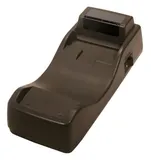 NipponDenso CU-6002Desktop docking station from$195.001 in stock Denso CU-6002Desktop docking station Call for availability
Filed with · 2 models
Also filed with these models on the old site
Summary
What is in it
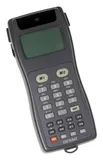
User's manual for the DENSO BHT-6000 bar code handy terminal (normal-range and long-range BHT-6000D types). It covers reading bar codes, the keypad and backlight, batteries, initializing and setting the clock, System Mode for downloading, uploading, settings and tests, RS-232C communications with the BHT-protocol and BHT-Ir protocol, error messages, and the optional CU-6000 optical communications unit (CU-6001 and CU-6002), with specifications in the appendices.
Its parts
- Quick Guide
- Getting Started the BHT-6000 and System Mode
- Communications Operations of BHT-6000
- Error Messages
- Handling the CU-6000 (Option)
From the manual
Key facts from this manual
Each line names its page in the PDF.
A Denso user's manual from 1997 for the BHT-6000 Bar Code Handy Terminal, with a chapter on the optional CU-6000 optical communications unit, which comes as the CU-6001 and the CU-6002. It explains System Mode, communications, error messages and specifications. It also shows how to power the CU-6000, set its speed, cable it to a host computer and charge battery cartridges on the CU-6001.
- Device
- CU-6002: optical communications unit that passes data and programs between the BHT-6000 and a host computer; it does not charge batteries p. 149
- Terminal link
- IrDA-compliant optical interface port to the BHT-6000 p. 24, 149
- Host interface
- RS-232C port (Dsub-25S); cross-mode cable to a host computer, straight-mode cable to a modem p. 159, 160
- Speeds
- 9,600 bps (factory setting), 19,200, 38,400, 57,600 or 115,200 bps, set by a DIP switch on the bottom p. 152
- Power
- 12 VDC via the AC adapter; 2W consumption p. 169
- Weight
- CU-6002: approx. 180 g (6.35 oz.) p. 169
- Dimensions
- CU-6000: 82 x 190 x 57 mm (3.23 x 7.48 x 2.24 inches), W x L x H p. 169
- Operating range
- CU-6000: 0 to 40 C (32 to 104 F); 20% to 80% humidity, no condensation p. 169
- Not on CU-6002
- BHT-6000 charge terminals, status indicator LEDs and battery cartridge slot p. 149, 150
- Host software
- Ir-Transfer Utility C (BHT-Ir protocol) or Transfer Utility (BHT-protocol) p. 153
- Terminal power
- BHT-6000: two alkaline manganese batteries (LR03) or Ni-MH battery cartridge (2.4 DVC); integrated lithium backup battery, 3.0 VDC p. 163
- Terminal memory
- BHT-6000: 16-bit CMOS CPU, 512KB RAM, 512KB/1MB flash ROM p. 163
- Terminal display
- BHT-6000: backlit FSTN dot-matrix LCD, 96 by 48 dots p. 163
- Terminal bar codes
- BHT-6000: EAN-13, EAN-8, UPC-A, UPC-E, Interleaved 2 of 5, Standard 2 of 5, CODABAR (NW7), CODE39, CODE93, CODE128 p. 164
What this manual walks you through
- Setting the CU-6000 transmission speed with its DIP switch p. 152
- Connecting the RS-232C interface cable between the CU-6000 and the host p. 152
- Uploading and downloading data between the BHT-6000 and the host through the CU-6000 p. 153
- Applying power to the CU-6000 with the AC adapter p. 151
- RS-232C pin assignment and cable wiring for host and modem p. 159, 160
- Charging Ni-MH battery cartridges on the CU-6001 p. 154
- Reading BHT-6000 system error messages and their fixes p. 137, 138
- BHT-6000 system configuration and optional host software p. 23, 24
- How the BHT-6000 flash ROM and RAM store programs and data p. 25
Good to know
- Use only the AC adapter supplied with the CU. p. 151
- Set the CU-6000 DIP switch only to one of the five speed settings shown. p. 152
- The BHT-6000 direct-connect port does not stand frequent plugging; the CU-6000 is recommended for that. p. 24
- The BHT-6000 flash ROM stops accepting writes after about 10,000 rewrites; rewrite it no more than once a day. p. 25
- A Ni-MH battery cartridge generally needs replacing after about 200 charge and discharge cycles. p. 154
Questions this manual answers
What is the difference between the Denso CU-6001 and CU-6002?
Both pass data and programs between the BHT-6000 and a host computer; only the CU-6001 also charges Ni-MH battery cartridges. p. 149
What power supply does the CU-6002 use?
12 VDC from the AC adapter, with a power consumption of 2W. p. 169
What baud rates does the CU-6000 support?
9,600 bps (factory setting), 19,200, 38,400, 57,600 and 115,200 bps, chosen with the DIP switch on the bottom. p. 152
What cable connects the CU-6000 to a PC?
An RS-232C interface cable with a 25-pin plug; a cross-mode cable for a host computer, a straight-mode cable for a modem. p. 152, 160
What batteries does the BHT-6000 take?
Two alkaline manganese LR03 batteries or a rechargeable Ni-MH battery cartridge, plus a built-in 3.0 VDC lithium backup battery. p. 163
Contents
Chapters and sections
Each line opens the PDF at its page.
The whole text · 20 parts
Read the manual here as text
Its text as extracted from the PDF, unedited, in parts; each page opens the PDF at that page.
- Preface1-3
- Pages 4 to 124-12
- Content Overviews13-15
- Chapter 1 Quick Guide16-21
- Chapter 2 Getting Started the BHT-6000 and System Mode, pages 22 to 3122-31
- Chapter 2 Getting Started the BHT-6000 and System Mode, pages 32 to 4132-41
- Chapter 2 Getting Started the BHT-6000 and System Mode, pages 42 to 5142-51
- Chapter 2 Getting Started the BHT-6000 and System Mode, pages 52 to 6152-61
- Chapter 2 Getting Started the BHT-6000 and System Mode, pages 62 to 7162-71
- Chapter 2 Getting Started the BHT-6000 and System Mode, pages 72 to 8172-81
- Chapter 2 Getting Started the BHT-6000 and System Mode, pages 82 to 9182-91
- Chapter 2 Getting Started the BHT-6000 and System Mode, pages 92 to 9592-95
- Chapter 3 Communications Operations of BHT-6000, pages 96 to 10596-105
- Chapter 3 Communications Operations of BHT-6000, pages 106 to 115106-115
- Chapter 3 Communications Operations of BHT-6000, pages 116 to 125116-125
- Chapter 3 Communications Operations of BHT-6000, pages 126 to 135126-135
- Chapter 4 Error Messages136-147
- Chapter 5 Handling the CU-6000 (Option)148-161
- Appendices162-173
- Index174-178
The file