Manual · AML
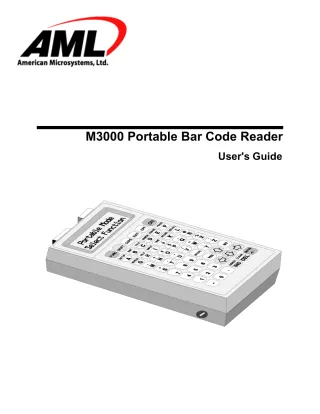
M3000 Portable Bar Code Reader User's Guide
Manual156 pagesPDF 1.5 MB
User's guide for the American Microsystems (AML) M3000 portable bar code reader: installation, programming, setup and communications.
Covers · 1 model
The models it covers
Summary
What is in it
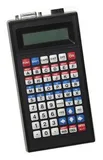
American Microsystems' user's guide for the M3000 Portable Bar Code Reader, which works in portable mode or as a keyboard wedge, serial wedge or RS-232 serial device. It covers installation in each mode, the keyboard and functions, a quick start, the built-in program generator and programming prompts, setup of bar codes, ports and transmit options, PC communication software, lookup tables and ASCII data files, troubleshooting, specifications and maintenance.
Its parts
- Overview
- Installation
- Keyboard
- Function Reference
- Quick Start - Basic Operations
- Programming
- Setup Procedures
- Communications
- Advanced Operations
- M3000 Programmer
- Troubleshooting
- Specifications
- Maintenance
From the manual
Key facts from this manual
Each line names its page in the PDF.
User's guide for the American Microsystems M3000 portable bar code reader, a handheld data collector with its own keyboard and display. It explains installation for portable use and as a keyboard wedge, serial wedge or RS-232 device, scanning, writing data collection programs, setup, sending files to a PC, troubleshooting and battery care.
- Device
- Portable bar code reader and data collector p. 1
- Input devices
- Wand, CCD, 5V laser, RS-232 serial p. 121
- Operating modes
- Portable mode, keyboard wedge, serial wedge, RS-232 serial p. 4
- Power
- 9V alkaline battery or external power supply; lithium battery backs up memory p. 121
- Power connector
- Female 2.1mm x 5.5mm, 9-12 VDC center negative p. 121
- Battery life
- 10 to 70 hours on a 9V alkaline battery, depending on conditions p. 126
- Memory
- 64K EPROM, 64K RAM with data compression p. 121
- Display
- 2x16 super-twist LCD p. 121
- Keyboard
- 54-key tactile membrane, separate alpha and numeric keys, F1-F10 p. 121
- Bar codes
- Code 39, Extended Code 39, Interleaved 2 of 5, UPC-A, UPC-E, EAN-8, EAN-13, Code 128, Code 93, Code 11, Codabar, MSI/Plessey p. 121
- Serial settings
- 300 to 38,400 baud; 7 or 8 data bits; 1 or 2 stop bits p. 121
- Protocols
- RS-232: XON/XOFF, XMODEM, ASCII, Hayes modem; keyboard wedge for IBM PC/XT/AT or PS/2 p. 121
- Size and weight
- 4.0"W x 7.5"L x 1.3"H, 14 oz. p. 121
- Operating temperature
- 0°C to +50°C (+32°F to +120°F), 5% to 95% humidity non-condensing p. 121
What this manual walks you through
- Installing the reader for portable, wedge, RS-232 and modem use p. 3
- Using the keyboard and its function keys p. 3
- Loading a built-in program and collecting data into a file p. 4
- Scanning with wands, lasers, CCD scanners and a slot reader p. 4
- Writing your own data collection programs p. 4
- Setting serial port, bar code and beeper options p. 6
- Sending files to a PC with PCOM and SOFTCOM software p. 8
- Using lookup tables, lookup files and ASCII data files p. 8
- Reading error messages and troubleshooting p. 9
- Replacing the battery p. 126
Good to know
- Battery run times in the manual's table are typical test results; real run time varies with battery, input device and temperature. p. 122
- The reader shows a Battery Low prompt when battery power drops too low. p. 126
- The manual states the unit meets FCC Class A limits and is likely to cause interference in a residential area. p. 2
Questions this manual answers
What battery does the AML M3000 take?
A 9V alkaline battery, with a lithium battery backing up memory. An external power supply can be used instead. p. 121
What power supply fits the M3000?
One with a 2.1mm x 5.5mm plug giving 9-12 VDC, center negative. p. 121
Which scanners can connect to the M3000?
A wand, a CCD scanner, a 5V laser, or a serial device over RS-232. p. 121
Can the M3000 work as a keyboard wedge?
Yes. Keyboard wedge mode supports IBM PC/XT/AT or PS/2 keyboards. p. 121
How long does the M3000 battery last?
The manual says 10 to 70 hours of operation, depending on operating conditions. p. 126
The whole text · 16 parts
Read the manual here as text
Its text as extracted from the PDF, unedited, in parts; each page opens the PDF at that page.
- Pages 1 to 81-8
- Pages 9 to 189-18
- Pages 19 to 2819-28
- Pages 29 to 3829-38
- Pages 39 to 4839-48
- Pages 49 to 5849-58
- Pages 59 to 6859-68
- Pages 69 to 7869-78
- Pages 79 to 8879-88
- Pages 89 to 9889-98
- Pages 99 to 10899-108
- Pages 109 to 118109-118
- Pages 119 to 128119-128
- Pages 129 to 138129-138
- Pages 139 to 148139-148
- Pages 149 to 156149-156
The file