Manual · Videx
LaserLite Pro and LaserLite Mx Hardware Manual
Manual99 pagesPDF 2.9 MB
Hardware manual for the Videx LaserLite Pro and LaserLite Mx portable data collectors with laser scanner and iButton reader.
Covers · 2 models
The models it covers
Summary
What is in it
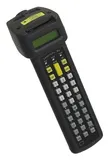
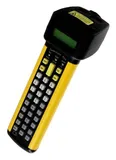
Videx's hardware manual for the LaserLite Pro and LaserLite Mx portable data collectors, which combine a laser bar code scanner and an iButton reader. Chapter 1 covers the case, memory, display and keypad, lock switch, batteries, scanning, reading iButtons and communicating with a computer through the IR port and Base Station. Chapter 2 covers the LaserLite Mx memory cards. Appendixes give bar code notes, specifications, cable pinouts, using multiple collectors, and how to reset the unit.
Its parts
- Introduction
- LaserLite Pro and LaserLite Mx Portable Data Collectors
- LaserLite Mx Memory Cards
- Bar Code Reference
- Product Specifications
- Glossary
- Cable Pin Out Configurations
- Using Multiple Data Collectors and Base Stations
- Resetting the LaserLite Pro and LaserLite Mx
From the manual
Key facts from this manual
Some pages are scans or cannot be read; this says only what the readable text supports. Each line names its page in the PDF.
The Videx hardware manual for the LaserLite Pro and LaserLite Mx portable data collectors, which scan bar codes with a laser and read iButtons. It covers the keypad, display, memory and batteries, IR communication and the Base Station, recharging, LaserLite Mx memory cards, specifications, cable pin outs and how to reset a locked unit.
- Device
- Portable data collector with a visible-light laser bar code scanner, iButton reader and keypad in an aluminum case p. 10, 13
- Memory
- 128K flash ROM and 256K battery-backed RAM, enough for over 8,000 5-digit scans with time and date p. 13, 14
- Power
- 4 AA batteries: alkaline, NiMH or NiCad; alkaline last about 300,000 button reads, 100,000 scans or 3 months p. 52
- Display and keypad
- 2-line x 16-character LCD; 32-key alphanumeric keypad with 5 function keys p. 15, 52
- Scan engine
- Visible laser diode 670nm ± 10nm; 36 (± 3) scans per second; element width 0.0055" (0.14 mm) to 0.2" (5.08 mm) p. 53
- Symbologies
- Code 3 of 9, Codabar, I-2 of 5, UPC, EAN, Code 128 p. 53
- Memory cards
- LaserLite Mx: 2 MB, 4 MB or 8 MB 3.3-volt SmartMedia (SSFDC) cards, plus a second CPU with 32K RAM p. 11, 13
- Communications
- Two-way IrDA infrared link at 9600 bps to a Base Station, a JetEye IR station or a built-in IrDA transceiver p. 27, 53
- Size and weight
- 7.61" long, 1.95"/1.75" wide, 2.19" deep; 13.5 oz (383.0 g) p. 52
- Temperature
- Operating 32° to 122° F (0° to 50° C); storage -4° to 140° F (-20° to 60° C); humidity 0 to 95% noncondensing p. 53
- Backup battery
- Rechargeable lithium; keeps RAM and clock up to five days without AA batteries; 20 hour charge; 10 year life p. 52
- Base Station
- 12 VDC, 300 mA adapter (120 VAC 60 Hz or 220 VAC 50 Hz); RS-232 to the computer via RJ-11 cable; trickle charge 42 mA p. 55
- Cables
- TWC-001 25-pin and TWC-008 9-pin DOS/Windows to Base Station; TWC-009 DIN 8 Macintosh (LaserLite Pro only); TWC-006 Base Station interconnect p. 62, 64, 66, 68
- Recharge times
- NiCad 500 mAh: 12–14 Hr.; NiCad 700 mAh: 20–22 Hr.; NiMH 1200 mAh: 35–37 Hr. p. 31
What this manual walks you through
- Turning the unit on and off with the lock switch p. 10, 16
- Using the keypad, function keys and indicator LEDs p. 15, 16
- Communicating through the IR port with a JetEye or built-in IrDA transceiver p. 27
- Connecting the Base Station to a computer p. 30, 31
- Recharging NiCad or NiMH batteries in the Base Station p. 29, 31
- Removing a memory card and what a LaserLite Mx can do with one p. 37
- Serial cable pin outs for DOS/Windows, Macintosh and Base Station interconnect cables p. 62, 64, 66, 68
- Resetting a locked unit to Monitor mode and resending the operating system p. 89
Good to know
- Turn the Base Station charge switch on only with NiCad or NiMH batteries; charging alkaline batteries can damage the data collector. p. 29, 31
- The LaserLite Mx is not Macintosh compatible. p. 27
- Place the Base Station at least three inches from the computer and monitor to avoid interference. p. 31
- Turn the lock switch off before removing a memory card. p. 37
- Up to 10 Base Stations can share one serial port, but only 3 when using one power transformer with charging on. p. 55
Questions this manual answers
What batteries does the Videx LaserLite take?
Four AA batteries, either alkaline, nickel-metal hydride (NiMH) or nickel-cadmium (NiCad), plus a built-in rechargeable lithium backup battery. p. 13, 52
What is the difference between the LaserLite Pro and the LaserLite Mx?
The LaserLite Mx adds a slot for 2 MB, 4 MB or 8 MB 3.3-volt SmartMedia memory cards and a second CPU with 32K RAM. p. 11, 13
How do I reset a LaserLite that has locked up?
Remove the battery end cap and hold the scan button while putting it back; the unit beeps three times and enters Monitor mode, then resend the operating system. p. 89
How long does it take to recharge LaserLite batteries?
In the Base Station with the charge switch on: NiCad 500 mAh 12 to 14 hours, NiCad 700 mAh 20 to 22 hours, NiMH 1200 mAh 35 to 37 hours. p. 31
Which bar codes can the LaserLite scan?
Code 3 of 9, Codabar, I-2 of 5, UPC, EAN and Code 128. p. 53
The whole text · 10 parts
Read the manual here as text
Its text as extracted from the PDF, unedited, in parts; each page opens the PDF at that page.
The file