Manual · Symbol
LS 3064MX Product Reference Guide
Manual140 pagesPDF 318 KB
Product reference guide for the Symbol LS 3064MX memory laser scanner: user's, programmer's and operator's guides in one.
Covers · 1 model
The models it covers
Summary
What is in it
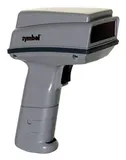
Symbol's product reference guide for the LS 3064MX, a hand-held laser memory scanner with on-board decoding, memory storage and battery operation. The User's Guide covers unpacking, charging, aiming, the decode zone, maintenance, the controller and RS-232 interfaces and technical specifications. It explains the Normal, Store and Download modes. The Programmer's Guide lists parameter selections, descriptions and the programming bar code menus with an ASCII table, and the Operator's Guide holds the mode bar codes.
Its parts
- LS 3064MX User's Guide
- LS 3064MX Programmer's Guide
- LS 3064MX Operator's Guide
From the manual
Key facts from this manual
Some pages are scans or cannot be read; this says only what the readable text supports. Each line names its page in the PDF.
Product reference guide for the Symbol LS 3064MX memory scanner, a hand-held laser scanner that decodes on board, stores scans in memory, and runs on NiCad batteries. It combines the user's, programmer's, and operator's guides: setup and charging, normal, store, and download modes, interface pin-outs, specifications, the programming parameters, and beeper meanings.
- Device
- Hand-held laser scanner with on-board decoding, memory storage, and battery operation p. 5
- Operating modes
- Normal, Store, and Download p. 6
- Outputs
- LS 3000 emulation for Symbol controllers, or standard RS-232C p. 6
- External power
- 9 to 14 VDC, 12 VDC typical; 130 mA typical scanning p. 25
- Battery
- Removable NiCad pack in the lower handle, 5 cells, 5.5 to 7.5 VDC p. 9, 25
- Charge time
- Full charge 48 hrs in the scanner, or 7 to 8 hrs removed; about 20,000 half-second scans p. 25
- External charger
- Universal Four Slot Battery Charger p. 9
- Memory backup
- Lithium battery, 3.0V at 250 mAh, typically 8 years p. 25
- Working range
- Up to 35 in. (89 cm) for 55 mil symbols; 5.0 mil minimum element width p. 26
- Serial defaults
- 9600 baud, seven data bits, even parity, two stop bits; 300 to 19,200 baud p. 35
- Bar codes read
- Code 39, Code 39 Full ASCII, Code 93, Codabar, UPC/EAN, Interleaved 2 of 5, Discrete 2 of 5, Code 128 p. 34
- Size and weight
- 6.9 in. high, 4.9 in. long, 2.8 in. wide; .825 lb. (.377 kg) p. 26
- Operating temperature
- 32 to 104 °F (0 to 40 °C) p. 26
- Durability
- 6-ft. drop to concrete p. 26
What this manual walks you through
- Charging through an interface controller or the cable p. 8
- Swapping the battery pack in the handle p. 9
- Setting up normal mode for a Symbol controller or an RS-232C device p. 10
- Downloading stored data p. 11
- Storing scans in memory away from the host p. 12
- Checking what to do when nothing happens p. 16
- Cleaning the window and caring for the NiCad batteries p. 17
- Finding the scanner software version p. 18
- Controller and RS-232 connector pin-outs p. 21, 22, 23, 24
- Reading the beeper definitions p. 138, 139, 140
Good to know
- Scanners should be fully charged before first use, for at least 36 hours. p. 8
- In LS 3000 emulation the controller must supply 12 volts. p. 10
- If the scanner loses its serial number, nothing scans until it is reset from the saved serial number label. p. 7
- Code types must be compatible with the controller in use. p. 34
- Water or cleaning liquid should not be sprayed directly into the window. p. 17
Questions this manual answers
How long does the LS 3064MX battery take to charge?
About 48 hours for a full charge in the scanner, or 7 to 8 hours with the pack removed. A full charge gives about 20,000 half-second scans. p. 25
Why does my LS 3064MX beep five times?
It has lost its serial number. Reset it with the SET SERIAL NUMBER symbol, as described in the Programmer's Guide. p. 16, 140
What are the LS 3064MX default RS-232 settings?
9600 baud, seven data bits, even parity, and two stop bits. p. 35
How do I download stored scans from the LS 3064MX?
Connect it to a Symbol controller or RS-232C host with 12 volts available, select the transmission mode, and scan Download From Start. The green LED blinks until the download finishes. p. 11
What does the LS 3064MX hi/lo warble repeated four times mean?
The memory is full. p. 139
The whole text · 14 parts
Read the manual here as text
Its text as extracted from the PDF, unedited, in parts; each page opens the PDF at that page.
The file