Manual · PSC
Universal Keyboard Wedge Connectivity Guide
Manual11 pagesPDF 186 KB
PSC connectivity guide for connecting Universal Wedge scanners such as the VS800 to PCs and terminals: keyboard type IDs and cables.
Covers · 2 models
The models it covers
Summary
What is in it
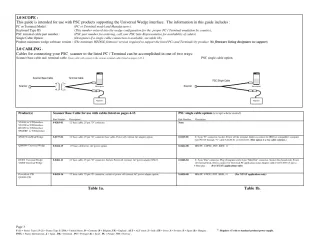
A connectivity reference for PSC scanners that support the Universal Wedge interface, including the VS800, QS6000+, Duet, PowerScan, QS1000, VS1000, VS1200, HS1250 and SP400 models. It explains the two cabling methods (scanner base cable plus terminal cable, or a single cable) and lists base cable part numbers. Large tables then list PC and terminal models by maker, with the keyboard type ID for each country, the PSC terminal cable part number, single cable availability and the minimum wedge firmware version per scanner.
From the manual
Key facts from this manual
Some pages are scans or cannot be read; this says only what the readable text supports. Each line names its page in the PDF.
The PSC Universal Keyboard Wedge Connectivity Guide R44-2039 (2002) for scanners with the Universal Wedge interface: PowerScan, Duet, VS800, QS1000, QS6000+, SP400 WorldWideWedge, and the VS1000, VS1200, HS1250 and SP400RF with STI interface. For each listed PC, terminal or notebook it gives the keyboard type ID by country, the PSC terminal cable part number, whether a single cable works, and the minimum wedge firmware.
- Guide contents
- Per PC or terminal: keyboard type ID, PSC terminal cable part number, single cable option, minimum wedge firmware p. 3
- Scanners covered
- PowerScan, Duet, VS800, QS1000, QS6000+, SP400WWW, VS1000, VS1200, HS1250, SP400RF p. 4
- Cabling options
- Scanner base cable plus a terminal cable, or a PSC single cable p. 3
- Keyboard type ID
- Number entered into the wedge configuration for the right PC or terminal emulation by country p. 3
- Keyboard countries
- France Type I and II, USA, Germany, Belgium, England, ALT mode, Italy, Swiss, Sweden, Spain, Hungary, France International, Japan, Denmark, Portugal, Israel, Poland, Norway p. 3
- Notebook ports
- External keyboard port, RS232 9 pin COM port with 6 pin minidin mouse port, or Apple ADB port p. 11
- PC makers listed
- Acer, ADDX / Normerel, ADI, Alcatel / Idea / ITT, Apple, Apricot, AST, Axel, Bull, Canon, Carry, Citoh, Commodore, Compaq p. 4
- Notebook makers listed
- Acer, Apple, Compaq, Digital, Dual, Fujitsu, Hewlett Packard, IBM, ICL, NEC, Toshiba, Unisys, Zenith Data System p. 11
What this manual walks you through
- Finding the keyboard type ID for a PC or terminal and its country keyboard p. 3, 4
- Choosing a base cable with a terminal cable or a single cable p. 3
- Checking the minimum wedge firmware a PC or terminal needs p. 3
- Connecting to notebooks, with or without reconnecting the mouse p. 11
Good to know
- Entries marked with an asterisk need a +5 volt or the standard product power supply. p. 3
- Where no firmware version is listed, that PC or terminal is not supported. p. 3
- For the Dual 486 DX/66 notebook, the wedge must use EPROM DIT50. p. 11
Questions this manual answers
What is the keyboard type ID in a PSC Universal Wedge setup?
It is the number entered into the wedge configuration so the scanner emulates the right PC or terminal keyboard for the country. p. 3
How is a PSC Universal Wedge scanner cabled to a PC?
Either with a scanner base cable plus a terminal cable for the PC, or with a PSC single cable where one is available. p. 3
Which scanners does the PSC Universal Keyboard Wedge Connectivity Guide cover?
PowerScan, Duet, VS800, QS1000, QS6000+, SP400WWW, VS1000, VS1200, HS1250 and SP400RF. p. 4
Can a PSC keyboard wedge scanner connect to a notebook?
The guide lists notebooks that connect through an external keyboard port, an RS232 COM port with a mouse port, or the Apple ADB port. p. 11
The whole text · 2 parts
Read the manual here as text
Its text as extracted from the PDF, unedited, in parts; each page opens the PDF at that page.
The file