Manual · PSC
LazerData 16000 Series Bar Code Scanner Installation Manual
Manual62 pagesPDF 705 KB
Installation manual for the PSC LazerData 16000 Series fixed-position bar code scanner with decoder: setup, wiring, layouts and reading features.
Covers · 1 model
The models it covers
Summary
What is in it
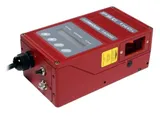
PSC's installation manual for the LazerData 16000 Series, a fixed-position unattended bar code scanner with a built-in decoder for omnidirectional reading. It covers laser and electrical safety, features (ACR code reconstruction, CD SQUARE and PackTrack), models and accessories, opening the scanner and selecting interfaces, mounting, JBOX wiring, RS232, RS485 and 20-mA current loop connections, inputs and outputs, focus, typical layouts, reading diagrams, maintenance and technical features.
Its parts
- Safety Precautions
- General Features
- Installation
- Reading Features
- Maintenance
- Service and Warranty
- Technical Features
From the manual
Key facts from this manual
Each line names its page in the PDF.
Installation Manual, part number 08871 revision A (10/98), for the PSC LazerData 16000 Series fixed-position unattended bar code scanner, in its connector (LD160101) and junction box (LD160102) models. It shows how to set the interface and inputs, mount and position the scanner, wire the serial interfaces, inputs and outputs, adjust focus and clean the window, and lists the technical features.
- Device
- Fixed-position, unattended omnidirectional bar code scanner with built-in decoder p. 1, 12
- Models
- LD160101 connector model; LD160102 junction box model p. 14
- Main serial interface
- RS232 (factory set), RS485-nonpolled, RS485-polled or 20-mA current loop, chosen by an internal jumper p. 20
- Auxiliary interface
- RS232 or RS485-polled, chosen in the LDHOST program p. 38
- Power
- 10 to 30 VDC; 9 W max p. 32
- Scan rate
- 800 scans/s on standard models p. 13
- Light source
- Solid-state laser diode, 650~680 nm p. 13
- Enclosure
- IP65 p. 13
- Connectors
- Connector model: power (male, 3 pins), presence sensors (female, 6 pins), output/serial (female, 19 pins), oscillating mirror (female, 2 pins) p. 29
- Inputs
- Presence sensors PS1 and PS2 (both NPN or both PNP) and encoder ENC, optocoupled; 30 V, 25 mA max p. 22, 39, 41
- Outputs
- NO READ and RIGHT, optoisolated Darlington; 30 V max, 130 mA max (40 mA if driven continuously) p. 42, 43
- Display and keys
- 2 by 16 character LCD, built-in keypad, internal beeper, status LEDs p. 13, 14
- Accessories
- LD16-90DEG 90° deflection mirror; LD16-MOUNT mounting bracket p. 14
- Configuration
- Windows LDHOST program on diskette, the built-in keypad, or ESC sequences from a host p. 13
What this manual walks you through
- Checking the package contents p. 16
- Opening the scanner to set the interface jumper, multidrop address and input type p. 18, 20, 21, 22
- Mounting the scanner p. 23
- Pinouts of the power, input, mirror and output connectors p. 29, 30, 31
- Wiring the RS232, RS485 and 20-mA current loop interfaces p. 33, 34, 35, 36, 37
- Wiring presence sensor and encoder inputs p. 39, 40, 41
- Using the NO READ and RIGHT outputs p. 42, 43
- Positioning the scanner for pitch, skew and tilt p. 43, 44
- Adjusting the focus p. 44
- Cleaning the laser output window p. 56
Good to know
- Disconnect the power cable before unscrewing the connector or cable panel. p. 18
- RS485-polled cannot be the auxiliary interface when the main interface is 20-mA current loop. p. 39
- An output driven continuously must stay at 40 mA or less. p. 43
- Keep the skew angle at least 10° to avoid direct reflection of the laser light. p. 44
- Above 35°C / 95ºF the Beam Shutter is advised. p. 61
Questions this manual answers
What is the difference between the PSC LD160101 and LD160102?
LD160101 is the connector model and LD160102 is the junction box model of the LazerData 16000 scanner. p. 14
What power does the PSC LazerData 16000 need?
10 to 30 VDC, with a maximum power consumption of 9 W. p. 32
What interfaces does the LazerData 16000 have?
A main serial interface set by jumper to RS232, RS485-nonpolled, RS485-polled or 20-mA current loop, plus an auxiliary RS232 or RS485-polled interface. p. 20, 38
How do I configure the LazerData 16000 scanner?
With the Windows LDHOST program on the diskette, through the built-in keypad, or by sending ESC sequences from a host computer. p. 13
How do I clean the LazerData 16000 window?
With the scanner or laser turned off, wipe the window with a soft cloth and alcohol; do not use abrasive cleaners. p. 56
The whole text · 7 parts
Read the manual here as text
Its text as extracted from the PDF, unedited, in parts; each page opens the PDF at that page.
The file