Manual · Opticon
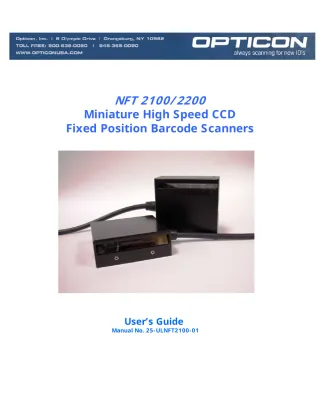
NFT 2100/2200 Miniature High Speed CCD Fixed Position Barcode Scanners User's Guide
Manual73 pagesPDF 332 KB
User's guide for the Opticon NFT2100 and NFT2200 miniature CCD fixed position bar code scanners: specifications, mounting and programming.
Covers · 1 model
The models it covers
Summary
What is in it
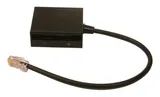
The user's guide for the Opticon NFT2100 (front view) and NFT2200 (side view) miniature CCD fixed position bar code scanners, built to be incorporated into host equipment. It gives a quick start-up procedure over RS232, full technical specifications, guidance on positioning the scanner for best performance, configuring it with computer and bar code programming commands, application support, servicing, and dimensional and placement drawings, including placement for test tubes.
Its parts
- Introduction and Getting Started
- Technical Specifications
- Positioning the Scanner
- Configuring the Scanner
- Application Engineering Support
- Scanner Labeling
- Scanner Servicing and Maintenance
From the manual
Key facts from this manual
Each line names its page in the PDF.
This is the user's guide for the Opticon NFT2100 and NFT2200 miniature CCD fixed position barcode scanners; the NFT2100 has a front view case and the NFT2200 a side view case. It gives the specifications, how to mount and aim the scanner for good reads, and how to program it with RS232 commands from a host or with programming bar codes.
- Device type
- Miniature CCD fixed position barcode scanner, 200 scans per second p. 4
- Case style
- NFT2100: front view case; NFT2200: side view case p. 4, 10
- Interface
- RS232 on a 9 pin D-sub female connector with a 3.5mm power pigtail stereo jack p. 9, 10
- Power
- +5 Volt DC, which the user must provide p. 4
- Focal distance
- NFT2100: 1.4 in; NFT2200: 1.2 in; field of view 3.1 in at the focal distance p. 11
- Symbologies
- Codabar, Code 39, Code 93, Code 128, Industrial/Interleaved/Matrix 2 of 5, MSI/Plessey, UK/Plessey, UPC/EAN/JAN, IATA, Telepen, TriOptic, SCode p. 6
- Light and sensor
- 660 nm visible red LED; CCD linear image sensor with 2048 pixels p. 6
- Part numbers
- NFT2100IR1S-054 (front view), NFT2200LR1S-054 (side view), each with 9 pin D-sub female connector and power pigtail p. 10
- Default serial settings
- 9600 baud, 8 data bits, 1 stop bit, no parity, no handshaking p. 15
- Enclosure and mounting
- Compact steel enclosure; 4 threaded M3 mounting holes, 2 on each side p. 4, 6
- Humidity
- Operating 20 to 80% RH, storage 20 to 90% RH, non-condensing p. 10
- Ambient light
- Fluorescent or incandescent, 5,000 lx max p. 10
- Power supply
- P/N 32-00907-01, plugs into the power jack on the DB9 connector (named for the LHA2107RR1S-054) p. 4
- Depth of field
- NFT2100: 0.9 to 1.6 in for 6 mil codes, 0.9 to 2.4 in for 40 mil codes p. 68
What this manual walks you through
- Quick start: connecting to a PC serial port and setting up a terminal program p. 4, 5
- Positioning the scanner: distance, field of view, reflection and label quality p. 11, 12, 13
- Finding the best mounting position with continuous read and the buzzer p. 13
- Settings for high throughput or for highest data integrity p. 13, 14
- Detecting whether a bar code was present when nothing is read p. 14
- Common causes of poor scanning performance p. 16
- Programming the scanner with commands sent from the host p. 19, 21
- Programming the scanner with bar code menus p. 19
- Returning the scanner to factory default settings p. 15, 20
- Cleaning the scanner p. 17
Good to know
- The scanner has no user adjustable or serviceable parts inside. p. 17
- Avoid aiming within 10 degrees of perpendicular to the label, where LED light reflects straight back; a skew of about 13 degrees is recommended. p. 12
- Settings sent as host commands are not kept through a power cycle until the Z2 store command is sent. p. 15
- With handshaking turned on, the scanner sends nothing until the CTS signal is active. p. 16
- Do not clean with bleach, full or diluted; water is preferred, with neutral detergent or ethanol only if needed. p. 17
Questions this manual answers
What power does the Opticon NFT2100 need?
It runs on +5 Volt DC, which the user must provide. p. 4
How far from the barcode should the NFT2100 be mounted?
At its focal distance, about 1.4 inches for the NFT2100; the NFT2200 focuses at about 1.2 inches. p. 11
How do I check that the NFT2100 is talking to my PC?
Send Esc Z3 Enter from the PC keyboard; the scanner should reply with a list of its software settings. p. 5
Why is the red light off on my NFT2100?
It may be in a mode that waits for a trigger command; sending Esc S7 Enter from the PC turns that mode off. p. 5
The whole text · 8 parts
Read the manual here as text
Its text as extracted from the PDF, unedited, in parts; each page opens the PDF at that page.
The file