Manual · Metrologic
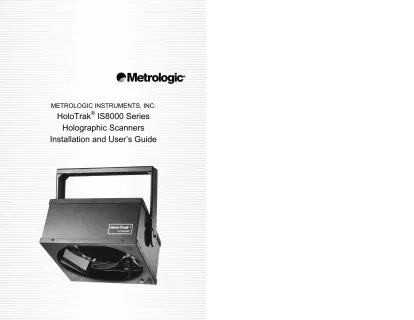
HoloTrak IS8000 Series Holographic Scanners Installation and User's Guide
Manual40 pagesPDF 2.5 MB
Installation and user's guide for the Metrologic HoloTrak IS8000 series (IS8300, IS8400, IS8500, IS8800) holographic industrial scanners.
Names · 4 models
The models it names
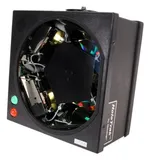 Metrologic IS8300Fixed-mount omnidirectional barcode scanner from$1,995.003 in stock
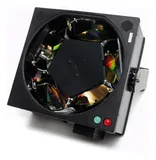 Metrologic IS8400Fixed-mount omnidirectional barcode scanner from$3,595.005 in stock Metrologic IS8500Fixed-mount omnidirectional barcode scanner from$2,995.0015 in stock Symbol IS8500Fixed-mount omnidirectional barcode scanner Call for availability
Filed with · 2 models
Also filed with these models on the old site
Summary
What is in it
Metrologic installation and user's guide for the HoloTrak IS8000 series of omnidirectional holographic scanners for long-range industrial scanning: the IS8300, IS8400, IS8500 and IS8800. It covers kit contents and accessories, single and primary/secondary installation, the MX001 industrial controller, external speaker and hand-held port options, configuring with MetroSet 2, mounting, indicators, depth of field and scan pattern for each model, maintenance, troubleshooting, specifications, defaults and pinouts.
Its parts
- Introduction
- Scanner and Accessories
- Installing the Scanner to the Host
- Configuration to the Host System
- Installing and Running the MetroSet 2 Program
- Parts of the Scanner
- Mounting Bracket Installation
- Visual and Audible Indicators
- Labels
- Depth of Field and Scan Pattern Characteristics
- Maintenance
- Troubleshooting Guide
From the manual
Key facts from this manual
Some pages are scans or cannot be read; this says only what the readable text supports. Each line names its page in the PDF.
The Metrologic Installation and User's Guide (MLPN 00-02377) for the HoloTrak IS8000 Series holographic scanners: the IS8300, IS8400, IS8500 and IS8800. It covers the kit contents and accessories, connecting the scanner to a host alone or as a primary/secondary pair, the optional MX001 controller, speaker box and hand-held port, MetroSet 2 setup, indicators, troubleshooting, specifications, default settings and connector pinouts.
- Device
- Long-range omnidirectional holographic bar code scanner for industrial use, in a NEMA-12 case; mounts in any orientation p. 5
- Scan performance
- IS8300: 5,250 scan lines per second, 457.2 mm (18") depth of field; IS8400: 3,360, 711.2 mm (28"); IS8500: 5,600, 711.2 mm (28") p. 5
- Interfaces
- RS-232, RS-422 and light pen emulation through a 25-pin D-type host connector p. 5, 14
- Power
- 12VDC @ 4.16 Amps power supply (MLPN 46-46207-US, 46-46207-UK or 46-46207-EC) on a 9-pin connector p. 6, 14
- Environment
- Operating 0°C to 40°C; storage -40°C to 60°C; 5% to 95% relative humidity, non-condensing p. 25
- Connectors
- 25-pin host, 15-pin for primary/secondary or MX001, 9-pin power, 9-pin for a 5V non-decode hand-held scanner, 8-pin AMP for the MX008 speaker p. 14
- Cables
- 52-52702 standard 2 meter (6 ft.); 52-52704 6 meter (20 ft.); 52-52707 3 meter (10 ft.) secondary cable, not for use with MX001; 51-51882 tech secondary adapter p. 6
- Brackets and windows
- Mounting bracket 45-45615 (IS8300) or 45-45616 (IS8400/IS8500/IS8800); scan window 45-45224 (IS8300) or 45-45223 (IS8400/IS8500/IS8800) p. 6
- MX001 controller
- 45-45745 (single scanner) or 45-45718 (primary/secondary); sensor input of 12V or 5V at 10mA; Triac switches 115 VAC at 10 Amps or 230VAC at 6 Amps p. 6, 9
- External speaker
- MX008 high volume speaker, for IS8400 and IS8500 only, with 52-52206 3.7 meter (12 ft.) cable p. 6
- Configuration software
- MetroSet 2 over an RS-232C serial port (COM1 or COM2); HoloSet can also be used p. 13
- Primary/secondary coverage
- IS8300: 12" (305 mm) to 24" (610 mm); IS8400 and IS8500: 22" (559 mm) to 44" (1118 mm) on a single conveyor p. 7
- Default codes
- UPC/EAN, Code 39, Code 93, Code 128, Codabar and Interleaved 2 of 5 enabled by default p. 26
- Laser
- The manual states 7.7 mW peak, under 1 mW average, Class II (CDRH) and Class 2 (EN) p. 25
What this manual walks you through
- Connecting a single scanner to the host and power p. 7
- Daisy-chaining two scanners as primary and secondary p. 7, 8
- Installing the MX001 industrial controller, external speaker or hand-held scanner p. 9, 10, 11
- Installing and running MetroSet 2 to configure the scanner p. 12, 13
- Fitting the mounting bracket p. 15
- Reading the LED and beep indicators p. 16
- Cleaning the output window p. 22
- Troubleshooting power, scanning and host communication problems p. 23
- Connector pinouts for host, auxiliary, power, hand-held and speaker ports p. 31, 32
Good to know
- Do not power up the scanner until the communication cable is secured to the host. p. 7
- Do not clean the window with solvents such as alcohol or acetone; they can damage it. p. 22
- Only one MX001 can be used in a primary/secondary setup, and it must connect to the primary scanner. p. 9
- All circuits connected to the scanner must meet SELV requirements according to EN 60950. p. 7
Questions this manual answers
What power supply does the Metrologic IS8500 use?
A 12VDC @ 4.16 Amps supply, MLPN 46-46207-US, -UK or -EC, plugged into the scanner's 9-pin power connector. p. 6, 14
What does it mean when the red and green LEDs alternate with a razz tone?
A motor failure. The guide says to contact a Metrologic service representative. p. 16, 23
What host interfaces does the IS8000 series support?
RS-232, RS-422 and light pen emulation, all on the 25-pin host connector. p. 5, 31
How do I configure an IS8500?
Install MetroSet 2 on a PC, connect the scanner to the PC's RS-232C serial port (COM1 or COM2), then select Holotrak and Configure. p. 13
Contents
Chapters and sections
Each line opens the PDF at its page.
The whole text · 4 parts
Read the manual here as text
Its text as extracted from the PDF, unedited, in parts; each page opens the PDF at that page.
The file