Manual · Intermec
EZBuilder Tutorial, Appendix A: Using EZBuilder Features (TFTP file transfer)
Manual12 pagesPDF 137 KB
EZBuilder tutorial pages on moving files between TCP TRAKKER Antares terminals and a TFTP server.
Filed with · 6 models
Also filed with these models on the old site
 Intermec 2420Portable batch data collection terminal from$1,095.0033 in stock
 Intermec 2425Wireless portable data collection terminal from$995.00271 in stock
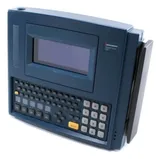 Intermec 2480Stationary data collection terminal for data entry from$1,275.003 in stock
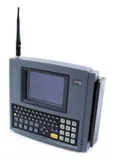 Intermec 2486Stationary data collection terminal for data entry from$1,795.001 in stock
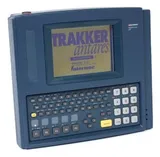 Intermec 2481Stationary data collection terminal for data entry Call for availability Intermec 2485Stationary data collection terminal for data entry Call for availability
Summary
What is in it
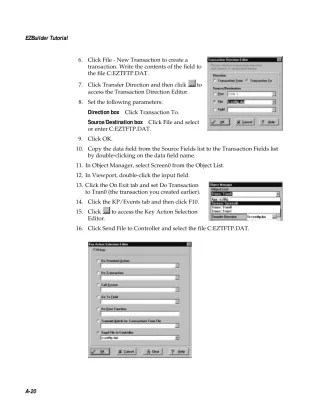
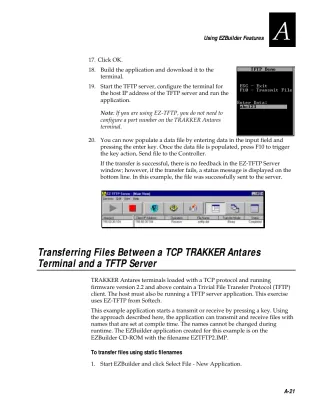
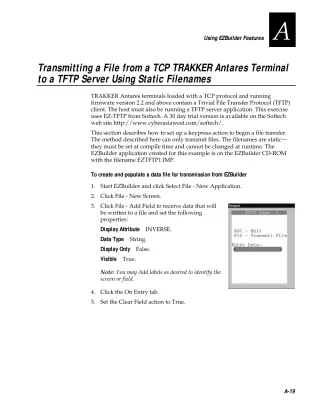
Pages A-19 to A-29 of the EZBuilder Tutorial, giving three step-by-step exercises for building EZBuilder applications that transfer files between a TRAKKER Antares terminal running a TCP protocol and a TFTP server on the host. The exercises cover sending a file with a static filename on a keypress, sending and receiving files with static filenames using file actions, and sending and receiving files with filenames entered at runtime through the im_transmit_file() and im_receive_file() functions. The examples use the EZ-TFTP server from Softech.
From the manual · read page by page
Key facts from this manual
Each line names its page in the PDF.
An excerpt from Appendix A of the Intermec EZBuilder Tutorial showing how to build EZBuilder applications that move files between a TRAKKER Antares terminal and a TFTP server. It names no terminal model number, only TRAKKER Antares terminals loaded with a TCP protocol. Three step-by-step exercises cover sending a file with fixed names, sending and receiving with fixed names, and transfers with names typed at run time.
- Document
- EZBuilder Tutorial appendix on TFTP file transfer from TRAKKER Antares terminals p. 1
- TFTP client
- Built into TRAKKER Antares terminals with a TCP protocol and firmware 2.2 or later p. 1
- Host side
- The host must run a TFTP server; the exercises use EZ-TFTP from Softech p. 1
- Port setting
- With EZ-TFTP, no port number is set on the terminal p. 3
- Sample files
- EZTFTP1.IMP, EZTFTP2.IMP and EZTFTP3.IMP on the EZBuilder CD-ROM p. 1, 3, 7
- PSK functions
- im_transmit_file() and im_receive_file(), wrapped in IM_ISGOOD p. 9, 10
- Key actions
- Send File to Controller and Receive File From Controller, triggered by a function key p. 2, 6
What this manual walks you through
- Sending a data file to a TFTP server with a fixed filename p. 1, 2, 3
- Sending and receiving files with fixed filenames using function keys p. 3, 4, 5, 6
- Transferring files with filenames entered at run time p. 7, 8, 9, 10, 11
- Setting success and failure messages and beeps for a transfer p. 5, 6
Good to know
- With static filenames, names are set when the application is compiled and cannot be changed while it runs. p. 1
- The first method can only transmit files, not receive them. p. 1
- Without IM_ISGOOD, EZBuilder reads the transfer status backwards. p. 9
- EZ-TFTP shows no message on a successful transfer, only on a failure. p. 3
Questions this manual answers
Does the TRAKKER Antares support TFTP?
Yes, terminals loaded with a TCP protocol and running firmware 2.2 or later include a TFTP client. p. 1
What TFTP server works with a TRAKKER Antares?
The exercises use EZ-TFTP from Softech on the host; the host must run some TFTP server application. p. 1
How do I receive a file from a TFTP server in EZBuilder?
Set a file action to Receive File From Controller, or call im_receive_file() in a user function, and trigger it with a key. p. 6, 10
Why does EZBuilder report a successful transfer as failed?
The im_transmit_file() status must be wrapped in IM_ISGOOD, or EZBuilder reads the status backwards. p. 9
The whole text · 2 parts
Read the manual here as text
Its text as extracted from the PDF, unedited, in parts; each page opens the PDF at that page.
The file