


Manual · Intermec
Intermec TD2400 Dock
Manual2 pagesPDF 69 KB
Both pages are below, each with its text.
Names · 1 model
The models it names
Filed with · 2 models
Also filed with these models on the old site


From the manual · read page by page
Key facts from this manual
Each line names its page in the PDF.
The quick reference guide (P/N 065555-004, 1998) for the Intermec TRAKKER Antares TD2400 Communications Dock, an accessory for the 2420 and 2425 hand-held terminals. The dock passes RS-232 serial data between the terminal and a host computer or modem over an optical link and charges the terminal's batteries. It covers setup, the status lights, specifications, the connector pinout and troubleshooting.
- Device
- Communications dock and charger for the TRAKKER Antares 2420 and 2425 hand-held terminals p. 1
- Host interface
- 9-pin D RS-232, up to 38400 baud p. 1
- Terminal link
- Optical: 2 IR receivers and 2 IR transmitters p. 1
- Power
- 12V 750mA from an external supply, Intermec Part No. 065236, ordered separately p. 1, 2
- Serial cables
- Intermec Part No. 047569 or 059167 p. 2
- Charging
- Trickle charges the lithium-ion pack and NiCad backup battery; a fully discharged pack takes 16 hours p. 2
- Charge temperature
- 32 to 104 F (0 to 40 C) p. 1
- Operating temperature
- -4 to 122 F (-20 to 50 C) p. 1
- Storage temperature
- -4 to 158 F (-20 to 70 C) p. 1
- Humidity
- 0 to 95%, non-condensing p. 1
- RS-232 pinout
- Pin 2 RXD, 3 TXD, 4 DTR, 5 GND, 7 RTS, 8 CTS p. 1
- Status lights
- Receive, Transmit and Power; Power is green with a terminal inserted, amber without p. 2
- Part number
- Guide P/N 065555-004 p. 1
What this manual walks you through
- Choosing a location and mounting the dock p. 2
- Connecting the dock to a host computer or modem p. 2
- Connecting the power supply p. 2
- Inserting the terminal and transferring data p. 2
- Reading the status lights p. 2
- Troubleshooting a bad connection or dark power light p. 1
Good to know
- The power supply must stay connected at all times to use the dock. p. 2
- A battery pack must be installed in the terminal for all operations. p. 2
- The lithium-ion pack will not charge below 32 F (0 C). p. 1
- Do not expose the dock to rain or moisture. p. 1
Questions this manual answers
What power supply does the Intermec TD2400 dock use?
A 12V 750mA Intermec power supply, Part No. 065236, ordered as a separate accessory. p. 2
Which terminals fit the TD2400 dock?
The TRAKKER Antares 2420 and 2425 hand-held terminals. p. 1
How long does a 2420 battery take to charge in the TD2400?
A fully discharged lithium-ion pack charges in 16 hours, with the external power supply connected. p. 2
Why is the TD2400 power light off?
Check that the outlet has power, the supply is plugged in, the terminal is fully seated, and the optical windows and the three dock pins are clean. p. 1
What serial cable connects the TD2400 to a PC?
An RS-232 serial cable, Intermec Part No. 047569 or 059167, attached to the 9-pin connector under the dock. p. 2
The file
Size and text
Every page · 2
Read it here
Each page as it is printed, and its words beside it, so a phone can search and copy them.
Page1of 2
Open in the PDF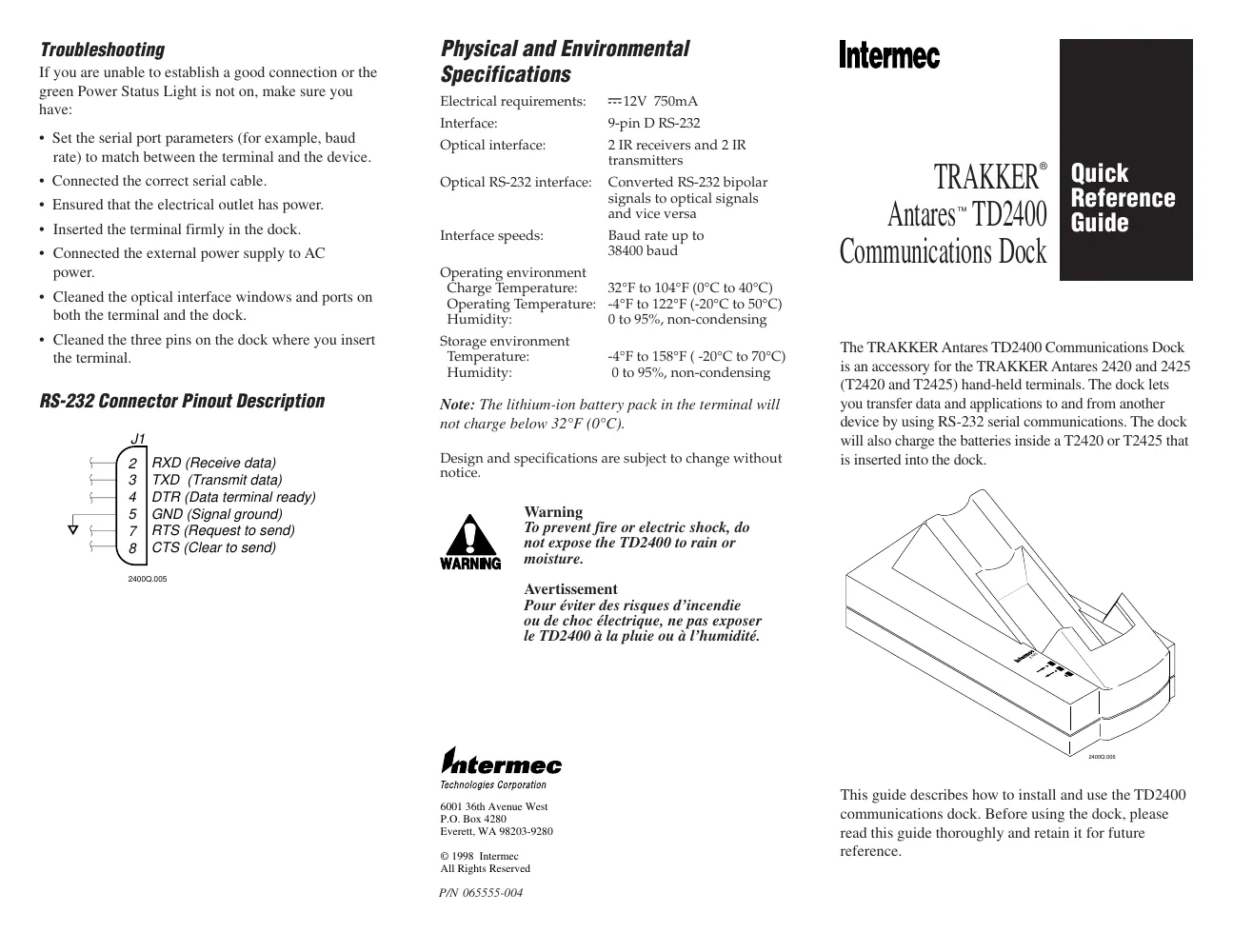
The text of page 1, from the PDF itself
Troubleshooting If you are unable to establish a good connection or the green Power Status Light is not on, make sure you have:
Physical and Environmental Specifications Electrical requirements:
xw12V 750mA
- Interface
- 9-pin D RS-232
- Set the serial port parameters (for example, baud rate) to match between the terminal and the device.
- Optical interface
- 2 IR receivers and 2 IR transmitters
- Connected the correct serial cable.
- Optical RS-232 interface
- Converted RS-232 bipolar signals to optical signals and vice versa
- Ensured that the electrical outlet has power.
- Inserted the terminal firmly in the dock.
- Connected the external power supply to AC power.
- Cleaned the optical interface windows and ports on both the terminal and the dock.
- Interface speeds
- Baud rate up to 38400 baud
Operating environment Charge Temperature: 32°F to 104°F (0°C to 40°C) Operating Temperature: -4°F to 122°F (-20°C to 50°C) Humidity: 0 to 95%, non-condensing
- Cleaned the three pins on the dock where you insert the terminal.
Storage environment Temperature: Humidity:
RS-232 Connector Pinout Description
Note: The lithium-ion battery pack in the terminal will not charge below 32°F (0°C).
-4°F to 158°F ( -20°C to 70°C) 0 to 95%, non-condensing
J1 2 3 4 5 7 8
RXD (Receive data) TXD (Transmit data) DTR (Data terminal ready) GND (Signal ground) RTS (Request to send) CTS (Clear to send)
Design and specifications are subject to change without notice.
TRAKKER Quick Antares TD2400 Reference Guide Communications Dock ™
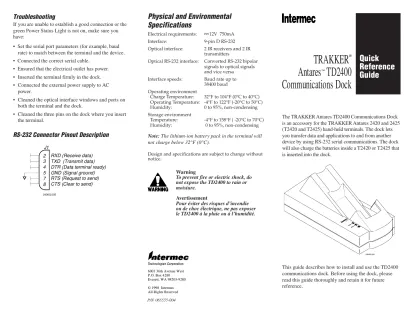
The TRAKKER Antares TD2400 Communications Dock is an accessory for the TRAKKER Antares 2420 and 2425 (T2420 and T2425) hand-held terminals. The dock lets you transfer data and applications to and from another device by using RS-232 serial communications. The dock will also charge the batteries inside a T2420 or T2425 that is inserted into the dock.
Warning To prevent fire or electric shock, do not expose the TD2400 to rain or moisture.
2400Q.0052425
Avertissement Pour éviter des risques d’incendie ou de choc électrique, ne pas exposer le TD2400 à la pluie ou à l’humidité.
2400Q.006
6001 36th Avenue West P.O. Box 4280 Everett, WA 98203-9280 © 1998 Intermec All Rights Reserved
P/N 065555-004
This guide describes how to install and use the TD2400 communications dock. Before using the dock, please read this guide thoroughly and retain it for future reference.
Page2of 2
Open in the PDF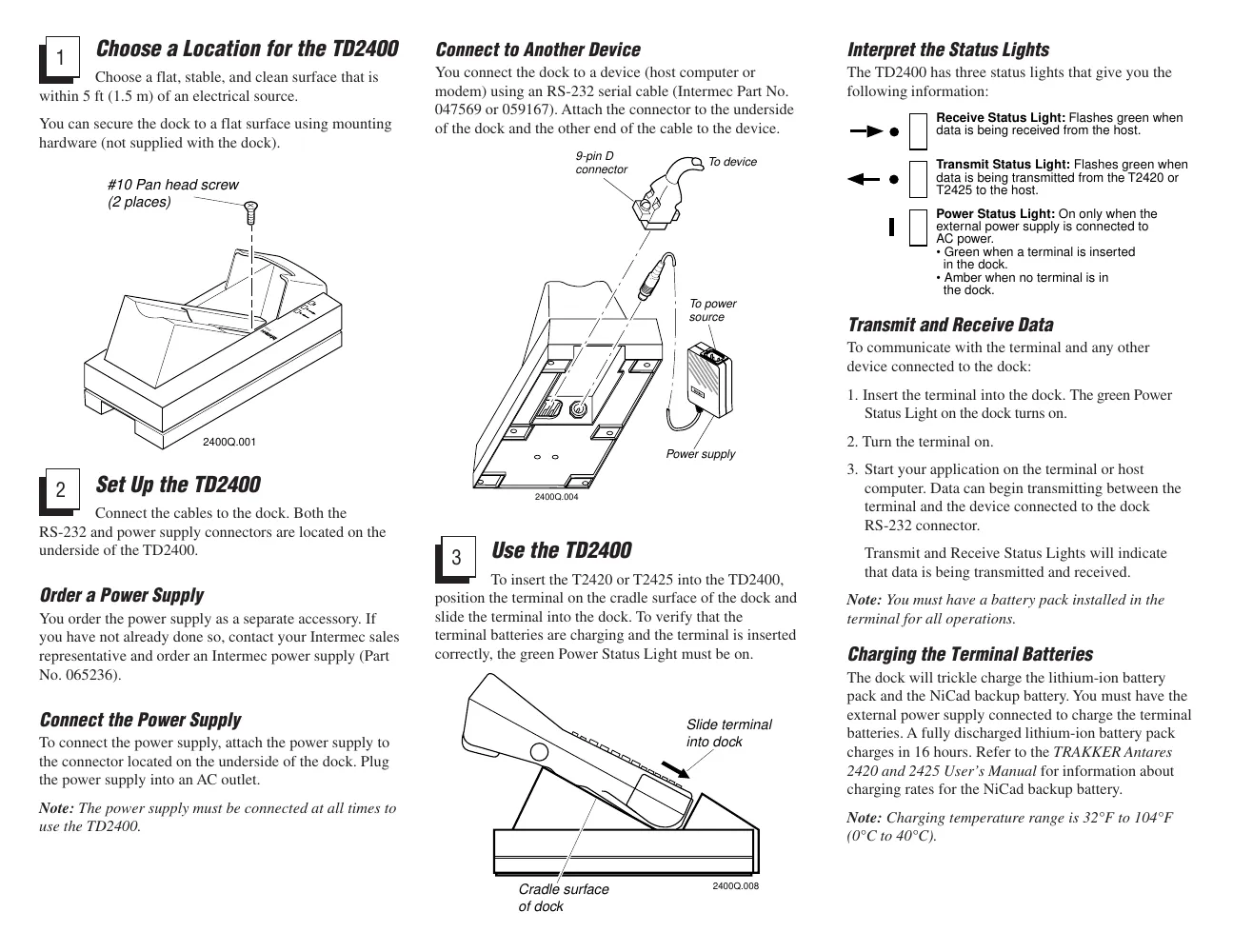
The text of page 2, from the PDF itself
1
Choose a Location for the TD2400
Choose a flat, stable, and clean surface that is within 5 ft (1.5 m) of an electrical source. You can secure the dock to a flat surface using mounting hardware (not supplied with the dock).
Connect to Another Device
Interpret the Status Lights
You connect the dock to a device (host computer or modem) using an RS-232 serial cable (Intermec Part No. 047569 or 059167). Attach the connector to the underside of the dock and the other end of the cable to the device.
The TD2400 has three status lights that give you the following information:
9-pin D connector
To device
#10 Pan head screw (2 places)
Receive Status Light: Flashes green when data is being received from the host. Transmit Status Light: Flashes green when data is being transmitted from the T2420 or T2425 to the host. Power Status Light: On only when the external power supply is connected to AC power.
- Green when a terminal is inserted in the dock.
- Amber when no terminal is in the dock.
To power source 52 42
Transmit and Receive Data To communicate with the terminal and any other device connected to the dock: 1. Insert the terminal into the dock. The green Power Status Light on the dock turns on. 2. Turn the terminal on.
2400Q.001Power supply2Set Up the TD2400
Connect the cables to the dock. Both the RS-232 and power supply connectors are located on the underside of the TD2400.
Order a Power Supply You order the power supply as a separate accessory. If you have not already done so, contact your Intermec sales representative and order an Intermec power supply (Part No. 065236).
3. Start your application on the terminal or host computer. Data can begin transmitting between the terminal and the device connected to the dock RS-232 connector.
2400Q.0043Use the TD2400
To insert the T2420 or T2425 into the TD2400, position the terminal on the cradle surface of the dock and slide the terminal into the dock. To verify that the terminal batteries are charging and the terminal is inserted correctly, the green Power Status Light must be on.
Connect the Power Supply
Slide terminal into dock
To connect the power supply, attach the power supply to the connector located on the underside of the dock. Plug the power supply into an AC outlet. Note: The power supply must be connected at all times to use the TD2400.
Transmit and Receive Status Lights will indicate that data is being transmitted and received. Note: You must have a battery pack installed in the terminal for all operations.
Charging the Terminal Batteries The dock will trickle charge the lithium-ion battery pack and the NiCad backup battery. You must have the external power supply connected to charge the terminal batteries. A fully discharged lithium-ion battery pack charges in 16 hours. Refer to the TRAKKER Antares 2420 and 2425 User’s Manual for information about charging rates for the NiCad backup battery. Note: Charging temperature range is 32°F to 104°F (0°C to 40°C).
Cradle surface of dock
2400Q.008





