


Manual · Intermec
Intermec Trakker Antares 4-Pack Battery Charger Instruction Sheet
Manual2 pagesPDF 90 KB
Both pages are below, each with its text.
Filed with · 3 models
Also filed with these models on the old site


From the manual · read page by page
Key facts from this manual
Each line names its page in the PDF.
The instruction sheet (P/N 064746-002, 1998) for the Intermec TRAKKER Antares 4-Pack Battery Charger, P/N 064667, which charges up to four SONY NP-500 series battery packs for the TRAKKER Antares 2400 series hand-held terminals. The sheet does not use the designation TZ2400 or name the 2420 or 2425 individually. It covers mounting, loading and unloading packs, status lights, specifications and power cord part numbers.
- Device
- 4-pack battery charger, P/N 064667, for TRAKKER Antares 2400 series terminals p. 1
- Batteries
- SONY NP-500 series packs, such as NP-520, NP-500 and NP-F530 p. 1
- Power
- 100-240V AC, 50/60Hz p. 1
- Power consumption
- 26 VA at 100V, 42 VA at 240V p. 1
- Charge time
- Usually two hours per pack; four hours each when two packs sit in adjacent slots p. 2
- Operating temperature
- 0 to 40 C (32 to 104 F); 10 to 30 C recommended for charging p. 1
- Storage temperature
- -20 to 60 C (-4 to 140 F) p. 1
- Dimensions
- About 76 x 112 x 165 mm (3 x 4.4 x 6.5 in.) p. 1
- Power cord, US
- 586105, 100-120 VAC (Canada, Central America, Japan, Korea, Mexico, Taiwan, US) p. 1
- Power cords, other
- 586266 UK; 586267 Europe; 586276 Switzerland; 586281 China; 586282 Chile, Italy; 586283 Denmark p. 1
- Status lights
- One orange light per slot: on charging, off complete, one blink already full p. 2
- Mounting
- Two sheet metal straps with flathead screws; bolts up to 1/2 inch diameter p. 2
- Part number
- Instruction sheet P/N 064746-002 p. 1
What this manual walks you through
- Mounting the charger to a work surface p. 2
- Loading and unloading battery packs p. 2
- Reading the slot status lights p. 2
- Ordering the right power cord by country p. 1
Good to know
- The charger is meant only for SONY NP-500 series battery packs. p. 1
- Packs slowly discharge when stored, so charge them shortly before use and remove them within 24 hours of a full charge. p. 1
- If a status light keeps blinking or fails to light, unplug the charger and contact Intermec service. p. 1
- There are no user-serviceable parts inside; do not disassemble it. p. 1
- An Intermec power cord for the charger is ordered from an Intermec sales representative if not already ordered. p. 1
Questions this manual answers
What batteries does the Intermec 064667 4-pack charger take?
SONY NP-500 series battery packs, such as the NP-520, NP-500 and NP-F530. p. 1
How long does a TRAKKER Antares battery take to charge?
Usually two hours; if two packs are in adjacent slots, each may take four hours. p. 2
What does a single blink on the charger light mean?
A fully charged battery pack was loaded. p. 2
Which power cord does the 4-pack charger need in the US?
Intermec power cord Part No. 586105, 100-120 VAC. p. 1
The file
Size and text
Every page · 2
Read it here
Each page as it is printed, and its words beside it, so a phone can search and copy them.
Page1of 2
Open in the PDF
The text of page 1, from the PDF itself
Important Precautions
This battery charger is intended to charge only the SONY NP-500 series of battery packs (such as NP-520, NP-500, and NP-F530).
Attach the battery pack firmly.
Charge the battery pack on a flat, vibration-free surface.
The battery pack gradually discharges even if it is fully charged. Intermec recommends that you charge the battery pack immediately before use, or at least within a couple of days before use.
Intermec recommends that you remove the battery pack from the charger within 24 hours after charging is completed.
The temperature range for charging is 0ºC to 40ºC (32ºF to 104ºF). However, for maximum battery pack efficiency, the recommended temperature range when charging is 10ºC to 30ºC (50ºF to 86ºF).
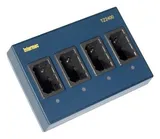
TRAKKER Antares 4-Pack Battery Charger Instruction Sheet The TRAKKER® Antares™ 4-pack battery charger (P/N 064667) lets you simultaneously charge up to four battery packs for the TRAKKER Antares 2400 series hand-held terminals. These instructions describe how to install and use the battery charger. Before using the charger, please read these instructions thoroughly and retain them for future reference. For help managing battery power, see your TRAKKER Antares 2400 series terminal user’s manual.
Warning
Be sure nothing metallic comes into contact with the contacts.
To prevent fire or electric shock, do not expose the battery charger to rain or moisture.
Do not disassemble the charger. There are no user-serviceable parts in the charger.
Avertissement
While the charger is in use, it becomes warm. This is normal.
Do not place the charger in locations that are extremely hot or cold, dusty or dirty, very humid, or subject to vibration.
Unplug the battery charger immediately and contact your Intermec service representative if the status light continues blinking or fails to light, if any part of the charger appears worn or damaged, or if any difficulty arises while using the battery charger.
Pour éviter des risques d’incendie ou de choc électrique, ne pas exposer le chargeur de la batterie à la pluie ou à l’humidité.
Specifications Power requirements
100-240V AC, 50/60Hz
Power consumption
26 VA (at 100V), 42 VA (at 240V)
Ordering Power Cords for the Battery Charger
Application
If you have not already ordered an Intermec power cord for your charger, contact your Intermec sales representative and order one:
SONY NP-500 series battery pack (such as NP-520, NP-500, and NP-F530)
Operating temperature
0ºC to 40ºC (32ºF to 104ºF)
Storage information
-20ºC to 60ºC (-4ºF to 140ºF)
Part No. 586105
Voltage 100-120 VAC
Where Used Canada, Central America, Japan, Korea, Mexico, Taiwan, and US
Dimensions
Approx. 76 X 112 X 165 mm (3 X 4.4 X 6.5 in.)
586266220-250 VACUK586267220-250 VACEurope586276220-230 VAC
Liechtenstein, Switzerland
586281220-250 VACChina, South Pacific586282120-250 VACChile, Italy586283220-250 VACDenmark, Greenland
Design and specifications are subject to change without notice. 6001 36th Avenue West P.O. Box 4280 Everett, WA 98203-9280 © 1998 Intermec All Rights Reserved
P/N 064746-002
Page2of 2
Open in the PDF
The text of page 2, from the PDF itself
TRAKKER Antares 4-Pack Battery Charger (P/N 064667)
Installing the Battery Charger For security purposes, you may want to install the battery charger as described below. Steps 1 and 2 are optional.
Battery pack
1.
Attach the two sheet metal mounting straps to the bottom of the battery charger with the two flathead screws provided.
2.
Attach the battery charger to a clean, stable, flat work surface using your own screws or bolts (up to 1/2 inch diameter).
3.
Plug the power cord into the charger and a wall outlet. If you do not have a power cord, see “Ordering Power Cords for the Battery Charger.”
Status Lights When a battery pack is loaded on the 1 side of the charger, status light 1 is on.
Charging a Battery Pack
2
1
When a battery pack is loaded on the 2 side of the charger, status light 2 is on. 1
Adjacent charging slots
You can charge up to four battery packs simultaneously, and you can load the battery packs into any slot. The charging time depends on the condition of the battery pack. Usually a battery pack is fully charged in two hours. If two battery packs are in adjacent slots, each may take four hours to charge.
Loading a Battery Pack Into the Charger 2
Press the battery pack against the battery charger and slide the battery pack down until it is seated firmly in the charger.
1 2
4PACK.001
Interpreting the Status Lights Attach the Intermec power cord here.
Adjacent charging slots
Note: A battery pack usually takes two hours to charge. If you load two battery packs in adjacent slots, then each battery pack takes four hours to charge.
Each charger slot has an orange status light which indicates the status of the battery pack in the slot. Next to each light is a line which points to the slot the light is for. Use this table to interpret the status lights: Lights
Description
On
The battery pack is charging.
Blinking
The battery pack is charging, but has not been charged for awhile.
One Blink
You loaded a fully charged battery pack.
Off
Charging is complete.
Unloading a Battery Pack From the Charger To unload a battery pack from the charger, slide it up in the opposite direction from when you loaded it. You can unload and use a battery pack before it has been fully charged.





