Manual · Intermec
21XX Universal Access Point Technical Reference Manual
Manual234 pagesPDF 982 KB
Technical reference manual for the Intermec 21XX Universal Access Point (2100 and 2101), covering installation, radios, bridging and upgrades.
Names · 1 model
The models it names
Filed with · 2 models
Also filed with these models on the old site
Summary
What is in it
Technical reference manual for the Intermec 21XX Universal Access Point, a wireless LAN device that links a wired network to wireless end devices. It covers the 2100 and 2101 UAPs and the wireless access point (WAP) setup: installing and configuring the unit, setting up the Ethernet, INCA/IP, 2.4 GHz OpenAir, 900 MHz Falcon, IEEE 802.11 DS and UHF ports, bridging and filters, remote management by Telnet or web browser, troubleshooting, specifications and firmware upgrades.
Its parts
- Learning About the 21XX Universal Access Point
- Installing and Configuring the UAP
- Installing and Configuring a Wireless Access Point
- Configuring the Ports
- Configuring the Bridging Parameters
- Managing the UAP Remotely
- Maintenance and Troubleshooting
- Advanced Features
From the manual
Key facts from this manual
Some pages are scans or cannot be read; this says only what the readable text supports. Each line names its page in the PDF.
The Intermec technical reference manual (P/N 067150-005, version 005 of 12/99) for the 21XX Universal Access Point, covering the industrial 2100 and the office 2101 Universal Office Access Point; it notes the 2110 Wireless Access Point is discontinued. It explains installing, configuring, managing and troubleshooting the access point with its 900 MHz, 2.4 GHz, IEEE 802.11 and UHF radio options.
- Device
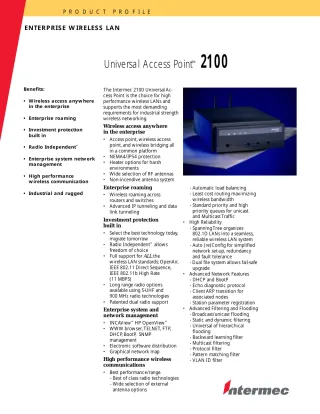
- Wireless LAN access point that links wireless end devices to a wired network; can also run as a point-to-point bridge, repeater or wireless access point (WAP) p. 19
- Ethernet ports
- 2100: 10Base2 (thin coaxial BNC) and 10BaseT (twisted-pair); 2101: 10BaseT; 10 Mbps p. 178
- Power
- 100 to 240V, 1.0 to 0.5A, 50 to 60 Hz AC; no On/Off switch p. 30, 38, 175
- Radio options
- 900 MHz Falcon, 2.4 GHz OpenAir, IEEE 802.11 Direct Sequence (2 Mbps or 1 Mbps) and UHF radios p. 176, 177
- Operating temperature
- 2100: 0°C to 50°C standard, -20°C to +50°C with optional heater module; 2101: 0°C to +40°C p. 175
- Size and weight
- 2100: 2.63 kg (5.8 lb); height 95 mm, length 355 mm, width 236 mm p. 175
- Configuration cable
- RS-232 null-modem cable with a 9-pin socket connector; Intermec 9-socket to 9-socket cable Part No. 059167 p. 38
- Serial settings
- 9600, N, 8, 1, no flow control; serial port maximum 115,200 bps p. 150, 178
- Enclosure
- 2100: sealed case for industrial and outdoor use; the manual states it meets IP 54 standards p. 19
- Management
- Telnet, SNMP (Version 1, RFC 1213) or web browser, after first setup over the serial port p. 20, 178
- Indicators
- Five LEDs: Power, Wireless #1, Wireless #2, Wired LAN, Root/error p. 29, 30
- 2101 specs
- 2101: 526 g (1.16 lb); 38 x 250 x 160 mm (height, length, width) p. 175
- Filtering
- 14,880 frames per second; AppleTalk, NetBEUI, IPX, IP, DECNET protocol filters p. 178
- Storage temperature
- 2100: -40°C to +70°C; 2101: -20°C to +70°C; humidity 10 to 90% non-condensing p. 175
What this manual walks you through
- Doing a quick installation with default settings p. 37, 38, 39
- Doing a standard installation and configuring over the serial port p. 39
- Opening the 2100 cable access door to reach the connectors p. 31
- Reading the LED pattern during boot and diagnostics p. 148, 149
- Understanding radio error messages p. 149
- Answers to common setup and roaming problems p. 150, 151
- Factory default settings for each configuration menu p. 179, 180, 181, 182, 183
Good to know
- The access point uses a custom antenna connector; using a different antenna may damage the connector and the access point. p. 38
- The access point has no default IP address; set an IP address and subnet mask over the serial port before connecting remotely. p. 150
- The 900 MHz Falcon radio is not available in Europe. p. 176
- The 2110 WAP is discontinued; its WAP function is available in the 2100 and 2101. p. 20
Questions this manual answers
What power does the Intermec 2100 access point need?
An AC source of 100 to 240V, 1.0 to 0.5A, 50 to 60 Hz. It has no On/Off switch and turns on when power is applied. p. 38, 175
What cable do I need to configure the 2100 from a PC?
An RS-232 null-modem cable with a 9-pin socket connector; Intermec offers Part No. 059167. Set the terminal to 9600, N, 8, 1, no flow control. p. 38, 150
Why can't I ping or Telnet to my new 2100?
It ships without an IP address. Set the IP address and subnet mask over the serial port first. p. 150
Can the 2100 work in cold storage?
With the optional heater module it runs from -20°C to +50°C, and with the heater module plus the optional insulated bag from -30°C to 0°C. p. 175
What does it mean when only the Power, Wired LAN and Root/Error LEDs stay on after boot?
The radio may be faulty or the configuration matrix string is incorrect; an error message also appears on a terminal connected to the serial port. p. 149
The whole text · 24 parts
Read the manual here as text
Its text as extracted from the PDF, unedited, in parts; each page opens the PDF at that page.
- Pages 1 to 101-10
- Pages 11 to 2011-20
- Pages 21 to 3021-30
- Pages 31 to 4031-40
- Pages 41 to 5041-50
- Pages 51 to 6051-60
- Pages 61 to 7061-70
- Pages 71 to 8071-80
- Pages 81 to 9081-90
- Pages 91 to 10091-100
- Pages 101 to 110101-110
- Pages 111 to 120111-120
- Pages 121 to 130121-130
- Pages 131 to 140131-140
- Pages 141 to 150141-150
- Pages 151 to 160151-160
- Pages 161 to 170161-170
- Pages 171 to 180171-180
- Pages 181 to 190181-190
- Pages 191 to 200191-200
- Pages 201 to 210201-210
- Pages 211 to 220211-220
- Pages 221 to 230221-230
- Pages 231 to 234231-234
The file