Spec sheet · HID
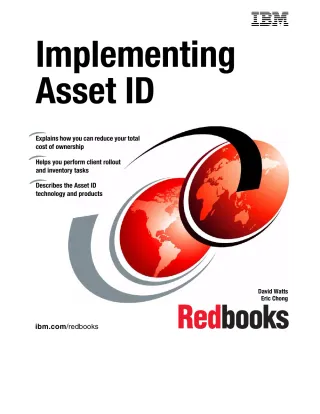
Implementing Asset ID
Spec sheet206 pagesPDF 3.5 MB
IBM Redbook on implementing Asset ID RFID tagging of PCs, including the HID AMH100 RF reader used with a Symbol PDT.
What this file really is
The old site listed this file as a spec sheet for the HID AMH100. Linked as a spec sheet, this is a 206-page IBM Redbook on implementing Asset ID, in which the HID AMH100 reader is one component.
Filed under · 1 model
Filed under these models in the old catalog
Summary
What is in it
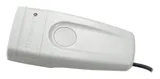
An IBM Redbook that explains Asset ID, a radio-frequency identification technology for reading and writing PC system data with handheld RF devices. It describes the components (the Asset ID EEPROM, the RF antenna, the Symbol Technologies Portable Data Terminal and the HID Corporation AMH100 RF Reader), the supported IBM systems, the QueTel Asset ID Starter Kit and Asset TraQ, and integration with LANClient Control Manager, Software Delivery Assistant, IBM Director and Tivoli Inventory, ending with a full rollout scenario.
Its parts
- Preface
- Introduction
- Components
- Asset ID partner solutions
- Integration with LCCM and SDA
- Integrating with IBM Director
- Integrating Asset ID with Tivoli Inventory
- Implementing a complete Asset ID solution
From the sheet
Key facts from this sheet
Each line names its page in the PDF.
IBM Redbook "Implementing Asset ID" (SG24-6165-00, February 2001), a 206-page guide to the RFID Asset ID chip and antenna built into some IBM PCs, workstations and ThinkPads. It describes the HID Corporation AMH100 handheld RF reader, which attaches to a Symbol 3100 or 6100 portable data terminal to read and write the Asset ID tag, and the QueTel, LCCM, IBM Director and Tivoli software that use the tag data.
- Device
- Handheld RF reader that plugs into a Symbol portable data terminal to read and write the IBM Asset ID tag p. 14, 22
- Interface
- RS-232 connector; with a converter it can connect straight to a PC serial port, but then needs an AC adapter p. 22
- Read distance
- Hold about 3-5 inches from the antenna, with the reader face parallel to it p. 24, 27
- LED
- Flashing green, or red and green in turn: talking to the tag (green reading or writing, red searching); red only: tag not found p. 27
- Compatible terminals
- Symbol 6100 and 8-line Symbol 3100 PDTs, with QueTel Asset TraQ and the Asset ID Starter Kit p. 19, 27
- Powered-off reading
- The PC being scanned need not be powered on or plugged in; the tag draws power from the reader's RF field, so systems can be read in the shipping box p. 16, 27
- Asset ID RF
- The reader sends a 125 kHz RF carrier; the tag answers by backscatter modulation p. 18
- Tag memory
- 1 KB EEPROM in three 248-byte areas (serial, user, configuration); over RF only the user area can be written p. 16
- Starter kit contents
- QueTel Asset ID Starter Kit: Symbol PDT 3100 with 640 KB RAM, HID AMH100, Starter Kit and PDT software, PC serial connection hardware, user guide p. 29
- PDT capacity
- QueTel application uses 500 KB; each Asset ID record 550 bytes; a 640 KB 3100 holds up to 254 systems p. 20
- Supported systems
- Listed IBM PC 300PL, IntelliStation and NetVista A40p/S40p models; ThinkPad T20 and A20 with RF Antenna option 08K6064 p. 23, 24
- Software
- QueTel Asset ID Starter Kit and Asset TraQ over RF; LCCM, SDA, IBM Director, UM Services and Tivoli through the system interface p. 25, 26
- Data export
- Starter Kit downloads collected data from the PDT as a comma delimited ASCII .CSV file p. 28
What this sheet walks you through
- Scanning a PC that is still in its shipping carton p. 22, 23
- Finding the Asset ID antenna on each IBM system p. 24, 25
- Reading the AMH100 LED and fixing failed reads p. 27, 28
- Clearing the Invalid Checksum error on a first scan p. 28
- Installing the QueTel Asset ID Starter Kit p. 29
- Attaching the AMH100 to the Symbol PDT and setting date and time p. 33
- Viewing and changing Asset ID data with the PDT p. 34, 36
Good to know
- A PC serial port cannot power the AMH100, so a direct PC connection needs an AC adapter. p. 22
- If the reader is turned 90° from the antenna it may not communicate. p. 24
- A large monitor or other strong magnetic field close to the tag or reader can cause interference. p. 28
- NetVista A40 and S40 systems have the EEPROM but no antenna option, so a handheld reader cannot read them. p. 24
- On a ThinkPad A20, disable antenna detection in the BIOS before removing the antenna, or POST error 0193 stops the system. p. 24
Questions this sheet answers
How close should I hold the HID AMH100 to the PC?
About 3-5 inches from the antenna, with the front of the reader parallel to it. p. 24, 27
Can the AMH100 connect straight to a PC?
Yes, through a converter on the PC serial port, but it then needs an AC adapter because the serial port cannot power it. p. 22
What does it mean when the AMH100 LED only flashes red?
The reader cannot find or talk to the tag: it may be too far or too close, the antenna may be disconnected, or a strong magnetic field may interfere. p. 27, 28
Does the PC need to be turned on to read its Asset ID tag?
No. The tag takes its power from the reader's RF field, so the PC can be off, unplugged or still boxed. p. 27
How do I fix an Invalid Checksum error when scanning?
The user area was never initialized; write data to any one user area field with the PDT to force a new checksum. p. 28
Contents
Chapters and sections
Each line opens the PDF at its page.
- Preface9
- Chapter 1. Introduction13
- Chapter 2. Components15
- Chapter 3. Asset ID partner solutions27
- Chapter 4. Integration with LCCM and SDA61
- Chapter 5. Integrating with IBM Director123
- Chapter 6. Integrating Asset ID with Tivoli Inventory139
- Chapter 7. Implementing a complete Asset ID solution173
- Appendix A. Special notices187
- Appendix B. Related publications191
- How to get IBM Redbooks193
3 more lines, from page 195 on
The whole text · 26 parts
Read the sheet here as text
Its text as extracted from the PDF, unedited, in parts; each page opens the PDF at that page.
- Pages 1 to 41-4
- Contents5-8
- Preface9-12
- Pages 13 to 2613-26
- Chapter 3. Asset ID partner solutions, pages 27 to 3527-35
- Chapter 3. Asset ID partner solutions, pages 36 to 4436-44
- Chapter 3. Asset ID partner solutions, pages 45 to 5345-53
- Chapter 3. Asset ID partner solutions, pages 54 to 6054-60
- Chapter 4. Integration with LCCM and SDA, pages 61 to 6961-69
- Chapter 4. Integration with LCCM and SDA, pages 70 to 7870-78
- Chapter 4. Integration with LCCM and SDA, pages 79 to 8779-87
- Chapter 4. Integration with LCCM and SDA, pages 88 to 9688-96
- Chapter 4. Integration with LCCM and SDA, pages 97 to 10597-105
- Chapter 4. Integration with LCCM and SDA, pages 106 to 114106-114
- Chapter 4. Integration with LCCM and SDA, pages 115 to 122115-122
- Chapter 5. Integrating with IBM Director, pages 123 to 130123-130
- Chapter 5. Integrating with IBM Director, pages 131 to 138131-138
- Chapter 6. Integrating Asset ID with Tivoli Inventory, pages 139 to 147139-147
- Chapter 6. Integrating Asset ID with Tivoli Inventory, pages 148 to 156148-156
- Chapter 6. Integrating Asset ID with Tivoli Inventory, pages 157 to 165157-165
- Chapter 6. Integrating Asset ID with Tivoli Inventory, pages 166 to 172166-172
- Chapter 7. Implementing a complete Asset ID solution173-186
- Appendix A. Special notices187-190
- Pages 191 to 194191-194
- Pages 195 to 200195-200
- IBM Redbooks review201-206
The file