Manual · Denso
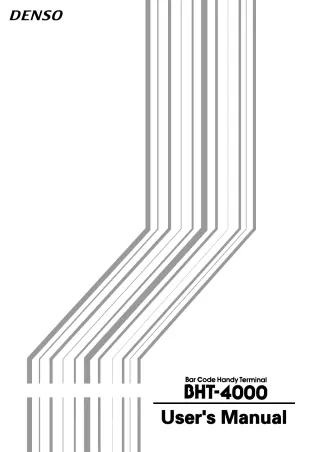
Bar Code Handy Terminal BHT-4000 User's Manual
Manual163 pagesPDF 3.1 MB
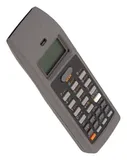
User's manual for the Denso BHT-4000 bar code handy terminal and its CU-4000 optical communications unit.
What this file really is
The old site listed this file as a manual for the Denso BHT-3041, BHT-3045 and NipponDenso BHT-3045. The file is named as a BHT-3041 manual, but it is the user's manual for the Denso BHT-4000 handy terminal.
Filed with · 3 models
Also filed with these models on the old site
Summary
What is in it
User's manual for the Denso BHT-4000 bar code handy terminal. It covers reading bar codes, the hand belt, backlight and keypad, setting up the battery cartridge and downloading the system and user programs, System Mode functions, RS-232C communications and the BHT-protocol, the Easy Pack 4.2 data collection program, error messages, the CU-4000 optical communications unit and battery charging, plus specifications.
Its parts
- Preface
- Chapter 1 Quick Guide
- Chapter 2 Getting Started the BHT-4000 and System Mode
- Chapter 3 Communications Operations of BHT-4000
- Chapter 4 Easy Pack 4.2
- Chapter 5 Error Messages
- Chapter 6 Handling the CU-4000
From the manual
Key facts from this manual
Each line names its page in the PDF.
A 1993 DENSO user's manual for the BHT-4000 Bar Code Handy Terminal and its CU-4000 optical communications unit; it does not name the BHT-3041 or BHT-3045. It covers the system setup, System Mode, RS-232C communications, Easy Pack 4.2, error messages, battery charging and specifications.
- Device
- BHT-4000 Bar Code Handy Terminal: reads bar codes and accepts keypad entry p. 20
- Power
- Rechargeable Ni-Cd battery cartridge, 4.8 VDC; integrated lithium backup battery, 3 VDC p. 156
- Memory
- 16-bit CMOS CPU; RAM 256KB, 768KB or 2MB; ROM 16KB for system use p. 156
- Display
- Dot-matrix FSTN LCD with backlight, 160 by 80 dots; 26 x 10 alphanumeric characters p. 156
- Keypad
- 8 function keys; 16 numerical and other keys p. 156
- Interfaces
- Optical interface to the CU-4000, 19200 bps max; direct-connect RS-232C level QM connector, 38400 bps max p. 159
- Bar codes
- EAN-13, EAN-8, UPC-A, UPC-E (also with supplemental codes), Interleaved 2 of 5, Standard 2 of 5, CODABAR (NW7), CODE39, CODE93, CODE128 p. 157
- Size and weight
- 93 x 235 x 67 mm (3.66 x 9.25 x 2.64 inches); approx. 380 g (13.4 oz.) with battery cartridge p. 156
- Operating environment
- 0˚C to 40˚C (32˚F to 104˚F); 10% to 90% humidity with no dew condensation p. 156
- CU-4000 unit
- Optical communications unit and battery charger; RS-232C port (Dsub-25S) to the host; 12 V from the AC adapter, 2W p. 82, 144, 160
- Charging
- In the CU-4000, about eight hours for a cartridge loaded in the BHT-4000; a cartridge can also charge alone in the CU-4000 slot p. 145, 149
- Software
- BHT-BASIC 3.0 System Pack (System Program, Easy Pack 4.2, System Loader) on 3.5 in floppy; BHT-BASIC 3.0 Compiler and Transfer Utility optional p. 20
- Host computer
- MS-DOS Ver. 3.1 or later, 640 kilobytes RAM; IBM PC-AT, PS/2 or Toshiba T-3100 series p. 20
- QM connector pins
- 1 SD (GND) ground and charging, 2 SD send data, 3 RD receive data, 4 RS, 5 CS, 6 CD, 7 ER, 8 CHG charging p. 159
What this manual walks you through
- What a BHT-4000 system needs: host computer, CU-4000 and RS-232C cable p. 20, 21
- Where System Program, Easy Pack 4.2 and data files sit in RAM p. 22
- The System Mode menu p. 23
- Parts, keys and their functions p. 25, 26
- Wiring the CU-4000 to a host computer or modem p. 82, 83
- System error messages and their solutions p. 134, 135, 136
- Errors in System Mode p. 137, 138
- Powering the CU-4000 p. 146
- Uploading and downloading through the CU-4000 p. 147, 148
- Charging the battery cartridge p. 149
Good to know
- The direct-connect port is not made for frequent plugging; the CU-4000 is recommended for host connections. p. 21
- A battery cartridge generally needs replacing after about 300 charge and discharge cycles. p. 149
- To avoid the Ni-Cd memory effect, discharge the battery fully before charging. p. 149
- A stained charge terminal on the CU-4000 lowers charging efficiency. p. 144
- On a low battery the terminal beeps five times; turn it off at once and replace or charge the cartridge. p. 135
Questions this manual answers
BHT-4000 shows No System
System Program has not been downloaded. Download it from the BHT-BASIC 3.0 System Pack. p. 134
How long does the BHT-4000 battery take to charge?
About eight hours on the CU-4000; the CHGI LED starts flashing when charging is complete. p. 149
BHT-4000 says Too many files when downloading
Forty files are already in RAM. Delete unneeded files, or download fewer files. p. 138
Which cable connects the CU-4000 to a PC?
A cross-mode RS-232C cable to the host computer's port; a modem takes a straight-mode cable. The CU-4000 port is a Dsub-25S. p. 82, 83
What battery does the DENSO BHT-4000 use?
A rechargeable Ni-Cd battery cartridge, 4.8 VDC, with an integrated 3 VDC lithium backup battery. p. 156
Contents
Chapters and sections
Each line opens the PDF at its page.
- Preface3
- How this book is organized4
- BE SURE TO OBSERVE THE FOLLOWING PRECAUTIONS:6
- Content Overview8
- Chapter 1 Quick Guide11
- Chapter 2 Getting Started the BHT-4000 and System Mode19
- Chapter 3 Communications Operations of BHT-400081
- Chapter 4 Easy Pack 4.2107
- Chapter 5 Error Messages133
- Chapter 6 Handling the CU-4000143
- Appendices155
The whole text · 20 parts
Read the manual here as text
Its text as extracted from the PDF, unedited, in parts; each page opens the PDF at that page.
- Preface1-3
- Pages 4 to 74-7
- Content Overview8-10
- Chapter 1 Quick Guide11-18
- Chapter 2 Getting Started the BHT-4000 and System Mode, pages 19 to 2719-27
- Chapter 2 Getting Started the BHT-4000 and System Mode, pages 28 to 3628-36
- Chapter 2 Getting Started the BHT-4000 and System Mode, pages 37 to 4537-45
- Chapter 2 Getting Started the BHT-4000 and System Mode, pages 46 to 5446-54
- Chapter 2 Getting Started the BHT-4000 and System Mode, pages 55 to 6355-63
- Chapter 2 Getting Started the BHT-4000 and System Mode, pages 64 to 7264-72
- Chapter 2 Getting Started the BHT-4000 and System Mode, pages 73 to 8073-80
- Chapter 3 Communications Operations of BHT-4000, pages 81 to 8981-89
- Chapter 3 Communications Operations of BHT-4000, pages 90 to 9890-98
- Chapter 3 Communications Operations of BHT-4000, pages 99 to 10699-106
- Chapter 4 Easy Pack 4.2, pages 107 to 115107-115
- Chapter 4 Easy Pack 4.2, pages 116 to 124116-124
- Chapter 4 Easy Pack 4.2, pages 125 to 132125-132
- Chapter 5 Error Messages133-142
- Chapter 6 Handling the CU-4000143-154
- Appendices155-163
The file