Manual · Datalogic
DS4600A Reference Manual
Manual63 pagesPDF 3.0 MB
Reference manual for the Datalogic DS4600A compact fixed-mount laser scanner with decoder: installation, wiring, layouts, reading and specs.
Covers · 1 model
The models it covers
Summary
What is in it
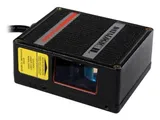
Reference manual for the Datalogic DS4600A, a compact laser bar code scanner with built-in decoder for medium range materials handling. It covers laser and power safety, mounting, electrical connections (RS232, RS485, inputs and outputs), positioning, network layouts such as master/slave and multiplexer, reading features including Advanced Code Reconstruction, reading diagrams, maintenance, troubleshooting and technical features. Configuration is done with the WinHost program.
Its parts
- References
- Safety Regulations
- General View
- Guide to Installation
- Introduction
- Installation
- Reading Features
- Maintenance
- Troubleshooting
- Technical Features
From the manual
Key facts from this manual
Each line names its page in the PDF.
The Datalogic DS4600A Reference Manual (Ed. 04/2006) for the DS4600A compact laser scanner with built-in decoder. It covers the models and accessories, mechanical and electrical installation, serial interfaces, inputs and outputs, typical layouts, reading features and diagrams, cleaning, troubleshooting and technical features.
- Device
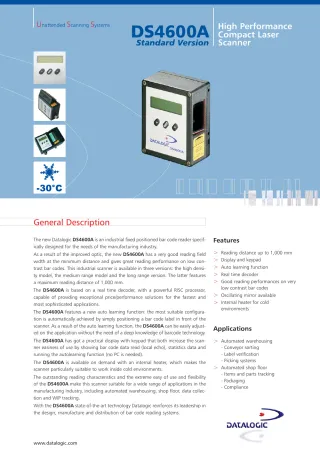
- Compact laser scanner with built-in decoder for medium range materials handling p. 13
- Power
- Standard models: 10 to 30 Vdc; Integrated Heater models: 24Vdc only p. 20
- Power input
- Pins 13 (VS) and 25 (GND) of the 25-pin connector, or a jack beside it for a direct plug-in power unit (plug not supplied) p. 20
- Serial interfaces
- Main: RS232, RS485 full-duplex or half-duplex (20 mA current loop only with C-Box 100 and INT-30); auxiliary RS232; 1200 to 115200 baud p. 56
- Inputs
- External Trigger, IN1, IN2, optocoupled NPN or PNP; 30 Vdc max., 25 mA max. p. 56
- Outputs
- OUT1 and OUT2, optocoupled open emitter or open collector; 40 Vdc max., 40 mA continuous, 130 mA pulsed p. 56
- Scan rate
- 800 scans/sec p. 13, 56
- Laser
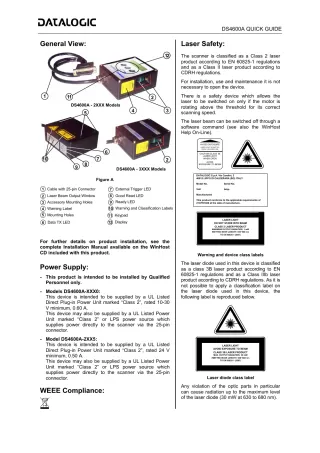
- Solid state laser diode, 630 to 680 nm; laser starts only once the motor is at speed p. 14
- Readable codes
- EAN/UPC, Code 93, 2/5 Interleaved, Code 128, Code 39, EAN 128, Codabar, Pharmacode; up to six per reading phase p. 57
- Operating modes
- On Line, Automatic, Serial On Line, Test; set up with WinHost or host mode commands p. 57
- Size and weight
- 101 x 83.5 x 42 mm (3.97 x 3.29 x 1.65 in.); about 615 g (22 oz.); aluminum housing p. 14, 57
- Enclosure
- IP65 p. 14
- Indicators
- READY (red), GOOD READ (red), EXT TRIG (yellow), TX DATA (green) LEDs p. 14
- In the box
- Reader with cable, Quick Reference Guide, barcode test chart, WinHost CD, mounting bracket with 4 screws and washers p. 16
What this manual walks you through
- Model options and the accessories available p. 15
- 25-pin connector pinout and power supply wiring p. 19, 20
- Cleaning the laser output window p. 52
- Troubleshooting power, trigger, reading and communication problems p. 54, 55
- Saving the configuration file before contacting support p. 53
Good to know
- Do not connect GND and the SGNDs to different external ground references; the internal filtering can be permanently damaged. p. 19
- Standard models draw a current peak of about 1A at 10 V at power on while the motor starts. p. 20
- Clean the window only with the scanner off or the laser beam deactivated. p. 52
- Above 35 C ambient, the manual advises using the beam shutter. p. 57
- If the scanner always returns the Reader Failure Character (<BEL> by default), a motor or laser failure has occurred. p. 55
Questions this manual answers
Why is the DS4600A Ready LED not lit?
Check that power is connected and measure the voltage at pins 13 and 25 of the 25-pin connector (or spring clamps 1 and 2 on a C-BOX 100). p. 54
Where is the serial number on a DS4600A?
On a label on the body of the reader; it has 9 characters: a letter, 2 numbers, a letter, then 5 numbers. p. 55
The DS4600A always returns No Read. What should I check?
Center the code on the scan line and run Test mode, then check reading distance, tilt and skew (skew under 10 degrees causes direct reflection), enabled code types and code quality. p. 55
Which pins take the external trigger on the DS4600A?
Pins 18 and 19 of the 25-pin connector (EXT TRIG+ and EXT TRIG-). p. 54
What comes in the DS4600A box?
The reader with cable, a Quick Reference Guide, a barcode test chart, the WinHost CD and a mounting kit with bracket, screws and washers. p. 16
Contents
Chapters and sections
Each line opens the PDF at its page.
The whole text · 9 parts
Read the manual here as text
Its text as extracted from the PDF, unedited, in parts; each page opens the PDF at that page.
The file