Manual · Datalogic
DS4600A Quick Guide
Manual12 pagesPDF 1.1 MB
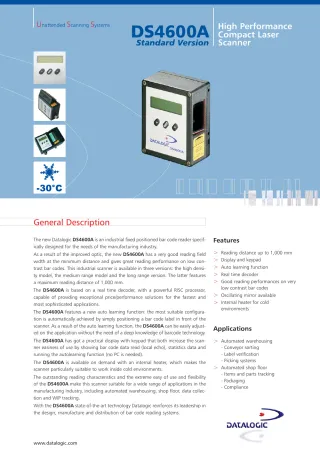
Quick guide for the Datalogic DS4600A fixed laser scanner: models, technical features, wiring, mounting and reading diagrams.
Covers · 1 model
The models it covers
Summary
What is in it
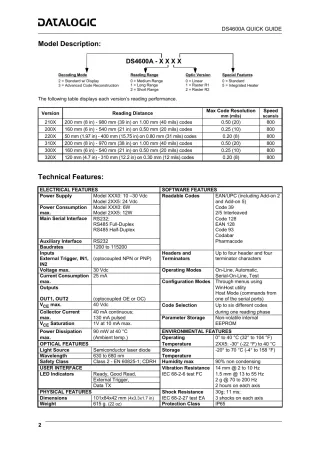
Datalogic's quick guide for the DS4600A industrial laser bar code scanner. It shows the general view and laser safety labels, power supply requirements, the model numbering (decoding mode, reading range, linear or raster optics, heater) and each version's reading distance. Technical features cover electrical, optical, software, physical and environmental data. It then gives accessories, the 25-pin connector pinout, mechanical dimensions and bracket, input and output wiring, connection layouts, reading diagrams, a PC test cable and the EU declaration of conformity.
From the manual · read page by page
Key facts from this manual
Each line names its page in the PDF.
A 12-page Datalogic quick guide (821000693 Rev. D) for the DS4600A laser scanner, covering the 2XXX and 3XXX models. It explains the model number code, gives technical features, the 25-pin connector pinout, input and output wiring, connection layouts, mounting dimensions and reading diagrams, and shows how to build a simple test cable.
- Device
- Industrial laser bar code scanner with a 25-pin cable; 2XXX models have a display p. 2, 3
- Model code
- DS4600A-XXXX: decoding mode (2 Standard w/ Display, 3 Advanced Code Reconstruction), range, optic (linear, raster R1, R2), 5 = integrated heater p. 2
- Power
- Model XXX0: 10-30 Vdc, 6W max.; Model 2XX5: 24 Vdc, 12W p. 2
- Interfaces
- Main: RS232, RS485 Full-Duplex or RS485 Half-Duplex; auxiliary RS232; 1200 to 115200 baud p. 2
- Connector
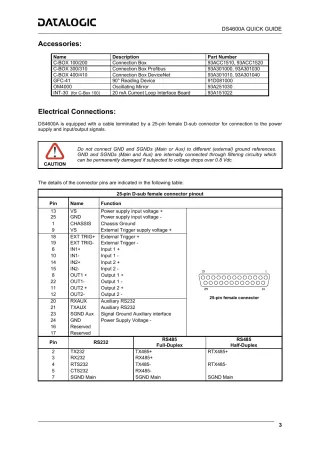
- Cable with a 25-pin female D-sub connector for power, I/O and serial p. 3
- I/O
- Inputs: External Trigger, IN1, IN2 (30 Vdc max.); outputs OUT1, OUT2 (40 Vdc max., 40 mA continuous) p. 2, 4
- Scan rate
- 800 scans/s on all six listed versions p. 2
- Laser
- Semiconductor laser diode, 630 to 680 nm p. 2
- Readable codes
- EAN/UPC with Add-on 2 and 5, Code 39, 2/5 Interleaved, Code 128, EAN 128, Code 93, Codabar, Pharmacode p. 2
- Size and weight
- 101 x 84 x 42 mm (4 x 3.3 x 1.7 in); 615 g (22 oz) p. 2
- Environment
- IP65; 0 to 40 C (32 to 104 F) operating, 2XX5 heater models from -30 C (-22 F); storage -20 to 70 C p. 2
- Setup
- WinHost utility menus or host mode commands; settings kept in non-volatile EEPROM p. 2
- Accessories named
- C-BOX 100/200, C-BOX 300/310, C-BOX 400/410, GFC-41, OM4000, INT-30 (for C-Box 100) p. 3
What this manual walks you through
- Decoding the DS4600A model number p. 2
- 25-pin connector pinout for RS232, RS485 full-duplex and half-duplex p. 3
- Wiring NPN and PNP inputs and open collector outputs p. 4
- Point-to-point, pass-through, master/slave and multiplexer layouts p. 5
- Mounting dimensions of the scanner and bracket p. 4
- Reading diagrams for the long, medium, short range and raster versions p. 6, 7, 8, 9, 10
- Building a simple test cable with power, trigger and PC RS232 connections p. 11
- Accessory names, descriptions and part numbers p. 3
Good to know
- Do not connect GND and the SGNDs to different external ground references; the internal filtering can be damaged. p. 3
- The scanner is meant to be installed by qualified personnel only. p. 1
- The device need not be opened for installation, use or maintenance; tampering with the optics can expose up to 30 mW of laser radiation. p. 1
- The guide states the scanner is a Class 2 laser product (EN 60825-1) and Class II (CDRH). p. 1
Questions this manual answers
What voltage does the Datalogic DS4600A need?
Models ending in 0 take 10-30 Vdc (6W max.); 2XX5 models with the heater take 24 Vdc (12W). p. 2
What does the last digit 5 in a DS4600A model number mean?
It marks the integrated heater version. p. 2
How do I configure the DS4600A?
Through menus in the WinHost utility, or with host mode commands sent over a serial port. p. 2
How do I wire a test cable for the DS4600A?
The guide shows a cable from the 25-pin connector to a PC 9-pin COM port, with power on pins 13 and 25 and a push-button trigger on pins 18 and 19. p. 11
The whole text · 2 parts
Read the manual here as text
Its text as extracted from the PDF, unedited, in parts; each page opens the PDF at that page.
The file