Manual · ZBA Inc
ZB-8150/ZB-8110/ZB-8210 CCD Barcode Scanner User's Manual
Manual95 pagesPDF 3.2 MB
User's manual for the ZBA ZB-8110, ZB-8150 and ZB-8210 CCD barcode scanners: installation, specifications and programming.
Covers · 2 models
The models it covers
Summary
What is in it
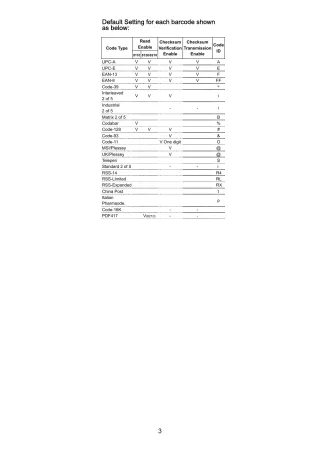
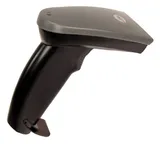
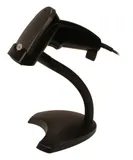
ZBA Inc's user's manual for its ZB-8110, ZB-8150 and ZB-8210 hand-held CCD barcode scanners. It shows how to install the scanner as a keyboard wedge, on RS-232 or on USB, lists the default settings for each barcode type and the specifications of the 8110 and 8150, then explains programming by scanning a Program code, an option code and alphanumeric entries from the fold-out page, with settings for the interface, keyboard type, layout and speed, and the other options.
From the manual
Key facts from this manual
Some pages are scans or cannot be read; this says only what the readable text supports. Each line names its page in the PDF.
The user's manual for the ZBA ZB-8150, ZB-8110 and ZB-8210 CCD barcode scanners. It gives the specifications of the ZB-8110 and ZB-8150, installation for keyboard wedge, RS-232 and USB, and how to program the scanner by scanning setup barcodes.
- Device type
- CCD barcode scanner with built-in decoder p. 1, 9
- Interfaces
- Keyboard wedge, RS-232, wand emulation and USB, plus keyboard/RS-232/USB auto detection p. 9
- Optics
- 660 nm visible red LED; 2048 pixel CCD p. 4
- Depth of scan field
- ZB-8110: 0-80 mm; ZB-8150: 0-250 mm (Code 39, PCS=90%, 20 mils) p. 4
- Scan speed
- ZB-8110: 50 scans/sec; ZB-8150: 200 scans/sec p. 4
- Input power
- 5 VDC ± 0.25V; DC transformer Class 2, 5VDC @ 450 mA p. 5
- Operating current
- ZB-8110: 76 mA @ 5 VDC; ZB-8150: 255 mA @ 5 VDC p. 5
- Connector and cables
- RJ-45 phone jack; keyboard wedge cable straight 2.0 m, universal cable straight 2.3 m p. 5
- Scanning width
- ZB-8110: 80 mm; ZB-8150: 120 mm p. 4
- Weight
- ZB-8110: 155 g; ZB-8150: 160 g (cable not included) p. 5
- Operating temperature
- 0 to 45 C (32 to 113 F); storage -40 to 60 C p. 5
- RS-232 settings
- 300 to 38400 BPS (9600 default); flow control None, RTS/CTS, Xon/Xoff or ACK/NAK p. 16, 17
- Programming
- Scanning setup barcodes, DOS commands through RS-232 or a Windows configuration program; firmware in flash memory p. 6
- Keyboard layouts
- USA, Belgium, Danish, France, Germany, Italian, Portuguese, Spanish, Swedish, Switzerland, UK, Latin American p. 12
What this manual walks you through
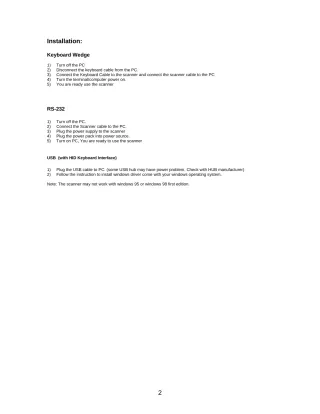
- Installing the scanner as keyboard wedge, RS-232 or USB p. 2
- Programming options by scanning barcodes p. 7
- Selecting the interface p. 9
- Setting keyboard type, layout and speed p. 10, 11, 12
- Setting RS-232 flow control, baud rate and parity p. 15, 16, 17
- Setting wand emulation polarity and output speed p. 18, 19
- Displaying the configuration and firmware version p. 93, 94
- Restoring factory default settings p. 94
Good to know
- The scanner may not work with Windows 95 or Windows 98 first edition over USB. p. 2
- Some USB hubs may have power problems with the scanner. p. 2
- If output characters are lost in keyboard wedge mode, set the keyboard speed to 05 or 06. p. 11
- With RTS/CTS flow control, the scanner gives 5 warning beeps if the host does not answer CTS in time. p. 15
Questions this manual answers
How do I reset the ZBA ZB-8110 to factory defaults?
Scan the Default value initialization bar code in the manual to return all settings to factory defaults. p. 94
What is the difference between the ZB-8110 and ZB-8150?
The spec table gives the ZB-8110 a 0-80 mm depth of field at 50 scans/sec and the ZB-8150 0-250 mm at 200 scans/sec. p. 4
What is the default baud rate of the ZB-8110 in RS-232 mode?
9600 BPS, with no parity, 8 data bits and one stop bit as defaults. p. 17
What power supply does the ZB-8110 need?
It runs on 5 VDC ± 0.25V; the spec lists a Class 2 DC transformer of 5VDC @ 450 mA. p. 5
Which interfaces does the ZB-8150 support?
Keyboard wedge, RS-232, wand emulation and USB; the interface changes with the cable and the interface setting. p. 9
The whole text · 10 parts
Read the manual here as text
Its text as extracted from the PDF, unedited, in parts; each page opens the PDF at that page.
The file