Manual · Unitech
Scanner Configuration Manager User Guide
Manual40 pagesPDF 767 KB
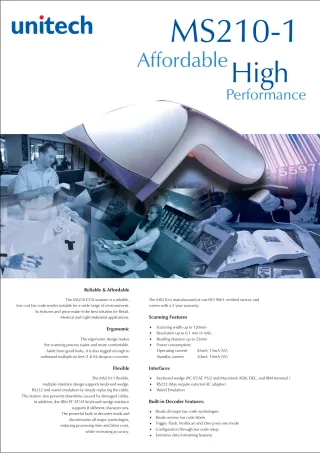
User guide for Unitech's Scanner Configuration Manager, Windows PC software for setting up Unitech scanners such as the MS210.
Filed with · 1 model
Also filed with these models on the old site
Summary
What is in it
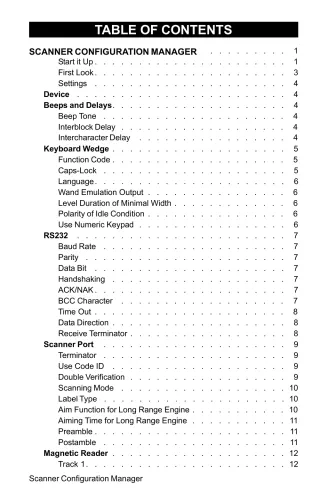
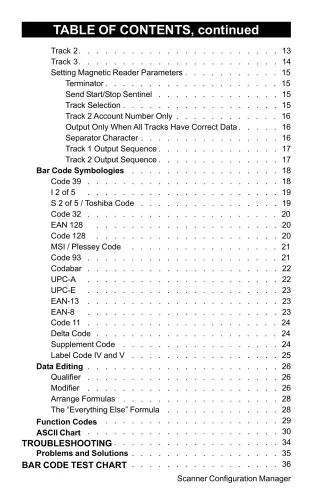
The user guide for Unitech's Scanner Configuration Manager (SCM), Windows software for reading, editing and downloading the settings of a Unitech scanner, with the MS210 used as the example. It explains the toolbar, uploading and downloading settings, and each setting: device, beeps and delays, keyboard wedge, wand emulation output, RS232, scanner port, magnetic reader tracks and bar code symbologies. It also covers data editing formulas, function codes, an ASCII chart, troubleshooting and a bar code test chart.
Its parts
- Scanner Configuration Manager
- Troubleshooting
- Bar Code Test Chart
From the manual
Key facts from this manual
Each line names its page in the PDF.
This is the Unitech Scanner Configuration Manager user guide, for the Windows program that reads, edits and writes the settings of Unitech bar code scanners. It explains the settings and their defaults, from keyboard wedge and RS232 options to scanning modes and symbologies, and ends with troubleshooting and a bar code test chart. It is a general guide and names the MS210 only as an example product number.
- What it is
- Scanner Configuration Manager (SCM), Windows software for setting up Unitech scanners p. 1, 4
- System requirement
- Windows PC; upload and download work only in Windows (NT excluded) p. 1, 38
- Installer
- SCMSetup.exe p. 4
- Settings files
- Saved as .cfg files p. 4
- Connection for upload
- By keyboard interface; for USB, Mac ADB or RS232, print configuration bar codes instead p. 5, 6
- Factory default interface
- PS2/AT/USB p. 37
- Default device ID
- 01 - IBM PC/AT, PS/2 MOD 40, 60, 80, USB p. 7
- RS232 defaults
- 9600 baud, no parity, 8 data bits, handshaking Ignore p. 10
- Scanning modes
- Trigger (default), Flashing, Multiscan, One Press One Scan, Test, Old Laser Flash, Continuous p. 13
- Scan rate
- 33 scans per second (except wands) p. 12
- Keyboard languages
- Danish, French, Norwegian, Swiss, U.S. English (default), German, Swedish, Alt Key Mode, U.K. English, Italian, Spanish p. 9
- Symbologies
- Code 39, I 2 of 5, S 2 of 5 / Toshiba Code, Code 32, EAN 128, Code 128, MSI / Plessey, Code 93, Codabar, UPC-A, UPC-E, EAN-13, EAN-8, Code 11, Delta Code, Label Code IV and V p. 3
- Default terminator
- Enter; other choices Return (numeric keypad), Field Exit or Right Control, None p. 12
- Wand emulation
- Minimal width level duration 200 µs (default) or 600 µs p. 9
What this manual walks you through
- Installing and starting SCM p. 4
- Uploading the current settings from a scanner and editing them p. 6
- Downloading new settings to the scanner and running a quick test p. 6
- Printing configuration bar codes when downloading is not possible p. 5
- Setting beep tone and data delays p. 7
- Keyboard wedge options: function codes, Caps Lock, language, wand emulation p. 8, 9
- RS232 settings: baud rate, parity, handshaking, ACK/NAK, terminators p. 10, 11
- Scanner port settings: terminator, code ID, double verification, scanning mode, preamble and postamble p. 12, 13, 14
- Resetting a scanner to factory default p. 4, 37
- Troubleshooting a scanner that will not scan, beep or output data p. 37, 38
Good to know
- Resetting to factory default erases any special configuration you created. p. 37
- After a reset the interface is PS2/AT/USB; another interface must be configured and downloaded again. p. 37
- SCM cannot upload or download under Windows NT or other operating systems; use printed configuration bar codes. p. 38
Questions this manual answers
How do I reset a Unitech scanner to factory default with SCM?
With SCM open, click the New Document icon and then download that unchanged setting to the scanner. p. 4, 37
Unitech scanner lights up but does not beep
Try bar codes of other symbologies; if they scan, the scanner may not be set to read your symbology. If the same symbology scans, adjust settings such as minimum or maximum length. p. 38
What are the default RS232 settings in Scanner Configuration Manager?
9600 baud, no parity, 8 data bits, and handshaking set to Ignore. p. 10
Scanner beeps but no data appears on the computer
Scan into a word processor or Notepad to check whether it is a software problem; on RS232, make sure the correct com port is selected. p. 38
Can SCM configure a scanner on USB or RS232?
Downloading is not an option for USB, Mac ADB or RS232; print the settings as bar codes from SCM and scan them instead. p. 5
The whole text · 4 parts
Read the manual here as text
Its text as extracted from the PDF, unedited, in parts; each page opens the PDF at that page.
The file