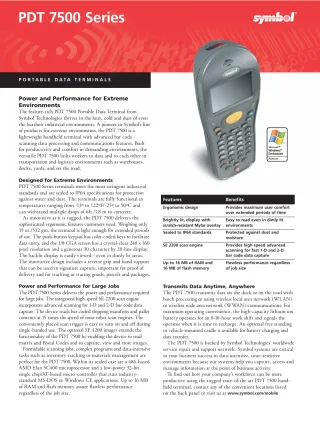
Manual · Symbol
PDT 7500 Series Product Reference Guide for Windows CE
Manual190 pagesPDF 2.9 MB
Product reference guide for the Symbol PDT 7500 Series Windows CE portable terminals, batch PDT 7500 and Spectrum24 wireless PDT 754x.
Covers · 4 models
The models it covers
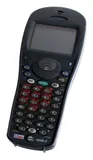 Symbol PDT-7500Portable batch data collection terminal from$1,195.0056 in stock
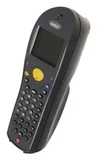 Symbol PDT-7540802.11 (1 Mbps) wireless portable data collection terminal from$1,495.00103 in stock Symbol PDT-7542802.11 (2 Mbps) wireless portable data collection terminal from$795.0015 in stock Symbol PDT-7546802.11b wireless portable data collection terminal Call for availability
Summary
What is in it
Symbol's system administrator guide for the PDT 7500 Series Windows CE terminals: the batch PDT 7500 and the PDT 754x with Spectrum24 wireless LAN. It covers unpacking and accessories, installing the SDK on a development PC, using the terminal, the flash file system, building and loading images with the Terminal Configuration Manager and IPL, laser and imager scanning, Spectrum24 setup, the CRD 7500 and VCD 7500 cradles, ActiveSync, maintenance and troubleshooting.
Its parts
- About This Guide
- Getting Started
- Software Installation on the Development PC
- Using The Terminal
- Terminal Features
- Terminal Configuration Options
- Configuring the Terminal
- Operating the Scanner
- Spectrum24 Network Configuration
- Cradle Setup and Operation
- Communications
- Maintenance and Troubleshooting
From the manual
Key facts from this manual
Each line names its page in the PDF.
The Symbol PDT 7500 Series Product Reference Guide for Windows CE, written for the system administrator who sets up, configures and maintains the terminals. It covers the batch PDT 7500 and the PDT 754x Spectrum24 radio models (PDT 7540, 7542 and 7546). It explains startup and booting, the scanner and imager, Spectrum24 setup, the CRD 7500 and VCD 7500 cradles, batteries, ActiveSync, troubleshooting and specifications.
- Device type
- Portable 486-class terminal with keypad, touch screen and integrated laser or imager for 1D and 2D bar codes p. 23
- Operating system
- Embedded Windows CE; recommended development tool Microsoft Embedded Visual Tools 3.0 p. 23
- Battery
- 1400 mAh rechargeable Lithium Ion smart battery pack; supercaps hold RAM for up to 5 minutes during a swap p. 26, 119
- Battery life
- 5 to 11 hours in typical use, depending on the model p. 118
- Charge time
- 2 hours or less in the terminal in the cradle; about 5 hours for a spare; charge only at 0 to 50 C p. 122, 123
- Cradles
- CRD 7500 single- and four-slot cradles (charging and RS-232 to a host); VCD 7500 vehicle cradle; up to 24 four-slot cradles chained at 38.4 kbps p. 25, 26, 125
- Wireless LAN
- PDT 7540: 1Mbit Spectrum24 (802.11); PDT 7542: 2Mbit Spectrum24 (802.11); PDT 7546: 11Mbit Direct Sequence Spectrum24 (802.11b); Type II PC card p. 27
- Cables
- RS-232 printer/host cable p/n 25-37380-01 (2-foot, null modem); 9-pin/9-pin null modem cable p/n 61383-00-00 with 25-to-9-pin adapter p/n 50-12100-620 p. 26
- DCE cable
- For a modem or DCE-type printer on a DB25 connection: cable p/n 25-19297-01 p. 117
- Scan engines
- SE 2200 integrated scanner (1-D and PDF417 2-D decode zones) or imager (1-D, PDF, Data Matrix and Maxicode decode zones) p. 140, 141
- Operating temperature
- -25 C to 50 C; storage -30 C to 60 C (-22 F to 140 F) p. 139
- Sealing and drops
- IP 64 and Mil Standard 810E; 1.83 meter drop to concrete p. 139
- Connector pin-out
- 15-pin table: PWROUT (+5V) on pin 7, PWRIN (+15V) on pins 8 and 15, TXD pin 11, RXD pin 3 p. 142
- Related manuals
- Quick Reference Guide p/n 72-38888-XX; Windows CE Help File p/n 72E-38880-XX; CRD 7500 Single-Slot guide p/n 72-39761-XX; Four-Slot p/n 70-37769-XX; VCD 7500 p/n 72-38525-XX p. 15
What this manual walks you through
- Starting the terminal and calibrating the touch screen p. 34, 35
- Warm and cold booting, and wakeup sources p. 36
- Viewing the Spectrum24 radio configuration p. 96
- Connecting power and a host cable to the CRD 7500 cradles p. 114, 115
- Mounting and wiring the VCD 7500 vehicle cradle p. 116, 117
- Chaining four-slot cradles p. 125
- Installing, removing and hot-swapping the battery p. 119, 120, 121
- Charging batteries and reading the charge LEDs p. 122, 123, 124
- Running ActiveSync over the serial cable or the cradle p. 129, 130, 131, 132
- Troubleshooting terminal and cradle problems p. 136, 137, 138
Good to know
- Charge the battery only between 0°C and 50°C. p. 123
- Each four-slot cradle in a chain needs its own power supply, and all must be powered up at the same time. p. 125
- The first ActiveSync must use a local, direct connection, not a modem. p. 129
- The CRD 7500 cradle needs a dedicated serial port on the PC. p. 130
- Removing a terminal with a badly discharged battery from the cradle before it is charged can cause a reboot and data loss. p. 122
Questions this manual answers
Which PDT 7500 model has 802.11b wireless?
The PDT 7546, with 11Mbit Direct Sequence Spectrum24 (802.11b); the PDT 7540 and 7542 are 1 and 2 Mbit 802.11. p. 27
How long does a PDT 7500 spare battery take to charge?
Up to 5 hours in the cradle's spare slot; a battery inside the terminal charges in about 2 hours. p. 123
What does a flashing yellow charge LED on the cradle mean?
A fault stopped charging, from a faulty battery or a momentary loss of contact; the cradle self-checks within about ten minutes. p. 123
How do I connect a PDT 7500 to ActiveSync?
Connect the serial cable or cradle to the PC, allow serial connections in ActiveSync's Connection Settings, then select PC Link on the terminal. p. 130
How many four-slot cradles can be chained together?
Up to 24, connected in series with an RS-232 inter-cradle cable at 38.4 kbps. p. 125
Contents
Chapters and sections
Each line opens the PDF at its page.
- Cover1
- About This Guide13
- Chapter 1 Getting Started21
- Chapter 2 Software Installation on the Development PC29
- Chapter 3 Using The Terminal33
- Chapter 4 Terminal Features41
- Chapter 5 Terminal Configuration Options49
75 more lines, from page 51 on
- Introduction51
- Chapter 6 Configuring the Terminal57
- Chapter 7 Operating the Scanner81
- Chapter 8 Spectrum24 Network Configuration93
- Chapter 9 Cradle Setup and Operation109
- Chapter 10 Communications127
- Chapter 11 Maintenance and Troubleshooting133
- Appendix A Specifications139
- Appendix B Demo Program143
- Appendix C Keyboard Maps169
- Index185
The whole text · 24 parts
Read the manual here as text
Its text as extracted from the PDF, unedited, in parts; each page opens the PDF at that page.
- Cover1-12
- About This Guide13-20
- Chapter 1 Getting Started21-28
- Chapter 2 Software Installation on the Development PC29-32
- Chapter 3 Using The Terminal33-40
- Chapter 4 Terminal Features41-48
- Chapter 5 Terminal Configuration Options49-56
- Chapter 6 Configuring the Terminal, pages 57 to 6457-64
- Chapter 6 Configuring the Terminal, pages 65 to 7265-72
- Chapter 6 Configuring the Terminal, pages 73 to 8073-80
- Chapter 7 Operating the Scanner81-92
- Chapter 8 Spectrum24 Network Configuration, pages 93 to 10093-100
- Chapter 8 Spectrum24 Network Configuration, pages 101 to 108101-108
- Chapter 9 Cradle Setup and Operation, pages 109 to 117109-117
- Chapter 9 Cradle Setup and Operation, pages 118 to 126118-126
- Chapter 10 Communications127-132
- Chapter 11 Maintenance and Troubleshooting133-138
- Appendix A Specifications139-142
- Appendix B Demo Program, pages 143 to 151143-151
- Appendix B Demo Program, pages 152 to 160152-160
- Appendix B Demo Program, pages 161 to 168161-168
- Appendix C Keyboard Maps, pages 169 to 176169-176
- Appendix C Keyboard Maps, pages 177 to 184177-184
- Index185-190
The file