Manual · Symbol
LS 3603 Product Reference Guide
Manual138 pagesPDF 1.3 MB
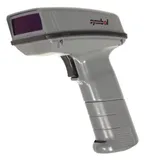
Product reference guide for the Symbol LS 3603 hand-held laser scanner: setup, host connections and programming bar code menus.
Names · 1 model
The models it names
Filed with · 7 models
Also filed with these models on the old site
 Symbol LS-3000Hand-held laser barcode scanner from$295.00124 in stock Symbol LS-3020Hand-held laser barcode scanner from$595.0049 in stock Symbol LS-3001Hand-held laser barcode scanner Call for availability Symbol LS-3002Hand-held laser barcode scanner Call for availability Symbol LS-3010Hand-held laser barcode scanner Call for availability Symbol LS-3030Hand-held laser barcode scanner Call for availability Symbol LS-3080Hand-held laser barcode scanner Call for availability
Summary
What is in it
Product reference guide for the Symbol LS 3603 hand-held laser bar code scanner. The user's guide chapter covers unpacking, switching cables, power options, connecting to RS-232C, wand emulation, OCIA, OCR, IBM 4683 and keyboard wedge hosts, aiming, Scanstand and IntelliStand use, the battery box, decode zone, maintenance, accessories, specifications and pin-outs. Later chapters describe each parameter and give bar code menus for RS-232, wand and Synapse hosts.
Its parts
- Chapter 1 User’s Guide
- Chapter 2 Programming
- Chapter 3 Parameter Menus
From the manual
Key facts from this manual
Each line names its page in the PDF.
The Product Reference Guide for the Symbol LS 3603 handheld laser scanner (70-13584-01, Revision C, June 1999). It covers setup on RS-232C, wand emulation and Synapse cable hosts, the power options and battery box, hands-free use in stands, troubleshooting, technical specifications and pin-outs, then the bar code parameter menus for programming the scanner.
- Device
- Handheld laser bar code scanner, 36 scans per second p. 9
- Host interfaces
- RS-232C, wand emulation, Synapse smart cables (IBM 4683/4, OCIA, keyboard wedge, OCR) p. 9
- Power
- 4.8 (min) to 14.0 VDC; 150 mA @ 5V typical p. 25
- Power options
- External power supply, battery box, or direct host power p. 10
- Battery
- 9-volt in the battery box; alkaline recommended or nickel-cadmium p. 18
- Symbologies
- UPC/EAN, Code 39 and Full ASCII, Codabar, I 2 of 5, Code 128, EAN 128, D 2 of 5, Code 93, MSI/Plessey p. 25
- Operating temperature
- -22° to 122°F (-30° to 50°C) p. 26
- Dimensions
- 6.3 in. high, 5 in. long, 2.8 in. wide p. 26
- Coil cable
- 9-12 ft., depending on host p. 26
- Drop rating
- 6-ft. drop to concrete p. 26
- Print contrast
- 25% minimum dark/light differential at 675 nm p. 25
- Connector pin 2
- VBAT 4.8-14.0V on every cable type; pin 3 ground p. 27
- Stands
- Scanstand Plus or IntelliStand for hands-free use p. 17
What this manual walks you through
- Changing the host cable p. 10
- Connecting to an RS-232C host with external, host or battery power p. 11, 12
- Using the Scanstand Plus in continuous-on mode p. 17
- Using the IntelliStand hands-free p. 17
- Changing or recharging the battery box battery p. 18
- Troubleshooting no read, no transmit, or wrong data on screen p. 21
- Connector pin-outs for RS-232, wand and Synapse p. 27
- Programming the scanner by scanning bar code menus p. 16
Good to know
- The scanner cannot answer some terminals' polls until the matching host type is selected, which can cause a host error message. p. 10
- Four short high beeps with scanning interruptions mean the battery is low. p. 18
- On direct host power, the host must supply enough power for the scanner. p. 26
- The Scanstand Plus works with all host interfaces except wand emulation with Norand terminals. p. 17
- Code 39 and Code 39 Full ASCII cannot be told apart automatically. p. 25
Questions this manual answers
What voltage does the Symbol LS 3603 need?
The guide lists 4.8 (min) to 14.0 VDC (max), drawing 150 mA at 5V typical on wand, RS-232C and Synapse. p. 25
What battery does the LS 3603 battery box take?
A 9-volt battery, either alkaline (recommended) or nickel-cadmium rechargeable. p. 18
Why does my LS 3603 read but not send data to the host?
Check that the proper host type is selected and that the right parameter set (RS-232, Wand, Synapse) is chosen. p. 21
What does four beeps mean on the LS 3603?
Four short high tone beeps with scanning interruptions signal low battery power; change or recharge the battery. p. 18
Can the LS 3603 be used as a keyboard wedge?
Yes, with a Synapse smart cable for XT, AT or PS/2-style keyboards; scanned data arrives as keystrokes. p. 9
Contents
Chapters and sections
Each line opens the PDF at its page.
The whole text · 14 parts
Read the manual here as text
Its text as extracted from the PDF, unedited, in parts; each page opens the PDF at that page.
The file