Manual · PSC
LazerData 11000 Series Bar Code Scanner Installation Manual
Manual48 pagesPDF 375 KB
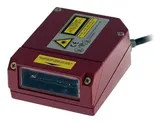
Installation manual for the PSC LazerData 11000 Series fixed-position bar code scanner with built-in decoder.
Covers · 2 models
The models it covers
Summary
What is in it
The installation manual for the PSC LazerData 11000 Series, a fixed-position unattended bar code reader complete with decoder. It covers laser safety, features and available models (standard or high resolution, linear or raster, several interface options), package contents, mechanical installation, power and wiring for RS232, RS485, 20-mA current loop and auxiliary interfaces, inputs and outputs, positioning and typical layouts, step ladder and picket fence reading, reading diagrams, maintenance, service and technical features.
Its parts
- Safety Precautions
- General Features
- Installation
- Reading Features
- Maintenance
- Service and Warranty
- Technical Features
From the manual
Key facts from this manual
Each line names its page in the PDF.
Installation manual (part number 08867) for the PSC LazerData 11000 Series fixed-position laser bar code scanners. It explains mounting, connector pinouts, power and serial interface wiring, presence sensor and output wiring, scanner positioning, multi-scanner layouts and the technical specifications.
- Device
- Fixed-position unattended laser bar code reader with built-in decoder p. 1, 10
- Power
- 10 to 30 VDC through the 25-pin or 9-pin connector p. 18
- Connector
- Cable ending in a 25-pin female D-sub; LD110X17 and LD110X18 use a 9-pin connector p. 9, 17
- Serial interfaces
- Main: RS232, RS485 polled or nonpolled, or 20 mA current loop (by model); auxiliary: RS232; 150 to 19200 baud p. 46
- Scan rate
- 350 scans/s standard, 600 scans/s high performance version p. 36
- Standard resolution
- 0.20 mm to 1 mm narrow bars, 40 to 300 mm from the window p. 36
- High resolution
- 0.15 mm to 0.30 mm narrow bars, 30 to 90 mm from the window p. 36
- Symbologies
- Up to 22, including EAN/UPC, 2/5 Interleaved, Code 39, Codabar, Code 93, Code 128, EAN 128, Plessey p. 47
- Presence sensor input
- Optocoupled, driven by NPN or PNP, external supply 30 VDC max. p. 26
- Outputs
- NO READ and RIGHT read outputs, 25-pin models only, level or 50 ms pulse p. 28
- Configuration
- LDHOST utility on diskette, or ESC sequences over the serial interface p. 10
- Size and weight
- 68 x 84 x 34 mm (2.7 x 3.3 x 1.3 inches); 300 g (0.77 lb.) p. 47
- Operating temperature
- 0 to 40 °C (32 to 104 °F) p. 47
- Enclosure
- IP65 protection class p. 11
What this manual walks you through
- Fitting the LD11-90DEG 90 degree deflection mirror p. 13
- Mounting the scanner and its bracket p. 16
- Pinouts of the 25-pin and 9-pin connectors p. 17, 18
- Wiring the power supply p. 18
- Wiring the RS232, RS485 and 20 mA current loop interfaces, main and auxiliary p. 19, 20, 21, 22, 23, 24, 25
- Wiring an NPN or PNP presence sensor p. 26, 27
- Using the NO READ and RIGHT outputs p. 28
- Setting pitch, skew and tilt angles when positioning the scanner p. 29, 30
- Master-slave, local echo and pass through layouts p. 31, 32, 33
- Working out the number of effective scans on a moving code p. 34, 35
Good to know
- Power must be 10 to 30 VDC only; the manual recommends connecting pin 1 (CHASSIS) to a common earth ground. p. 18
- Above 35 °C (95 °F), the manual advises using the beam shutter set in LDHOST. p. 47
- Allow at least five scans while the code passes to get a good read. p. 34
- Only passive current loop connections are supported. p. 24
- In a master-slave layout the RS485 bus termination resistors must not be installed. p. 31
Questions this manual answers
What power supply does the PSC LazerData 11000 scanner need?
It runs on 10 to 30 VDC, supplied through pins on its 25-pin or 9-pin connector. p. 18
How many scans per second does the LazerData 11000 do?
The standard performance version scans at 350 scans/s and the high performance version at 600 scans/s. p. 36
How far from the window can the 11000 read a bar code?
The standard resolution version reads 0.20 mm to 1 mm narrow bars between 40 and 300 mm from the emission window. p. 36
How do I configure the LazerData 11000 scanner?
Use the LDHOST utility supplied on diskette, or send ESC sequences through the serial interface. p. 10
Can several LazerData 11000 scanners work together?
Yes: one master and up to 5 slaves connect over RS485-polled on the main interface, and the master talks to the host PC over the RS232 auxiliary interface. p. 31
The whole text · 5 parts
Read the manual here as text
Its text as extracted from the PDF, unedited, in parts; each page opens the PDF at that page.
The file