Manual · Intermec
User's Manual: 4630 and 4830 Bar Code Printers
Manual252 pagesPDF 1.6 MB
User's manual for the Intermec 4630 and 4830 bar code label printers: setup, operation, maintenance, IPL label design and commands.
Covers · 1 model
The models it covers
Summary
What is in it
The user's manual for the Intermec 4630 and 4830 bar code label printers, which handle both direct thermal and thermal transfer printing. It covers loading media and ribbon, connecting to a PC, network, AS/400 or mainframe, the control and menu panels, the cutter, self-strip and rewind options, cleaning and troubleshooting, designing labels and the full Intermec Printer Language (IPL) command set, cloning between printers, and reference specifications and communications details.
Its parts
- Before You Begin
- Getting Started
- Operating and Configuring the Printer
- Maintaining the Printer
- Troubleshooting
- Designing Labels Using IPL Commands
- Intermec Printer Language Commands
- Special Procedures
From the manual
Key facts from this manual
Some pages are scans or cannot be read; this says only what the readable text supports. Each line names its page in the PDF.
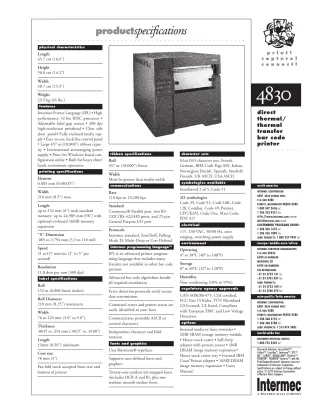
This is the user's manual for the Intermec 4630 and 4830 Bar Code Printers, one book covering both models. It explains setup, loading media and ribbon, connecting to a host, configuration, cleaning, and troubleshooting by error message and error code. An appendix lists the specifications of both printers.
- Device
- Direct thermal and thermal transfer bar code label printer p. 21
- Resolution
- 300 dots per inch (11.8 dots/mm) p. 206
- Print speed
- 4830: 2.0 to 5.0 in (51 to 127 mm) per second p. 206
- Maximum print width
- 4830: 8.5 in (216 mm) p. 206
- Media width
- 4830: 3.0 to 9.0 in (76.2 to 228.6 mm) p. 203
- Media
- Roll-fed, die-cut continuous, or fan-fold labels, tags, or tickets, 0.0025 to 0.0100 in thick; rolls up to 8 in (203 mm) on 1.5 to 3 in cores p. 203
- Ribbon widths
- 3.0, 4.1, 5.4, and 6.7 in; 4830 only: 8.6 in (218 mm) p. 203
- Interfaces
- RS-232C or RS-422 serial at 110 to 19,200 baud, plus a parallel port; Intermec parallel cable P/N 051211 p. 23, 29, 202
- AS/400 connection
- Coax/twinax interface adapter card P/N 063870 and a twinaxial cable equivalent to IBM P/N 7362267 or 7362062; twinax up to 5000 feet p. 29
- Power
- 115/230 VAC, 50/60 Hz, auto ranging; two 8 amp, 250V fuses p. 202
- Memory options
- 4MB and 16MB image memory expansion; 1MB and 4MB flash cartridges for storage, 8MB maximum p. 205
- Display and keys
- 2 x 16 character LCD; Alert, On line, and Power lights; Feed/Reload, On line/Off line, and Cancel keys p. 203
- Operating temperature
- 40 to 100 °F (4 to 38 °C); storage 32 to 120 °F (0 to 49 °C) p. 202
- Size and weight
- 4830: 14.2 in H x 15.3 in W x 18 in D (360 x 387 x 457 mm); 64 lbs. (29 kg) p. 205
What this manual walks you through
- Plugging in and turning on the printer p. 23
- Choosing direct thermal or thermal transfer printing p. 24
- Loading fanfold media p. 24
- Connecting to a PC parallel port, a network, or an AS/400 p. 29
- Working through the troubleshooting checklist p. 73
- Fixing operation, print quality, and communications problems p. 74, 75, 76
- Clearing error messages shown on the display p. 76, 77, 78, 79, 80, 81
- Looking up error codes sent to the host p. 81, 82
- Printing test pages, formats, fonts, and graphics p. 82
- Checking the functional limits for formats, fields, and graphics p. 207
Good to know
- Do not use direct thermal media with a thermal transfer ribbon installed; print quality will be unacceptable. p. 24
- Outside the United States on a 230V source, get the proper power cord from an Intermec representative. p. 23
- The printer must be connected to a properly grounded receptacle. p. 202
- Burnt-out main or secondary fuses are to be replaced by an Intermec service technician. p. 74
- Formats, fonts, and graphics share memory, so memory can run out before a functional limit is reached. p. 207
Questions this manual answers
What does PAPER FAULT mean on an Intermec 4830?
The printer is out of media, has a jam, or cannot find a label or index mark. Check the media path and the Label Stock and Media Length settings, then press Feed/Reload. p. 78
What does OVERFLOW ERROR 42 mean on a 4830 printer?
There is not enough printer memory to store the format. Delete formats, fonts, or graphics no longer needed, or remove fields from the format. p. 78
How do I set the 4830 to thermal transfer printing?
Direct thermal is the default. In the menu panel's Configuration menu, select Label, Media Type, Thermal Transfer. p. 24
What fonts are built into the 4830?
21 bitmapped fonts, including OCR-A and OCR-B, and three smooth scaleable outline fonts. p. 203
How do I connect an Intermec 4830 to an AS/400?
Use a coax/twinax interface adapter card (P/N 063870) and a twinaxial cable equivalent to IBM P/N 7362267 or 7362062, up to 5000 feet long. p. 29
The whole text · 26 parts
Read the manual here as text
Its text as extracted from the PDF, unedited, in parts; each page opens the PDF at that page.
- Pages 1 to 101-10
- Pages 11 to 2011-20
- Pages 21 to 3021-30
- Pages 31 to 4031-40
- Pages 41 to 5041-50
- Pages 51 to 6051-60
- Pages 61 to 7061-70
- Pages 71 to 8071-80
- Pages 81 to 9081-90
- Pages 91 to 10091-100
- Pages 101 to 110101-110
- Pages 111 to 120111-120
- Pages 121 to 130121-130
- Pages 131 to 140131-140
- Pages 141 to 150141-150
- Pages 151 to 160151-160
- Pages 161 to 170161-170
- Pages 171 to 180171-180
- Pages 181 to 190181-190
- Pages 191 to 200191-200
- Pages 201 to 210201-210
- Pages 211 to 220211-220
- Pages 221 to 230221-230
- Pages 231 to 240231-240
- Pages 241 to 250241-250
- Pages 251 to 252251-252
The file