Manual · Intermec
4100 Bar Code Label Printer User's Manual
Manual282 pagesPDF 1.4 MB
User's manual for the Intermec 4100 thermal and thermal transfer bar code label printer: setup, operation, maintenance and commands.
Covers · 1 model
The models it covers
Summary
What is in it
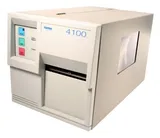
Intermec's user's manual for the 4100 Bar Code Label Printer, a thermal and thermal transfer printer for industrial labels. It covers unpacking and loading media, installing the printer and connecting it to a host or network (serial settings, DIP switches, communication protocols), operating it, routine maintenance, troubleshooting, designing labels, and a full printer command reference, with specifications and options in the appendix.
Its parts
- Before You Begin
- Getting Started
- Installing the Printer
- Operating the Printer
- Routine Maintenance
- Troubleshooting
- Designing Labels and Using Commands
- Printer Commands
From the manual
Key facts from this manual
Each line names its page in the PDF.
The user's manual (P/N 057713-005) for the Intermec 4100 bar code label printer. It explains installing and connecting the printer, loading media and ribbon, maintenance, troubleshooting with error codes, label design and printer commands, and gives the full specifications and options.
- Printer type
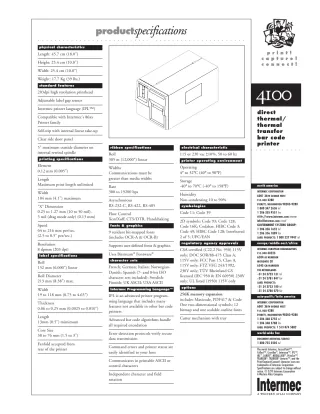
- Direct thermal or thermal transfer bar code label printer; can emulate the Intermec 4400 and 86XX printers p. 27, 247
- Input power
- 115 or 230 VAC ±10%, 50 Hz to 60 Hz p. 247
- Interfaces
- Asynchronous RS-232C, RS-422 and RS-485 serial, 110 to 19200 baud p. 249
- Print speed
- 2.5 to 8.5 inches per second; 3.5 ips by default p. 247, 250
- Printhead
- 203 DPI (8 dots per mm), 4.1 inches (104 mm) maximum width p. 247
- Media
- 0.75 to 4.65 inches wide, 0.5 to 10 inches long; rolls up to 8.38 inches across on 1.5 to 3 inch cores p. 248
- Ribbon
- 12,000 linear inches (305 m); 2.5, 3.25, 4.1 or 4.5 inches wide p. 248
- Fuse
- 1.5A Slo-Blo at 115 VAC; 1.2A double pole circuit breaker at 230 VAC p. 105, 247
- Operating environment
- 40°F to 100°F (4°C to 38°C), 10% to 95% noncondensing p. 248
- Size and weight
- 10.0 in high, 10.0 in wide, 18.0 in long; 39 pounds (17.7 kg) p. 247
- PC cables
- 048693 for an IBM PC AT or compatible; 048668 for an IBM PC XT or compatible p. 64
- Bar codes
- Code 39, Code 93, Interleaved 2 of 5, Codabar, Code 11, Code 128, UPC/EAN, Code 49, Code 16K p. 249
- Options
- Ribbon save, cutter and tray, Present Sensor for self-strip, 256K memory expansion p. 36, 257, 258
- Cutter
- Media 0.75 to 4.25 inches wide; tray adjustable from 3.5 to 6.25 inches; about 1 million cuts per blade p. 36, 248
What this manual walks you through
- Looking up error codes sent to the host and fixing them p. 114, 115
- Replacing the main power fuse p. 105
- Making RS-232 and RS-422 null modem cables for a PC or AT p. 64, 65
- Dealing with image overrun and memory errors p. 113
- Setting ribbon save zones within a label p. 36
- Factory default settings p. 250
- Uploading configuration parameters p. 256
Good to know
- Interface cables are not included with the printer and are ordered separately. p. 64
- Always disconnect the power cord before replacing the fuse. p. 105
- Self-Strip mode needs the optional Present Sensor installed. p. 257
- Image overrun is most common on labels over 5 inches long; the 256K memory expansion lets the printer image the whole label first. p. 113
- A label format can hold up to 200 fields. p. 115
Questions this manual answers
What fuse does the Intermec 4100 printer use?
A 1.5A Slo-Blo fuse for 115 VAC operation; printers running at 230 VAC use a 1.2A double pole circuit breaker. p. 105
What cable connects the Intermec 4100 to a PC?
Intermec part no. 048693 for an IBM PC AT or compatible, and 048668 for an IBM PC XT or compatible. p. 64
What does error code 42 mean on the Intermec 4100?
There is not enough room in RAM to store the format; delete fields or remove or reduce UDCs, formats or fonts. p. 115
Can the Intermec 4100 emulate other printers?
Yes, it can emulate the Intermec 4400 and the 86XX series bar code label printers. p. 27
What ribbon widths fit the Intermec 4100?
Ribbons 2.5, 3.25, 4.1 or 4.5 inches wide, in rolls of 12,000 linear inches. p. 248
The whole text · 29 parts
Read the manual here as text
Its text as extracted from the PDF, unedited, in parts; each page opens the PDF at that page.
- Pages 1 to 101-10
- Pages 11 to 2011-20
- Pages 21 to 3021-30
- Pages 31 to 4031-40
- Pages 41 to 5041-50
- Pages 51 to 6051-60
- Pages 61 to 7061-70
- Pages 71 to 8071-80
- Pages 81 to 9081-90
- Pages 91 to 10091-100
- Pages 101 to 110101-110
- Pages 111 to 120111-120
- Pages 121 to 130121-130
- Pages 131 to 140131-140
- Pages 141 to 150141-150
- Pages 151 to 160151-160
- Pages 161 to 170161-170
- Pages 171 to 180171-180
- Pages 181 to 190181-190
- Pages 191 to 200191-200
- Pages 201 to 210201-210
- Pages 211 to 220211-220
- Pages 221 to 230221-230
- Pages 231 to 240231-240
- Pages 241 to 250241-250
- Pages 251 to 260251-260
- Pages 261 to 270261-270
- Pages 271 to 280271-280
- Pages 281 to 282281-282
The file